YouTube for Google TV revamps side menu for faster library & channel access
▼ Summary
– YouTube for TV is rolling out a new sidebar design that improves access to the user’s library and recently-watched channels.
– The existing sidebar requires many clicks to reach Subscriptions and Library, two of the most-used sections.
– The new sidebar keeps Search and Home at the top, then adds a section with Subscriptions, Library, and two direct channel shortcuts.
– Below that section, shortcuts for News, Live, Podcasts, Music, Gaming, and Sports appear, though this may vary by TV.
– The update appears to be a server-side change, spotted on Google TV and Samsung TV devices.
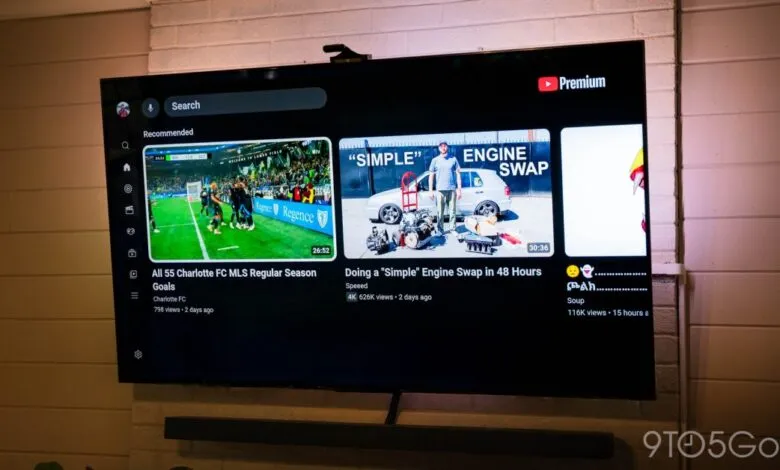
The YouTube app on televisions, including Google TV, is introducing a refreshed sidebar design that streamlines navigation to your library and highlights recently watched channels. This subtle but practical update is now appearing for certain users.
The current sidebar layout includes links for Search, Home, Music, Movies & TV, Podcasts, Subscriptions, Library, and a “More” overflow menu, with Settings at the bottom. While functional, this setup forces users to scroll past several options just to reach Subscriptions and Library, two of the most frequently visited areas.
The redesigned sidebar keeps Search and Home at the top. Directly below, a new section features Subscriptions and Library, plus two direct channel shortcuts. It is unclear whether these channels are based on recent views, recent subscriptions, or algorithmic recommendations. Notably, these shortcuts remain visible even when the sidebar is collapsed.
Below that section, users will find shortcuts for News, Live, Podcasts, Music, Gaming, and Sports, though the exact lineup may vary depending on the TV model. A Settings button stays anchored at the bottom.
We have not yet seen this interface on our own devices, but it appears to be a server-side update. One reader reported the change on Google TV, and a Redditor spotted it on a Samsung TV.
If you notice this redesign on your television, share your thoughts in the comments. We want to know whether this tweak improves your experience.
Thanks to Sterling for the tip.
More on YouTube:
(Source: 9to5google.com)