Is Your Managed WordPress Silently Blocking AI Bots?
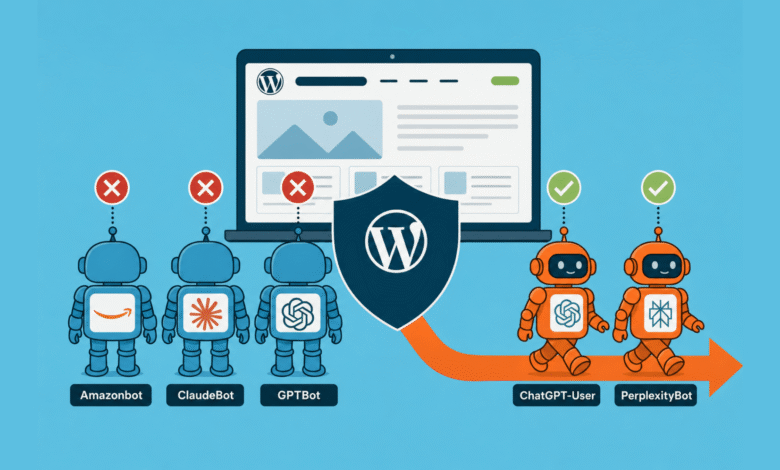
▼ Summary
– A 7-day analysis of Cloudflare logs for searchinfluence.com showed that AI training crawlers like Amazonbot, ClaudeBot, and GPTBot were heavily rate-limited (HTTP 429), while user-facing crawlers like PerplexityBot were not, causing a direct correlation between crawl access and AI citation presence.
– The source of the block was identified as WP Engine’s platform-level infrastructure, not the customer’s security plugins or Cloudflare settings, and it cannot be disabled or overridden by the customer.
– The block is inconsistent, as it allows the older `anthropic-ai` and `CCBot` user agents, meaning scrapers can still feed data into LLM training pipelines through those unblocked crawlers.
– WP Engine appears to be the only top-tier managed WordPress host that enforces a default-on, non-disableable platform-level AI bot block, as competitors like Kinsta, Pressable, and Pantheon leave the decision to the customer.
– To diagnose the issue, users can run a simple curl test with a ClaudeBot user agent; if it returns a 429 status while a browser user agent returns a 200, the host is blocking the bot.
Everything looked fine in the SEO dashboard. Google Search Console showed no red flags. Traffic and indexing were stable. Then I opened Scrunch, our AI citation monitoring tool, and checked platform-by-platform presence for searchinfluence.com over the prior 30 days. The numbers told a different story.
Google AI Mode held 37.8%. Copilot came in at 22.2%, Google Gemini at 16.3%, ChatGPT at 9.6%, and Perplexity at 7.8%. Two platforms sat at zero: Claude and Meta AI. Every crawler reads the same site, so content quality and topical authority can’t explain that gap. Those factors are identical for every platform on the list.
What varies is access. Whether each platform’s crawler is allowed in. Nothing else explains how Google AI Mode hits 37.8% while Claude lands at 0%. So I opened the logs.
What 7 days of Cloudflare logs revealed
Seven days of Cloudflare data for searchinfluence.com, from April 4 to 10, showed 29,099 bot requests. 65.8% of those were AI bots. Here’s the per-bot share of requests that were rate-limited, broken out by bot user-agent (the identifier each request sends):
- Amazonbot: 51% rate-limitedThe split isn’t random. Training crawlers , those that pull entire sites in large bursts , get throttled. User-facing crawlers , those that fire human-paced requests during a live user query , do not.For context, Cloudflare’s Q1 2026 crawl-to-referral analysis shows ClaudeBot makes 20,583 crawl requests for every referral it sends back. GPTBot: 1,255 to 1. Perplexity: 111 to 1. Google: 5 to 1. AI training crawlers take far more than they give back, so it makes sense that hosting infrastructure has started fighting back. Whether that’s the right fight for your site is a separate question.The 429s in our logs were being passed through Cloudflare with a cache status of dynamic or bypass. I wrote them off as downstream of Cloudflare, likely a web application firewall (WAF) or security plugin. That assumption sent me down a multi-hour rabbit hole through the wrong layers.Where we looked first, and why we were wrongSuspect 1 was Solid Security’s HackRepair default ban list, a WordPress security plugin with a built-in bot UA blocklist. We toggled it off and ran a 24-hour before-and-after comparison on per-bot 429 counts. No change. Two bots even spiked higher in the post-toggle window , coincidental crawl bursts, not a regression. Ruled out.Suspect 2 was Solid Security’s other firewall subsystems. We found 24,538 firewall log entries over 30 days. Every single one was a /wp-login.php brute-force lockout. Zero entries for ClaudeBot, GPTBot, or Amazonbot. Rules were empty. IP Management was clean. Ruled out.Suspect 3 was Sucuri Cloud WAF. Searchinfluence.com has a Sucuri subscription. Logging into the portal showed warnings across every service column: Monitoring, Firewall/CDN, SSL, Backups. A dig and curl confirmed why: DNS resolved to Cloudflare ranges, and response headers showed no x-sucuri-id. Sucuri was never in the request path. The subscription existed; the activation never happened. Ruled out.Suspect 4 was Cloudflare itself. I originally wrote it off because cache-status was dynamic or bypass. That inference was sloppy: Cloudflare can return 429 from rate-limit rules with the same cache-status. Going back to the right view , Security → Analytics → Events tab, filtered by ClaudeBot UA, last 24 hours , showed zero events. Cloudflare took no security action on ClaudeBot in 24 hours while passing through 608 ClaudeBot 429s. Ruled out.At that point, we were out of suspects on layers we could see.The reproduction test that changed everythingWe ran 60 fast curl requests with a ClaudeBot UA against three different paths. Every single one returned a 429. Control runs with the same paths but a browser UA returned 60 x 200 (HTTP OK). Same paths with a Googlebot UA returned 60 x 200. The block was unambiguously UA-based , not path-based, not rate-based.The headers gave it away. A single curl -I showed x-powered-by: WP Engine. We were on a managed host, and the block was firing from a layer that hadn’t been on the suspect list: the host’s own platform infrastructure, sitting between Cloudflare and WordPress. The hosting platform itself.The bot-by-bot fingerprintOnce we knew which question to ask, we ran the rest of the AI bot UA list through the same curl harness.
- ClaudeBot: 60/60 x 429 , BlockedTwo findings stood out. First, the blocklist is dated. It targets the AI training crawler set as of mid-2024. The older anthropic-ai UA is allowed. CCBot, the Common Crawl bot that feeds many LLM training pipelines, is allowed. If the intent is to block all LLM training data, this gap defeats it. Scrapers can use CCBot’s UA, or Common Crawl can pull the site directly, and the data ends up in training sets anyway. The named-bot list is a fence with a gate left open.Second, cached responses serve through the block. WP Engine’s edge cache returns cached pages to ClaudeBot just fine , x-cache: HIT in the headers. Cache-miss requests hit the origin handler and get 429. This explains the Cloudflare data exactly: in 24 hours, 1,054 ClaudeBot requests returned 200 (cache hits) and 608 returned 429 (cache misses). Same UA, same site, two outcomes.It’s worth flagging that roughly 100% of our 24-hour “ClaudeBot” traffic came from a single Microsoft/Azure IP, not Anthropic’s published AWS ranges. Almost certainly, it’s a spoofed UA: a scraper on Azure pretending to be ClaudeBot. A meaningful slice of “AI crawler 429s” in WAF reports may be blocking imposter traffic rather than legitimate Anthropic crawl.Why this is hard to findStart with what WP Engine itself says about its firewall. From their support page on the security environment: “Further information cannot be provided around our firewall, as this can compromise its secure integrity.” That’s the company’s own statement, verbatim. Whatever the rules are, customers don’t get to see them.Their 2025 Year in Review reports 75 billion bot requests mitigated via Cloudflare-powered bot management. No documented user portal control opts you out per-site or per-bot. I checked every customer-facing setting that could plausibly fire AI bot 429s. Utilities → Redirect bots: Off. Web rules: Empty. Robots.txt setting: Not customized. The live /robots.txt only disallows a few specific PDFs. All clean. The block is somewhere customers can’t reach.A few more reasons it’s invisible. It returns 429, not 403. Returning “forbidden” can get a site flagged by search engines as a site-wide failure, so 429 is the safer choice. But 429 reads as “rate limit” in every WAF analytics tool, which sends investigators chasing rate-limit configurations at the wrong layer. It fires below the WAF plugins: Wordfence, Sucuri, and Solid Security all log at the WordPress application layer. WP Engine’s block fires at the platform edge, before the request reaches WordPress. Plugin logs show nothing. It fires below customer Cloudflare, too. WP Engine runs its own Cloudflare-backed bot management at the hosting edge. That’s a separate Cloudflare layer behind your own Cloudflare zone. Events fired there don’t appear in your Cloudflare dashboard. WP Engine’s billing already accounts for the block: They exclude “suspected bots” from billable metrics. From a hosting-cost perspective, the customer benefits. From a GEO/AEO perspective, the customer pays in citation absence, without ever knowing they signed up.What WP Engine confirmed when I askedAfter several rounds of canned auto-replies, I reached a live agent. On the policy itself: “WP Engine does enforce platform‑wide rate limiting on certain high‑impact bots to protect overall server performance, and that part can’t be selectively disabled per bot.” On whether the customer-facing Web Rules Engine could route around it: “Allowing AI bot IPs via Web Rules Engine does not override WP Engine’s platform-wide rate limiting rules, which operate at the infrastructure level.” On whether the SEO downside was acknowledged anywhere internally: “The documentation acknowledges that blocking or rate limiting bots like Amazonbot and similar user agents can impact their crawling and indexing… It emphasizes balancing bot management with SEO considerations and suggests customers be empathetic as many did not configure these bots themselves.”Read that last bit twice. The internal framing assumes the customer is being protected from bots they didn’t ask for. For agencies, content sites, B2B SaaS, and anyone whose growth depends on AI search citations, the assumption inverts. Those bots are the audience the customer is trying to reach.There’s an escalation path: “If you have an exceptional use case or need a bot to behave differently than the platform defaults allow, we can escalate it to ProdEng (product engineering) for review.” So the policy isn’t immutable. It’s just not a self-service setting.WP Engine appears to be the outlier hereWe assumed every managed host did this. Public record on the other three top-managed WordPress hosts contradicts that. Kinsta’s CTO said in March 2026 that they will not block at the platform level and will not bill for bot bandwidth. Their Bot Protection feature is opt-in, with four customer-controllable levels. Pressable explicitly states in its knowledge base: “Pressable does not currently disallow these bots by default.” The customer manages it via robots.txt. Pantheon explicitly states: “We do not block identified bot traffic from entering the platform.” They detect and exclude bots from billing only.Outside managed WP, the closest analog is SiteGround, which blocks training crawlers by default but is more transparent about the policy and distinguishes training bots from user-action bots.One wrinkle: Flywheel, a managed WP host owned by WP Engine since 2019, has no documented AI bot block. Same parent company, two products, two different stated policies. Not a corporate-wide stance. A product-level decision specific to WP Engine.Caveat on the comparison: we confirmed WP Engine’s block empirically with curl. We didn’t run the same diagnostic against Kinsta, Pressable, or Pantheon. What we have for them is their public documentation, which is reliable but not the same as a live test.The precise claim: based on what each host publicly discloses, WP Engine appears to be the only top-tier managed WP host with a default-on, non-disableable platform-level AI bot block.The question shifts. It’s not “Are other hosts doing this?” It’s “Why is WP Engine, and apparently only WP Engine, doing it this way?”How to check whether it’s happening to youThe standard audit advice for your WAF logs doesn’t catch this. Below are three steps that don’t require root access.Step 1: Reproduce with curl. Run a loop of 30 requests with the ClaudeBot UA against your domain. Then run the same loop with a browser UA. If the browser run returns 200s and the ClaudeBot run returns 429s, the block is UA-based and someone in your stack is doing it. If both return the same code, you don’t have this problem.Step 2: Identify your host. Run curl -I against your domain and look at the response headers for x-powered-by or server. They often name the host. If your host is unmanaged or self-hosted, this article likely doesn’t apply. Investigate your WAF instead.Step 3: Check what the host actually controls. For WP Engine specifically, confirm Utilities > Redirect Bots is off and that Web Rules has no AI UA blocks, then open a support ticket. Recommended wording: “We’ve reproduced via curl that requests with ClaudeBot/GPTBot/Amazonbot user-agent strings receive HTTP 429 responses for cache-miss requests on our environment. Cloudflare and our security plugins are not the source. Is this WP Engine’s platform-level AI crawler mitigation? Can it be disabled or scoped per-bot for our environment?”For other hosts, the equivalent path is their portal’s security section first, then a support ticket with the same evidence.What to do once you knowFour real options, in order of effort.First, escalate to your host’s product engineering. WP Engine’s support agent named an “exceptional use case” escalation path. The policy isn’t immutable; it’s just not a self-service toggle. SEO and AI search visibility is exactly the kind of case that the escalation path is built for.Second, allowlist via the customer-controllable Web Rules Engine. It lets you allowlist UAs at the site level, but the support agent confirmed it doesn’t override the platform rules. It’s useful for the bots not on the platform list (CCBot, anthropic-ai), but not a fix for the ones that are.Third, move to a host that doesn’t impose this. A nuclear option, but worth costing out if AI search visibility is a strategic priority and ProdEng escalation goes nowhere. Kinsta’s and Pressable’s documented stances both leave AI crawler access to the customer.And to be clear: AI search visibility absolutely should be a strategic priority right now. ChatGPT alone handles billions of queries a week, and the answers cite a small set of sources. If your category is being decided in those answers and your site can’t be crawled, you don’t get cited. There is no “I’ll just rank later” backup plan, because the citation set hardens fast. Treating AI access as optional in 2026 is the same call as treating organic search as optional in 2008. It worked for a while. Then it didn’t.Fourth, accept the block as a deliberate policy. Some companies will conclude that staying out of AI training data is the right call. The honest version: tell the team that’s what’s happening, factor it into AI-search expectations, and stop running GEO/AEO audits that score you on missing citations you weren’t going to get anyway.The wrong move is to keep running the WAF audit playbook and concluding that nothing’s wrong. The block fires invisibly, and the citation’s absence shows up months later in dashboards that no one connects back to it.The citation correlationGooglebot at roughly 100% access correlates with Google AI Mode at 37.8% citation presence. GPTBot at 54% access correlates with ChatGPT at 9.6%. PerplexityBot at 100% access correlates with Perplexity at 7.8%. ClaudeBot at 57% access correlates with Claude at 0.0%.The platform-by-platform split in citations matches the platform-by-platform split in crawl access. Where the bot can read the site, the AI cites it at meaningful rates. Where the bot is blocked, citation presence collapses.This is suggestive, not proof: a 7-day correlation on a single site, with no controlled before-and-after comparison. Part 2 will publish the post-fix numbers if we get the block lifted or move hosts. The intuition: crawl access is the floor; content quality, topical authority, and freshness are the ceiling. If the bot can’t read you, the ceiling doesn’t matter.Perplexity is the wrinkle: 100% access, 7.8% citation. Full access alone doesn’t guarantee citation. But the absence of access , Claude at 0% , is decisive.CaveatsThis is a single-site case study. The diagnostic generalizes; the specific numbers don’t. AI citation is multi-factor: content quality, topical authority, entity coverage, freshness, schema, and brand recognition all matter. Crawl access is the floor, not the whole game. Bot UAs can be spoofed: roughly 100% of our “ClaudeBot” traffic was from a non-Anthropic IP. The host-level block is doing the right thing for those impostors. AI bots don’t fully respect crawl-delay: GPTBot and ClaudeBot only partially honor crawl-delay in robots.txt, so the 429 is one of the few signals they actually act on. That’s a feature, until they improve crawl-delay compliance. WP Engine’s defaults aren’t malicious: they’re protecting customers who didn’t ask for AI bot traffic. The opacity is the issue, not the intent. Customers who do want the traffic should have a way to say so without escalating to product engineering.What you should do nextIf you’re on WP Engine, run the diagnostic above. If the curl reproduction shows the same pattern, you’ve got the same issue. Open a ticket and see where that goes, or switch providers.If you’re on a different managed host, run it anyway. The diagnostic takes three minutes.If you’re spending months on content updates, schema markup, and llms.txt files while a default-on platform setting is silently blocking the crawlers you’re trying to reach, you’re optimizing the ceiling of a building with no floor.Full disclosure on method: An AI assistant (Claude) ran the curl tests, parsed headers, and walked the architecture with me. Where this piece says “we” tested or reproduced something, that’s me plus the AI. Where it says “I,” it was me directly: portal logins, the WP Engine support chat.