USB-C Adapters Play Old Nintendo Cartridges
▼ Summary
– The author highlights the fragility of old Game Boy cartridges with failing batteries and introduces Epilogue’s Operators as a solution for backing up save data.
– These devices, including the $50 GB Operator and $60 SN Operator, connect real cartridges to computers via USB-C to read and write data without using original chips.
– Users can play physical carts on modern hardware like Steam Decks or phones by having the device emulate the game while saving progress back to the cartridge.
– While the Playback software simplifies the process, the readers are sensitive to cartridge condition and may struggle with dirty or damaged games.
– The technology allows for seamless cross-device play, enabling users to switch between PC, handhelds, and original consoles while maintaining save continuity.
Reviving Retro Gaming with USB-C Cartridge Readers
A 26-year-old copy of Pokémon Pinball recently lost its save file, erasing memories like the Charmander caught for my daughter and the high scores we achieved together. Before flash memory became standard, Nintendo cartridges relied on tiny watch batteries to store game data. These batteries were never designed to last decades, meaning many classic games are now losing their progress permanently. However, this loss is not inevitable if you have taken precautions. I had previously backed up my family’s save files using an Epilogue Operator, a device that bridges the gap between vintage Nintendo hardware and modern computing devices.
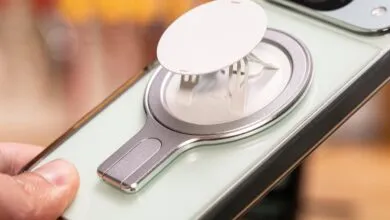
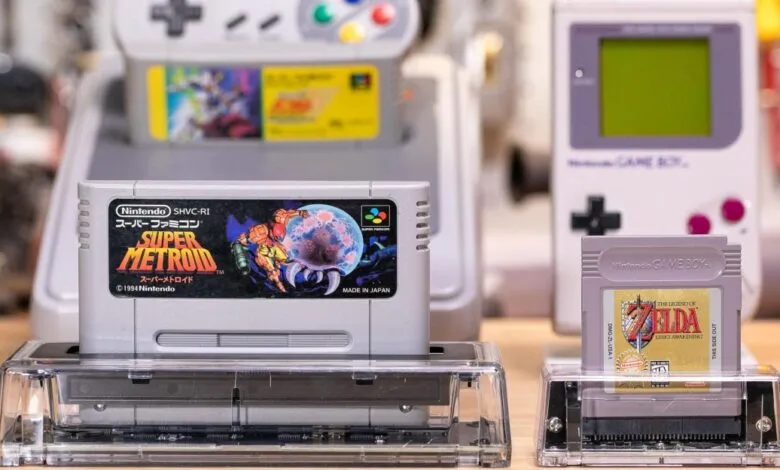
The $50 GB Operator is a transparent, trapezoidal cartridge reader that connects to Windows PCs, MacBooks, and Steam Machines via a USB-C cable. It reads and writes data to real Game Boy, Game Boy Color, and Game Boy Advance cartridges. Epilogue has also released a $60 SN Operator for Super Nintendo and Japanese Super Famicom titles, with an N64 version in development. These devices are not merely backup tools; they enable direct gameplay on modern hardware. By attaching these readers to devices like an Xbox Ally or Steam Deck, users can play original cartridges natively. For instance, I used magnet rings and Mechanism mounts to turn my phone into a functional Game Boy Camera.
Technically, these operators function as simple cartridge readers without containing original Nintendo chips or FPGAs. When a game is played, the computer extracts the ROM and runs it through an emulator. However, Epilogue’s Playback software creates a seamless experience that mimics playing on original hardware. Users simply plug in the reader and cartridge, hit play, and the game appears on screen. The software automatically saves progress back to the physical cartridge when in-game saves occur. Removing the cart instantly closes the application, maintaining the illusion of authentic console behavior.
Despite their utility, the Operators have notable limitations regarding cartridge detection. They are less forgiving than original consoles when dealing with dirty or damaged contacts. I experienced interruptions while playing Japanese copies of Bahamut Lagoon and Sailor Moon R if the cartridge was slightly disturbed. Nevertheless, the ability to write savegames to physical carts allows for cross-device continuity. A player can start on a PC, move the cartridge to a Steam Deck, and then insert it into an original Game Boy or Super Nintendo to resume progress. For those who do not require automatic saving, the system supports emulator cores that offer features like RetroAchievements, save states, and time rewinding.
One particularly interesting use case involves transferring saves from emulator-based consoles to physical media. My family recently played Super Metroid on the 2017 Super Famicom Classic Edition. Using the SN Operator, I extracted the save file and wrote it to an actual Japanese Super Metroid cartridge. This allowed me to play that specific save state on 30-year-old original Nintendo hardware. Interestingly, Japanese versions of Super Metroid are often affordable and fully English-language releases, making them ideal candidates for this process.
For collectors missing peripherals like the Super Scope or SNES Mouse, the SN Operator offers digital emulation options. Users can map their PC mouse cursor to emulate light gun or mouse inputs, which I successfully configured on my Steam Controller’s gyroscope. This eliminates the need for aging, unreliable hardware accessories. While open-source alternatives exist, Epilogue’s hardware stands out for its build quality. The minimalist circuit boards are visible through polycarbonate casings, appealing to enthusiasts who value aesthetic transparency in tech gadgets.
Epilogue has also partnered with the developers of Delta Emulator to allow direct cartridge connection to smartphones. Additionally, they created a dedicated Flashback app to enhance the mobile experience. However, the product pages should be more transparent about certain compromises. The Operators do not support multi-game flashcarts or the Super Game Boy. Furthermore, their advertised Counterfeit cartridge detection feature proved inconsistent during testing, and the claim that the GB Operator can function as a webcam is more accurately described as an OBS screen recording workaround.
Perhaps the most urgent issue is the degrading battery life in original cartridges. If your cartridges still contain their original batteries, some saves may already be unrecoverable. Second-generation Pokémon games like Gold, Silver, and Crystal likely lost their data over a decade ago due to drained real-time clocks. Even first-generation games are at risk. I managed to extract a save from an original Pokémon Red cartridge last year, but even those batteries are nearing failure. Similarly, a 30-year-old copy of The Legend of Zelda: Link’s Awakening lost its save last week, despite working just months prior. Fortunately, having the GB Operator available allowed me to restore my progress after installing a new battery and flashing the save file.
(Source: The Verge)