Clawdmeter turns Claude Code stats into a desktop dashboard
▼ Summary
– A new open source hardware device called the Clawdmeter displays Claude Code token usage statistics on a small desktop screen with pixel-art animations.
– The device is built using a Waveshare ESP32-S3-Touch-AMOLED-2.16 display that connects to a laptop over Bluetooth and reads the user’s OAuth token to pull usage data from API response headers.
– Icelandic developer Hermann Haraldsson created the Clawdmeter with AI assistance from Claude, which helped him build the embedded project in just a few days despite having no prior experience.
– The dashboard includes side buttons that send keyboard shortcuts for Claude Code’s voice mode and mode-toggle, and a middle button to cycle through screens showing session and weekly usage charts.
– The project reflects the growing “tokenmaxxing” trend among developers who maximize AI token consumption, and has garnered over 800 GitHub stars and 50 forks since its launch.
Silicon Valley’s tokenmaxxing trend now has a physical manifestation. A new open source project transforms your Claude Code usage statistics into a compact desktop dashboard, giving AI power users a real-time window into their token consumption.
Yes, you can monitor Claude Code activity through terminal commands or third-party apps. But none of those options let you watch a pixel-art Clawd sprite dance across a tiny screen before displaying your token usage at a glance. That’s the charm of the Clawdmeter.
This device is both a playful side project and a telling sign of how deeply Anthropic’s Claude has embedded itself in the developer community. It also reflects the rising fascination with tokenmaxxing, a productivity trend where software engineers compete to maximize their AI token consumption at work as proof of their AI adoption.
One Reddit user joked, “At this point, Anthropic should just mail these to us for free.” Another suggested adding a button to instantly top up tokens using a saved card. (That could get expensive fast.)
The concept originated from Hermann Haraldsson, a software developer based in Reykjavik, Iceland. He had long wanted to experiment with embedded devices but never found the time. “I’m not an embedded developer or anything like that,” Haraldsson told TechCrunch. But Claude guided him through the build in just a few days. “It’s really democratized access to programming, so that anyone can now do what developers used to do. I think that’s really positive, actually.”
Most of his development time went into design , perfecting the font, colors, and subtle animations.
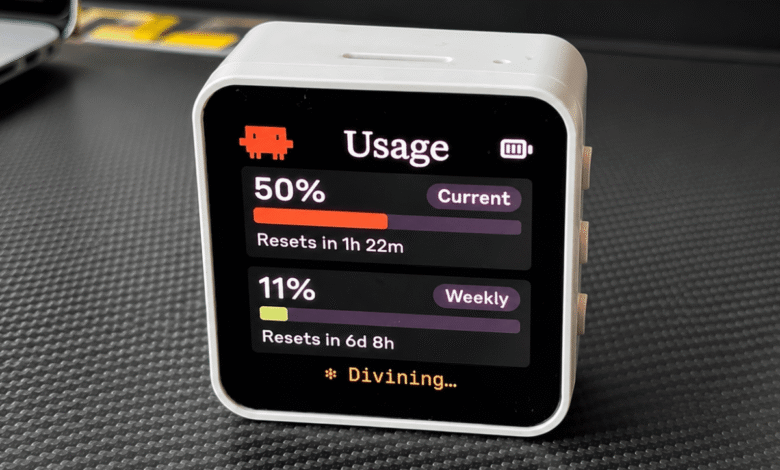
To create your own Clawdmeter, you’ll need a small lithium-ion battery-powered display like the Waveshare ESP32-S3-Touch-AMOLED-2.16, which connects to your laptop via Bluetooth. When powered on, the splash screen shows pixel-art Clawd animations that grow more frantic as your usage rate rises. You can press the middle button to cycle through different animation styles.
“I like it when I’m working, and I see it going crazy , it’s like a little dopamine loop,” Haraldsson said.
The animation stays active until you press the middle button, which then reveals your session and weekly Claude usage data in simple charts. Press again to reach the Bluetooth screen, which shows connection status and a reset option. A tap on the screen returns you to the splash animation.
Two additional side buttons send Space and Shift+Tab over Bluetooth, triggering Claude Code’s voice mode and mode-toggle shortcuts. These let you switch between Normal mode, “Accept Edits” mode, Plan Mode, and Auto Mode.
The device stays accurate with your usage limits by reading your Claude Code OAuth token to make an API call, pulling the usage numbers directly from the response headers.
Since Clawdmeter is open source, anyone can fork it to add custom features, animations, screens, or functionality tailored to their needs.
Haraldsson was surprised to see over 800 GitHub stars since its May 10 launch, with 50 forks already. He believes the device’s appeal lies in its nostalgic feel. “There’s a kind of nostalgia for when you used to have a hardware device for everything , like a Walkman to play music, or an iPod,” he said. (One Redditor called it a “hardware Tamagotchi for my context window.”)
“I know it’s not replacing anything , like, you could have this on your computer , but it’s just fun,” Haraldsson added.
(Source: TechCrunch)