Overlooked Open-Source Note-Taking App Deserves Attention
▼ Summary
– Joplin is a free, open-source, and cross-platform note-taking app that prioritizes functional consistency across all devices over flashy design.
– It ensures strong data ownership by storing notes locally in Markdown format and offering a clean export process to avoid vendor lock-in.
– Joplin provides end-to-end encryption for synced data as part of its free core, unlike some competitors that charge for this feature.
– The app offers advanced, customizable functionality through features like a local REST API, a command-line client, and a manageable plugin ecosystem.
– Its limitations include a less visually polished interface and the lack of native bidirectional linking, as it focuses on being a serious, private note-taking tool rather than a collaborative or knowledge-graph platform.
In the crowded field of digital note‑taking, many users cycle through popular apps seeking the perfect fit. While platforms like Obsidian, Notion, and OneNote offer compelling features, one open‑source note‑taking app consistently stands out for its practical reliability and unwavering commitment to user freedom. That application is Joplin, a tool whose understated design belies a powerful, polished, and profoundly flexible system for managing information.
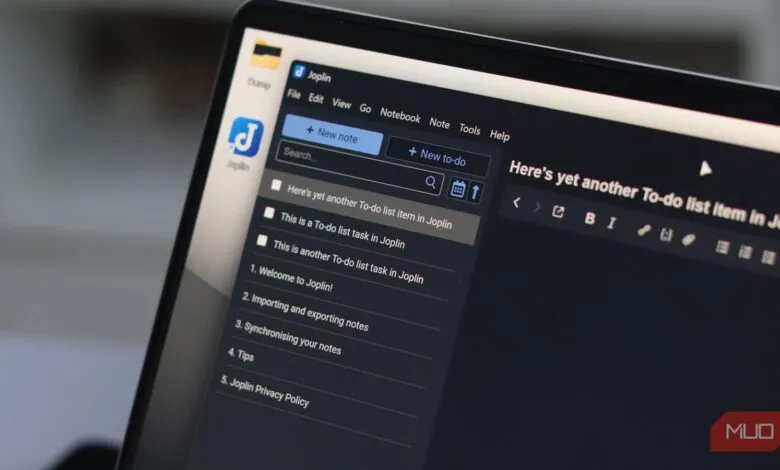
Joplin’s initial impression is one of simplicity, not spectacle. Its interface presents a straightforward three‑panel layout for notebooks, notes, and editing, a design that remains consistent across platforms including Windows, macOS, Linux, Android, and iOS. This deliberate uniformity extends to keyboard shortcuts and overall structure, creating a seamless experience whether you are on a desktop or a mobile device. This consistency is Joplin’s form of polish, a functional elegance that proves more valuable over time than a flashy but disjointed first impression. The ability to switch devices mid‑task without reorienting yourself is a finish many other tools neglect.
At its core, Joplin is built on principles of data ownership and privacy. Your notes are stored locally on your device in Markdown format within a database, meaning they never depend on a company’s servers being online. The app provides a clean export process, delivering your content in readable, editable Markdown files, ensuring you are never locked into a proprietary ecosystem. This stands in stark contrast to apps that use closed formats.
A key advantage over some competitors is its built‑in end‑to‑end encryption (E2EE) for synced data, a feature included at no cost. While Obsidian also emphasizes local file control, its comparable sync encryption requires a paid subscription. Joplin’s encryption protects data in transit and on the sync server, addressing a relevant threat model for most users. It is important to note that, like nearly all apps in this category, the local database on your device is not encrypted. The optional Joplin Cloud sync service, priced around €2.40 monthly, is a convenience, not a gatekeeper for essential features.
The true depth of Joplin reveals itself through extended use. Its capabilities extend far beyond basic note entry. For automation, the local REST API allows other tools to create, search, and modify notes directly, enabling powerful workflows like piping web content into notebooks without touching the main interface. Terminal users can leverage its command‑line client. Furthermore, a manageable plugin ecosystem lets you add specific functionality as needed. Plugins like Jarvis, which can connect to local AI models for summarizing, auto‑tagging, and semantic search, demonstrate how the app can evolve with your requirements.
Of course, Joplin is not without compromises. It does not prioritize visual aesthetics, so it will not satisfy those who need a highly elegant interface for creative motivation. It also lacks a native, bidirectional linking system, a area where Obsidian excels, particularly for methodologies like Zettelkasten. However, these gaps define what Joplin intentionally is not: it is not a collaborative workspace or a dedicated knowledge‑graph tool. Instead, it focuses singularly on being a cross‑platform, privacy‑focused note‑taking application that is genuinely free.
Ultimately, Joplin encourages you to invest in your notes, not in a platform. Its combination of consistent experience, robust data control, and extensible functionality creates a trustworthy foundation for everyday work. This is why, despite the allure of more visually polished alternatives, many users find themselves consistently returning to this overlooked open‑source powerhouse.
(Source: MakeUseOf)