Stop Wondering: What the iPhone Battery Line Means
▼ Summary
– The line under the battery icon on the iPhone Lock Screen can only be removed by disabling Lock Screen access to Control Center.
– Disabling Control Center access while locked is a security measure that prevents a thief from enabling airplane mode, aiding device recovery.
– Even offline, modern iPhones can be tracked via Bluetooth through the Apple Find My network, but cutting cellular and Wi-Fi makes real-time tracking harder.
– To disable Lock Screen Control Center access, go to Settings > Face ID & Passcode, enter your passcode, and toggle off Control Center under “Allow Access When Locked.”
– The line still appears if Face ID recognizes your face, meaning Control Center remains accessible to you but hidden from others when your face is not in view.
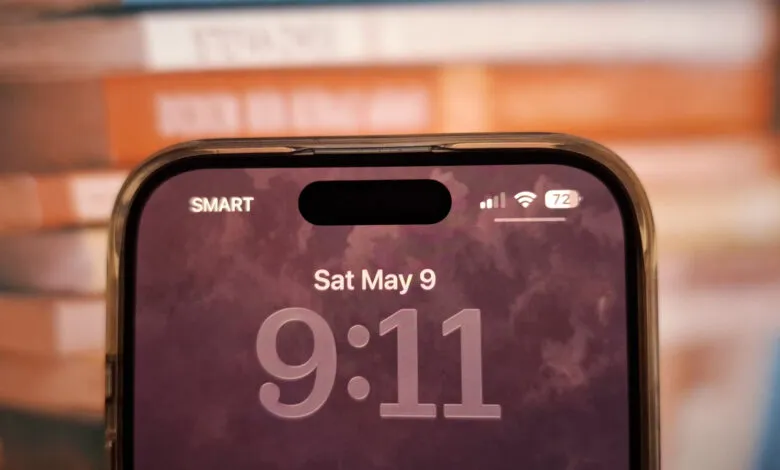
If you’ve ever glanced at your iPhone’s Lock Screen and noticed a small line beneath the battery icon, you might have wondered what it means , and more importantly, how to get rid of it. The answer is straightforward: you need to disable Lock Screen access to Control Center. That’s the only way to make that line vanish from view. It may feel like a big trade-off, especially if you rely on quickly toggling settings from the Lock Screen.
But here’s the thing , this isn’t just a cosmetic quirk. It’s actually a security feature designed to protect your iPhone. If someone steals your device, they won’t be able to enable Airplane Mode from the Lock Screen, which significantly boosts your chances of tracking and recovering it. While modern iPhones can still be located offline using Bluetooth through the Apple Find My network, blocking cellular and Wi-Fi access makes continuous, real-time tracking far more difficult for a thief.
To turn off Lock Screen access to Control Center, follow these simple steps:
Open the Settings app. Tap on Face ID & Passcode. Enter your passcode when prompted. Scroll down to the section labeled “Allow Access When Locked.” Then, toggle off Control Center.
Once you do this, the line under the battery icon on your iPhone Lock Screen will disappear. However, keep in mind that if you have Face ID enabled and your face is in view, you’ll still see that line. That means if you’re the one using the phone, Control Center remains accessible as usual. But if your face isn’t detected , or you don’t use Face ID to unlock , the line simply won’t appear.
(Source: BGR)