iOS 27 Ends 15 Years of iPhone and iPad Muscle Memory
▼ Summary
– Since iOS 5 in 2011, Notification Center has been accessed by swiping down from the top edge of the iPhone or iPad display.
– On iOS 27 and iPadOS 27, enabling Siri AI changes the swipe-down gesture from the center of the top edge to open Siri AI instead of Notification Center.
– When Siri AI is enabled, Notification Center can still be accessed by swiping down from the top-left corner of the display.
– Apple prioritizes Siri AI access by devoting most of the top edge to invoking the new Siri experience, shrinking the area for Notification Center.
– Early feedback on the Siri AI system is overwhelmingly positive, though the change disrupts 15 years of muscle memory for accessing Notification Center.
For more than a decade, iPhone and iPad users have relied on a simple, instinctive gesture: swipe down from the top of the screen to open Notification Center. That muscle memory, built since iOS 5 launched in 2011, is about to be disrupted. With the arrival of iOS 27 and iPadOS 27, Apple is fundamentally reworking how you access that central hub of alerts, all in service of a new priority: Siri AI.
The default gesture for opening Notification Center remains unchanged, but only until you activate the new Siri AI system. Once enabled, a swipe down from the center of the top edge of your iPhone or iPad display no longer pulls down your notifications. Instead, it invokes the revamped Siri AI experience. This is a deliberate design choice by Apple to prioritize access to its new intelligent assistant.
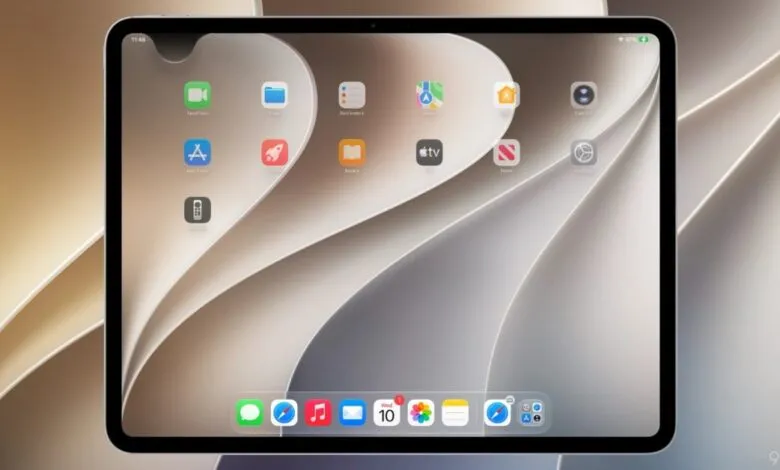
If you want to reach Notification Center after enabling Siri AI, you must now swipe down from the top-left corner of the screen. The rest of the top edge is effectively reserved for Siri. This marks the most significant change to notification access since Apple moved Control Center from a bottom swipe to a top-right corner gesture on the iPhone X, eventually unifying that behavior across all devices.
Now, Notification Center is being pushed into the corner. On the iPad, the impact is even more pronounced. The area above your Home screen app icons is almost entirely dedicated to launching Siri AI. Interestingly, the usable space for opening Notification Center can shrink further if you choose to hide the AM/PM indicator or the date in the status bar.
After 15 years of ingrained habit, it will take time to decide whether this trade-off is a smart evolution or a misstep. Early user feedback, however, is surprisingly positive, centering on the dramatically improved capabilities of Apple’s new Siri AI system. Hearing that Siri is finally good will, for many, be a far bigger adjustment than learning a new swipe.
(Source: 9to5Mac)