Claude Code adds live iOS app testing to its Mac app

▼ Summary
– Claude Code’s Mac app now allows Pro, Max, and Team plan users to test iOS apps in an interactive simulator pane within Claude Code Desktop.
– The feature requires macOS, Xcode with the iOS platform installed, and Claude Desktop version 1.24012.0 or later.
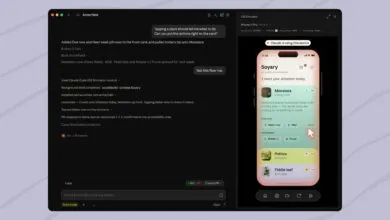
– Users can watch Claude run and interact with the app, or directly tap and swipe in the simulator pane alongside the conversation.
– The simulator pane drives the simulator directly without taking over the screen, while CLI sessions use computer use to control the simulator with a mouse.
– The feature is only available in local sessions, as cloud and SSH sessions cannot access the user’s Mac simulators.
Claude Code’s latest Mac app update introduces a powerful new capability: the ability to test iOS apps directly within an interactive simulator pane. This feature, currently available in public beta, requires users to have Xcode installed with the iOS platform. It is designed for developers on the Pro, Max, and Team plans who want to streamline the app development and testing workflow.
As spotted by MacRumors, the update allows Claude to build, launch, and test iOS applications inside a dedicated simulator window within the Claude Code Desktop environment. Claude can see the app as it runs, interact with its interface, and make iterative improvements. Users also have the option to tap through the simulator themselves at any time, using taps, swipes, or standard Apple Simulator shortcuts.
The feature is part of Claude Desktop v1.24012.0 or later. When an app launches in the simulator, a new iOS Simulator pane appears alongside the conversation. Claude installs the app, navigates through it, and reads the screen to verify its own changes while the developer watches. This pane drives the simulator directly, meaning it does not require “computer use” and will never take over your screen or hide other windows. From the command line interface, however, Claude relies on computer use to control the simulator, mimicking mouse-based interaction.
Anthropic emphasizes that this is a Mac-only feature because Apple’s iOS Simulator runs exclusively on macOS. Users must also have Xcode with the iOS platform installed. The feature is restricted to local sessions, as cloud and SSH sessions cannot access the simulators on the user’s machine.
To get started, open your iOS project in the Code tab of Claude Code Desktop, using the project folder as the session root. Any project that builds for the iOS Simulator will work. Then, ask Claude to run or test the app, phrasing the task around verification or execution. For example: “Build the app and run it in the simulator to check the onboarding flow.” The first time Claude uses a device, the desktop app will ask for permission. After that, the simulator pane opens automatically next to your conversation.
For more detailed instructions, including how sessions manage devices and how to grant Claude access, follow the link provided by Anthropic. This update represents a significant step forward for iOS developers using Claude, offering a more integrated and efficient testing loop.
(Source: 9to5Mac)