Claude Code Now Builds and Tests iOS Apps in Apple’s Simulator
▼ Summary
– Claude Code for desktop now integrates with the iOS Simulator in public beta, allowing it to open, run, and interact with in-progress apps.
– Claude can watch the iOS Simulator live, interact with it, and iterate on projects while developers continue using the simulator.
– The integration drives the simulator directly without needing computer use, avoiding the macOS Accessibility and Screen Recording permissions required for that feature.
– Screenshots from the iOS Simulator are sent to Anthropic per standard retention settings, and users are advised not to sign into real accounts.
– The feature requires Claude Code Desktop on macOS with Xcode and the iOS platform installed, and is available only in local sessions.
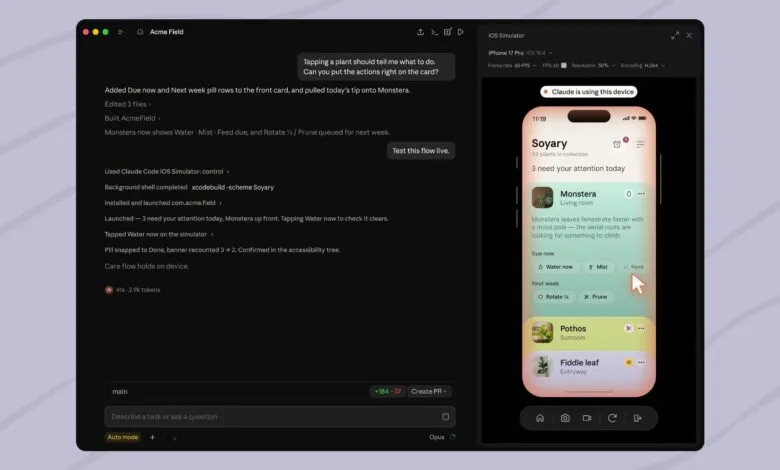
Anthropic has announced a significant update to Claude Code for desktop, introducing public beta support for Apple’s iOS Simulator. This integration allows developers to build, run, and test iOS applications directly within the Claude environment.
When instructed, Claude Code can open an in-progress app in the iOS Simulator pane. The AI assistant monitors the simulator live as the application runs, interacts with its interface, and iterates on the project until completion. Developers retain full control, able to use the iOS Simulator themselves while Claude works in the background.
A key distinction of this feature is that the simulator pane drives the device directly, bypassing the need for computer use functionality. Unlike methods that require Claude to control the screen as a human would, this direct access eliminates the need for macOS Accessibility and Screen Recording permissions typically associated with computer use.
For privacy considerations, screenshots Claude captures of a device within the iOS Simulator are sent to Anthropic and handled according to standard conversation retention policies. The company advises users to avoid signing into real accounts on any device Claude is using.
To take advantage of this integration, developers need Claude Code Desktop on macOS with Xcode and the iOS platform installed. The simulator pane is currently limited to local sessions. Complete setup instructions are available on Anthropic’s website.
(Source: MacRumors)