Claude AI Controlled My Mac With Only Two Minor Issues
▼ Summary
– Claude AI can now autonomously control a computer to perform tasks like opening files, clicking icons, and browsing the web.
– This feature is currently in a research preview and is only available to Claude Pro and Max subscribers on Mac.
– The AI requires user permission for specific actions and is designed to avoid interacting with sensitive apps or data.
– Claude captures the screen to navigate, so users must ensure confidential information is not visible during its operation.
– The article demonstrates the feature with examples, such as having Claude find recent files or create an email, noting it works accurately but can be slow.
The ability for an AI to directly control your computer, navigating the interface and executing multi-step tasks autonomously, represents a significant leap forward for AI agents. Anthropic’s Claude now offers this capability in a research preview, allowing it to open files, launch applications, and browse the web to fulfill user commands. This feature is currently exclusive to Claude Pro and Max subscribers using the Claude Mac app, with Windows support anticipated soon. While powerful, it requires careful user oversight and specific permissions to mitigate potential security risks.
Functioning through Claude Cowork for general tasks and Claude Code for development, the AI can handle complex assignments like data entry, formatting, and file management. The system operates by capturing the screen to understand the layout, meaning any sensitive information visible could be recorded. Consequently, Anthropic advises users to keep confidential applications closed and to avoid granting Claude access to apps related to banking, healthcare, or legal matters. The company has programmed certain safeguards, but as the feature is in preview, manual intervention may still be necessary to prevent unintended actions.
To begin using the computer control feature, Mac users must first download the dedicated Claude application. Within the app’s settings, enabling “Keep computer awake” and granting permission for Claude to take screenshots and control the keyboard and mouse are essential preparatory steps. Once configured, users can submit a request through the Cowork or Code interface. The AI will then seek explicit approval before interacting with each new application, a safety measure that currently resets after every session.
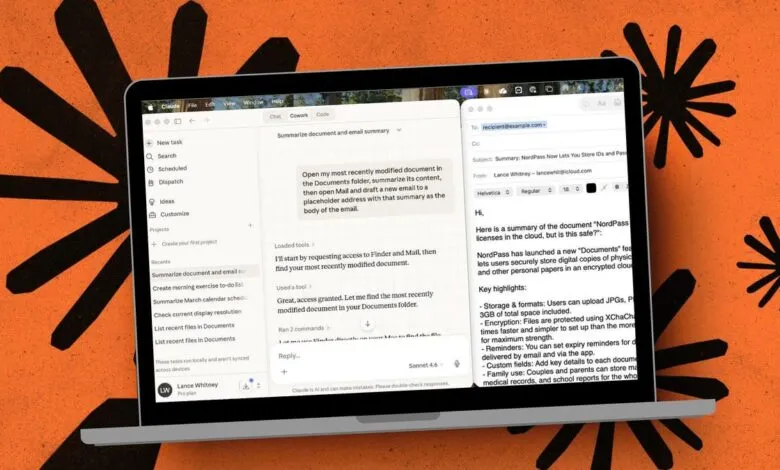
In practical tests, the system demonstrated reliable performance across a variety of tasks. When instructed to locate the five most recent files in a Documents folder, Claude successfully navigated Finder and presented the list. It adeptly summarized a monthly calendar and created a new note with a morning exercise to-do list. A more complex request to summarize a document and draft an email revealed the AI’s capacity for self-correction, as it initially placed the email subject in the address field but promptly identified and fixed the error.
Despite its capabilities, the experience includes some friction. The permission model, while enhancing security, requires re-authorization for the same app in every new session, which can become repetitive. Additionally, the execution speed for simple tasks can feel slower than manual completion, as the AI meticulously mimics human clicks and navigation. The true advantage emerges with compound, multi-step commands that would be time-consuming to perform manually.
This evolution in AI functionality is undoubtedly promising, offering a glimpse into a future where digital assistants can manage intricate workflows. However, its current preview status necessitates a cautious approach. Users are encouraged to start with simple, non-sensitive tasks and provide clear, precise instructions. As the technology develops, balancing this expansive new utility with robust safety and security protocols will be paramount for its successful integration into daily computer use.
(Source: ZDNet)