1Password’s New Feature Fights Phishing Attacks
▼ Summary
– 1Password is introducing a new phishing prevention feature to help reduce the risk of costly attacks, which cost businesses an average of $4.8 million.
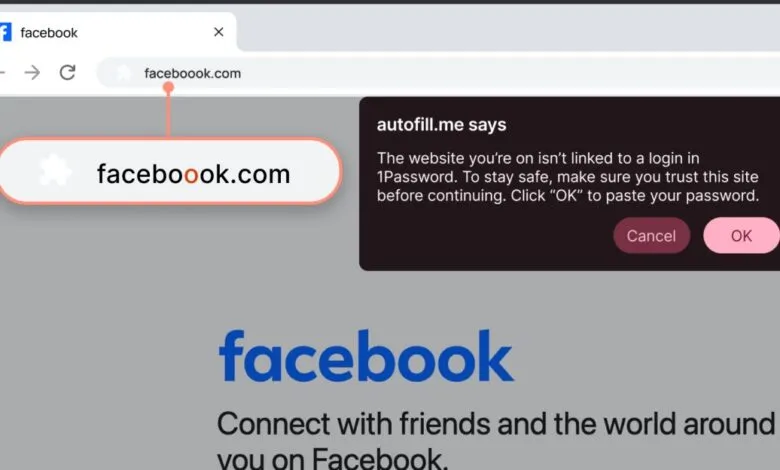
– The feature works by detecting suspicious website URLs, such as those that are slightly misspelled and don’t match saved login records.
– When a mismatch is detected, the 1Password browser extension will not autofill credentials and will display a warning pop-up to the user.
– This feature is not foolproof, as users can still manually enter their credentials, but it aims to make them aware and encourage caution.
– The feature is rolling out starting now, enabled by default for individual and family plans, while business admins must manually enable it.
The financial impact of a successful phishing attack can be devastating for any organization, with average costs reaching into the millions. To combat this pervasive threat, 1Password is launching a new security feature designed to proactively detect and warn users about potential phishing attempts. This tool specifically monitors for deceptive website addresses, a common tactic used by cybercriminals to steal sensitive login information.
When the 1Password browser extension is active, it continuously checks the website a user visits against the legitimate URLs stored in their password vault. If you click a link and land on a site with an address that doesn’t match the one saved with your login credentials, such as a subtly misspelled version of a trusted domain, the system immediately intervenes. The extension will refuse to autofill your username and password and will instead display a clear pop-up alert. This warning explicitly states that the current website’s URL is not associated with any saved login in your 1Password account, signaling a high probability of fraud.
It is important to understand that this is not an absolute barrier against phishing. The feature acts as a critical warning system, but it does not physically prevent a user from proceeding. Individuals can still choose to manually copy and paste their credentials into a suspicious site if they ignore the alert. The primary goal is to create a moment of pause and awareness, encouraging people to exercise more caution and think twice before entering their information on an unverified webpage.
The rollout of this phishing prevention capability begins immediately, though the company notes it may take several weeks to reach all user accounts. For those on individual and family plans, the feature will be activated automatically once available. Business customers will have a different process; 1Password Admins will need to manually enable the security setting for their organization’s teams, allowing for centralized control over its deployment.
(Source: The Verge)