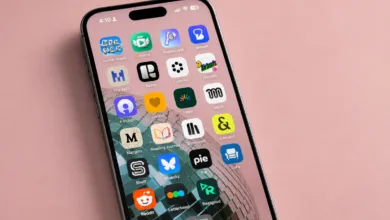
This tiny magnetic e-reader fights doomscrolling
▼ Summary
– The Xteink X3 is a small, MagSafe-compatible e-ink reader that attaches to an iPhone, designed as an alternative to doomscrolling on social media.
– The author found the device helped them read more during short waits, but noted that buying it alone won’t change habits without conscious effort.
– The X3 uses a magnetic charger instead of USB-C and can transfer files over Wi-Fi, though the process is not very user-friendly.
– A major drawback is incompatibility with Libby library ebooks and Amazon Kindle books, limiting legal access to many titles.
– The author recommends replacing the clunky default firmware with the community-made, open-source CrossPoint firmware for a better experience.
It was the kind of serendipity that feels fated. Imagine wandering through a labyrinthine department store, hunting for something you can’t quite name, only to stumble upon it in an unexpected corner. That’s exactly what happened when I discovered the Xteink X3, a tiny, MagSafe-compatible e-ink reader that attaches magnetically to the back of an iPhone like a Pop Socket. I hadn’t even known I was searching for it, but the moment I saw it, I knew my relationship with my phone was about to change.
I convinced myself this was the answer. No more endless scrolling through social media feeds. No more doomscrolling. Instead, I would read more books than ever,and that’s saying something, since I already devour at least 50 titles a year. But the truth is, I probably spend even more time on TikTok and Instagram than I do reading. I know cutting back on social media would lower my anxiety, but the pull is relentless. So when I imagined flipping my phone over to read on a Kindle-like e-ink screen, I wondered: Could this $80 gadget actually fix me?
I’ve tried reading on my phone before, diving into fan fiction or novels instead of doomscrolling through political headlines. But the problem is that my phone is a portal to every distraction imaginable. Even when I’m absorbed in a story, the temptation to check a notification or open an app is always there. That’s why e-ink devices like the Kindle feel so soothing,they’re single-purpose tools that don’t beg for attention.
When the X3 finally arrived, I was giddy. I’d compared its dimensions to my iPhone 16 and my Pop Socket wallet countless times, but I still worried it might not fit. The previous model, the Xteink X4, was only compatible with larger phones like the iPhone Pro Max. But the X3 snapped onto my phone as if it were custom-made. Two hours before a Phillies game, I loaded it with books and headed out, thinking it would be hilarious to read “The Power Broker” in a crowded stadium. And it was.
For the first few days, I kept the X3 attached to my phone, but I quickly realized I missed my Pop Socket wallet. I’d gotten used to leaving home without my actual wallet, so carrying both felt awkward. Eventually, I started stashing the ereader in my purse or pocket instead. It came with a compact magnetic case for just $9, which protects the screen and makes it easier to hold. The case can also attach to your phone, though it feels less secure than using the device alone.
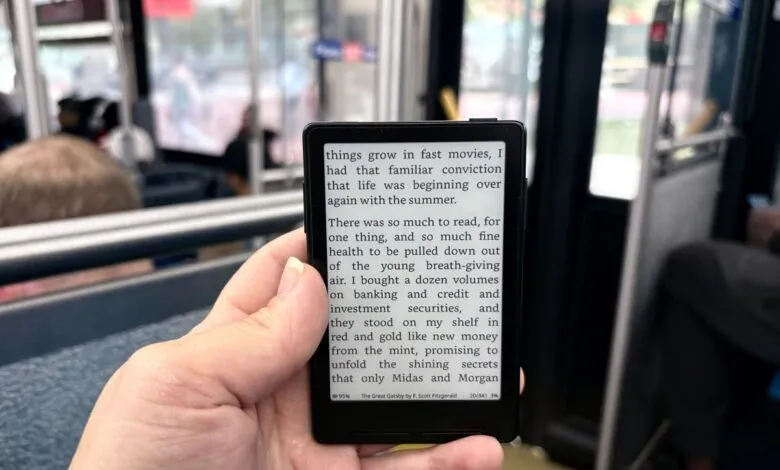
After two weeks of testing, I can say the X3 genuinely helped me read more. Waiting for coffee? Standing at a bus stop? Instead of reaching for Instagram, I pulled out the ereader. The 3.7-inch screen is surprisingly easy to read, though it’s small enough to fit in a pocket. But the device alone won’t change your habits,you have to remember you’re carrying hundreds of books in that tiny package.
Still, the X3 isn’t perfect. The stock firmware is clunky,functional but not intuitive. I’d heard about CrossPoint, a community-built open source firmware, through the Xteink Reddit community. As someone who writes words, not code, the installation process was intimidating, but the instructions and a few YouTube videos made it manageable. My only mistake was trying to install the X4 firmware on my X3. Once I corrected that, everything worked smoothly.
Another quirk: the X3 uses a magnetic charger instead of a USB-C port like the X4. Yes, it’s annoying to carry another cable, but after two weeks of daily use, my battery only dropped from 100% to 96%. You can also transfer files over Wi-Fi, which isn’t the most user-friendly process but doesn’t require any Googling.
The biggest drawback is book compatibility. I rely on Libby for borrowing ebooks from my library and sending them to my Kindle. But libraries use protected .epub files that can’t be transferred to the X3 legally. Similarly, Amazon’s ebook store locks purchases to Kindle devices. This limitation makes the X3 feel like a “dumb” device,no apps, no touch screen, no distractions. In an age of AI-powered everything, that’s oddly refreshing.
Fortunately, there are plenty of free .epub files available. Classic books in the public domain, like “Pride and Prejudice,” are easy to download. I’ve also bought entire .epub catalogs from authors like Charlie Jane Anders and Annalee Newitz through charity fundraisers. For articles and blogs, a program like Calibre can convert them into .epub files.
So, did the Xteink X3 fix me? Am I now a reformed woman with a healthy relationship to social media, reading classic novels I skipped as an English major? Not exactly. But if you meet the device halfway and make a conscious effort to use it, you might spare yourself a little more brainrot.
(Source: TechCrunch)