I Built a Cheaper, More Customizable Codex Micro Alternative

▼ Summary
– OpenAI’s $230 Codex Micro add-on keyboard sold out immediately upon release.
– The author replicated the Codex Micro’s core controls on a Stream Deck+, which has programmable buttons with customizable graphics.
– Stream Deck buttons can change appearance and function per application, unlike the Codex Micro’s fixed physical keycaps.
– The author used hotkeys defined in ChatGPT’s settings to map Stream Deck dials and buttons to Codex functions like agent switching and mode selection.
– A $27 third-party plugin added light-up status indicators to Stream Deck buttons, emulating the Codex Micro’s agent activity pulses.
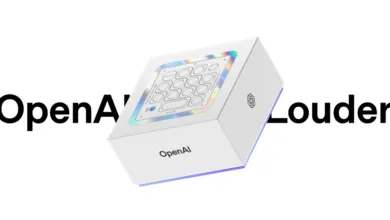
I have a confession to make. I am an absolute sucker for add-on control surfaces. Over the years, I’ve amassed a collection that includes three Stream Decks (one being the Stream Deck+ with its four dials), a SpaceMouse for 3D modeling, a Loupedeck that sits in my gear bin for reasons I can no longer recall, and countless other keypads that have come and gone. So when OpenAI announced the Codex Micro , a sleek, $230 mini-keyboard designed specifically for Codex users , my interest was piqued immediately. Yes, the price tag is steep, but I imagined the productivity gains: no more reaching for the Enter key when I could tap a dedicated Checkmark key, no more clicking Cancel on-screen when an X key was at my fingertips. It even has a dial and a joystick. Ooh. Ah.
And I’m not being sarcastic. I genuinely love this stuff. But alas, the universe had other plans. The Codex Micro sold out on day one, leaving me and countless other geeks empty-handed. So, what do we do when we know something can be done but are thwarted from obtaining the objects of our productivity affection? We make them. I decided to turn my Stream Deck+ into my very own Codex Micro clone. And it worked.
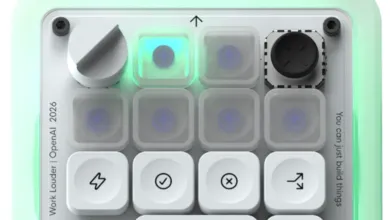
Before diving in, I needed to understand exactly what the Codex Micro does. The device, a collaboration between OpenAI and custom keyboard maker Work Louder, has three main features. First, Agent Keys let you switch between agents and sessions in Codex, with lights that change based on agent status. Second, programmable keys allow you to accept or decline agent activity, branch sessions, and toggle voice dictation. The Codex Micro even comes with spare keycaps so you can swap designs. Frankly, I think the Stream Deck’s programmable mini-screens are a big improvement over physical keycaps. Finally, a dial controls file-processing mode, and a joystick lets you hop between features like a D-pad.
Is it worth $230? Only you can decide. But since it’s unavailable, I had to make do with what I had.
The Stream Deck solution is actually better overall. While the Codex Micro’s keys don’t change (unless you physically pull off keycaps), the Stream Deck is almost infinitely customizable. And it’s cheaper: a basic 15-button Stream Deck costs $149, the Stream Deck+ I’m using is $179, and if you want to go all out, the Stream Deck + XL with 36 buttons and six dial wheels is $349. The real value lies in the ability to assign custom graphics to each button and use the powerful customization app.
To clone the Codex Micro, I first needed icons. I could have paid $11.04 for a custom icon pack on the Stream Deck marketplace, but since this was for my own use, I just copied the original keycaps. I captured an image of the Codex Micro from the product page, brought it into Photoshop, selected each key, and saved them as individual files. For the wide push-to-talk icon, I merged the microphone image with another button. The Stream Deck software already has a mic icon, but I wanted everything to match the Codex style.
Next, I created a new profile in the Stream Deck app. I renamed it and set it to activate when I switch to the ChatGPT application (which now includes Codex). This way, when I launch Codex, all my custom keys appear automatically. I already do this for Final Cut Pro, so it was a natural workflow.
The dials were the trickiest part. The Codex Micro’s dial lets you scroll through the plugin list. In the Stream Deck app, I added an Action Trigger to the first dial, with three action slots. I assigned hotkeys for up and down arrows to the first and third slots, and a Hotkey Switch to the middle slot. This toggles between two actions: Shift-2 (which types the @ sign to open the plus menu) and Enter (which executes the selected option). Clicking the dial opens the menu, spinning it scrolls through options, and clicking again confirms the choice.
For the mode menu, I used a similar setup: clicking the dial fires the / character, the dial emulates arrow keys, and a second click hits Enter. The final dial controls the sidebar and prompt history. It toggles the sidebar with CMD-B and scrolls through historical prompts with arrow keys.
Individual buttons were easier. I started with the Microphone button, assigning a hotkey (Control-M) that I defined in ChatGPT’s Voice settings. I dragged a Hotkey action to the first button, typed the hotkey, and selected the microphone icon I created. I left the title blank to avoid cluttering the display. Then came the Checkbox button (Return key for confirming actions), the X button (Escape for canceling), and the Branch button (Option-Shift-Command-F for complex automations).
The one feature I thought I couldn’t replicate was the light-up agent status buttons. These pulse different colors based on agent activity. After some searching, I found Beautiful Thread Pulses by Lideal Innovation on the Elgato Marketplace. For $27, it added customizable status indicators to my Stream Deck. Now, when an agent thread changes state, the button changes color and pulses when the thread completes. It’s a fantastic addition.
Comparing the two, the Codex Micro is smaller and supports USB or Bluetooth, while the Stream Deck is USB-only. The tiny Codex Micro could almost be used for vibe coding without a keyboard , if it had a mic. As it stands, it’s just a keyboard with light-up indicators. If you’re a hard-core Codex coder at OpenAI, the dedicated keyboard makes sense. But I switch between tools constantly, and I can configure the Stream Deck to manage Claude Code just as easily as Codex. I also use my Stream Deck+ for video editing and controlling my studio.
I’m not against the Codex Micro. Had it been available, I might have spent the money. But I would have had some buyer’s remorse. It’s cool and hip, but it’s very limited. The Stream Deck makes custom buttons truly customizable , not just in the signals they send, but in how they look. The Codex Micro seems very 2015. Who wants to yank off keycaps when switching from Codex to Photoshop? The Stream Deck adapts instantly.
I’m pretty impressed I managed to fully emulate the Codex Micro on my Stream Deck+. I’ll probably tweak it further, adding more pages of buttons. That’s the beauty of the Stream Deck: you can always modify it. And so can you.
Would light-up agent status buttons make a dedicated Codex control surface worth buying for you? Let us know in the comments below.
(Source: ZDNet)