Google Gemini adds synced Notebooks for productivity
▼ Summary
– Google’s Gemini app has introduced a new “Notebooks” feature, turning it into a project management tool.
– This feature allows users to organize past chats by topic, upload documents for context, and set custom instructions for projects.
– Notebooks sync bidirectionally with NotebookLM, allowing the same project to appear automatically in both apps.
– The feature is currently rolling out on the web for subscribers of Google’s paid AI plans.
– Access will expand to mobile users and free accounts in the coming weeks.
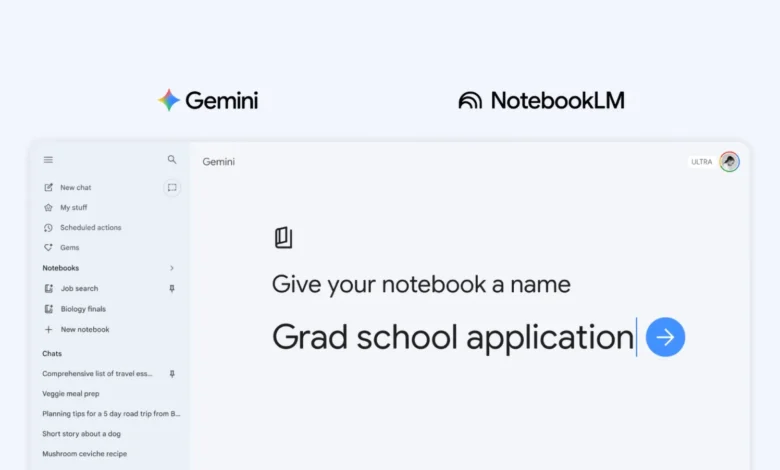
For anyone who has ever lost a crucial piece of information in the endless scroll of a chat history, a significant solution has arrived. Google Gemini has launched a new Notebooks feature, fundamentally evolving the assistant from a conversational tool into a structured workspace for managing complex projects. This integration effectively merges the capabilities of Gemini with NotebookLM, establishing a persistent and synchronized personal knowledge base that users can access across Google’s ecosystem.
The primary innovation is dedicated organization. Users are no longer confined to a chronological feed of disparate conversations. Now, from the Gemini side panel, you can initiate a “New notebook.” This dedicated container allows for a far more methodical approach to information. Within a notebook, you can systematically relocate past chats, grouping them by subject matter for easy retrieval. You can also upload source materials like PDFs and text documents, providing Gemini with specific context to generate more accurate and relevant responses. Furthermore, the feature supports custom instructions, enabling you to assign a specific persona or set of guidelines to Gemini for each unique project, tailoring its assistance to your exact needs.
The most powerful aspect of this update is its seamless bidirectional sync with NotebookLM. When you begin compiling research, links, and documents within a notebook in Gemini, that entire workspace automatically becomes available in the NotebookLM application. This creates a fluid workflow between the two platforms. You might use the Gemini app for its web-connected capabilities to brainstorm ideas and draft content, then switch over to NotebookLM to leverage its specialized tools. There, you could command the AI to produce a Cinematic Video Overview or an Infographic directly from the curated sources in your shared notebook.
This new functionality is currently rolling out on the web for subscribers to Google’s premium AI plans, including Google AI Ultra, Google AI Pro, and Google AI Plus. The company has stated that access will broaden to include mobile users and free accounts in the near future. For professionals, researchers, and students managing in-depth projects, this integration marks a compelling reason to consolidate their workflow within Gemini’s newly expanded framework.
(Source: Chrome Unboxed)