Edit Your WordPress Site with AI Prompts
▼ Summary
– WordPress is introducing an AI assistant for users to edit websites starting Tuesday, accessible within the site editor and media library.
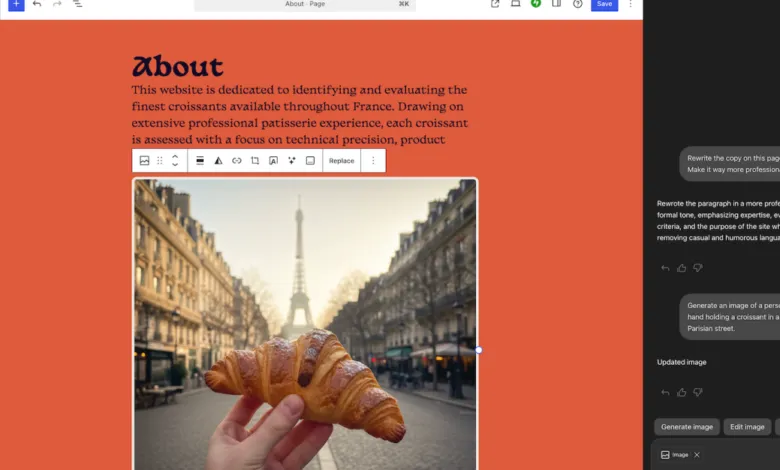
– The AI can edit and translate text, generate and edit images using Google’s Nano Banana, and make site adjustments like creating pages.
– Users can also interact with the AI through block notes by tagging it with “@ai” to give prompts for editing text or suggesting headlines.
– To use the AI assistant, users must manually enable “AI tools” in their site’s settings, unless their site was built with WordPress’s AI website builder.
– Sites created with WordPress’s AI website builder from last year will have the AI tools enabled by default.
WordPress is introducing a powerful new AI assistant directly into its core editing interface, allowing users to make complex changes to their websites through simple text prompts. This integration marks a significant step in making advanced web design and content management more accessible. The tool, now available for users to enable, functions within the site editor’s sidebar and the media library, providing a centralized hub for AI-powered tasks.
The assistant can perform a wide range of functions, from editing and translating text to generating and modifying images using Google’s advanced Nano Banana technology. It extends beyond content to handle structural adjustments, such as creating entirely new pages or altering design elements like fonts. This capability transforms the editor from a manual tool into a collaborative partner, responding to natural language requests to execute changes that would typically require multiple steps.
Interaction with the AI isn’t limited to a single panel. A particularly innovative feature leverages the block notes system added in WordPress’s 6.9 update. Within any comment in the site editor, users can tag the assistant by typing “@ai” followed by a specific instruction. This allows for precise, contextual commands, such as asking the AI to rewrite a particular paragraph of text or propose an alternative headline for a section. It brings the power of prompt-based editing directly into the workflow of reviewing and revising content.
Accessing this new functionality requires a quick manual step for most users. To activate the AI tools, you must navigate into your site’s settings and toggle the feature on. However, there is an important exception. Websites originally created with the AI-powered website builder that WordPress launched the previous year will find these tools already enabled and ready to use by default. This streamlined approach ensures a consistent experience for those who began their site-building journey with AI assistance from the very start.
(Source: The Verge)