Logitech MX Master 4 Review: Still the King?
▼ Summary
– The MX Master 4 is a premium productivity mouse that maintains Logitech’s high standards without introducing major innovations.
– Its standout feature is the MagSpeed scroll wheel, which automatically switches between precise clicking and free spinning for efficient navigation.
– The mouse offers extensive customization through Logi Options+ software, including programmable buttons and Logitech Flow for multi-computer control.
– It has exceptional battery life rated for 70 hours and performs reliably on various surfaces, though its heavy 152g weight makes it unsuitable for gaming.
– While comfortable for right-handed users with quiet main buttons, it has drawbacks including a bulky design, imprecise thumb wheel, and premium price point.
The Logitech MX Master 4 continues the brand’s tradition of excellence, delivering a premium productivity mouse packed with innovative features. While it doesn’t represent a radical departure from its predecessor, it refines an already outstanding formula, making it a compelling choice for professionals seeking enhanced workflow efficiency. This device maintains its position as a market leader through thoughtful improvements and reliable performance.
Logitech’s MX Master series enjoys widespread recognition in the computer peripheral market, with the previous MX Master 3S model establishing itself as a benchmark for quality. The MX Master 4 successfully builds upon this legacy without compromising the core elements that made its forerunner so popular.
The most notable upgrade involves a haptic touch panel positioned for thumb use, delivering tactile feedback during operation. Although this addition is welcome, it doesn’t overshadow the mouse’s standout feature: the brilliant MagSpeed scroll wheel that automatically shifts between precise clicking and smooth freewheeling modes. This intelligent scrolling mechanism remains one of the device’s most impressive capabilities.
Customization represents another area where this mouse shines. The gesture button and multiple other controls can be tailored to individual preferences through various presets and programmable options. The exceptional Logitech Flow software enables seamless mouse control across multiple computers, while the Options+ application serves as the central hub for personalization settings.
Potential buyers should note some limitations. The mouse carries substantial weight and bulk, making it less suitable for frequent travelers or serious gaming enthusiasts. The thumb wheel also lacks the refined responsiveness of the primary MagSpeed wheel. Despite these minor drawbacks, the overall user experience remains highly satisfying.
Priced at $119.99 in the United States, £119.99 in the United Kingdom, and AU$199.95 in Australia, the MX Master 4 positions itself in the premium segment. The investment is justified by the comprehensive suite of productivity-enhancing tools and superior build quality. While not ideal for everyone, particularly gamers or those preferring lightweight devices, it delivers outstanding value for its target audience of productivity-focused users.
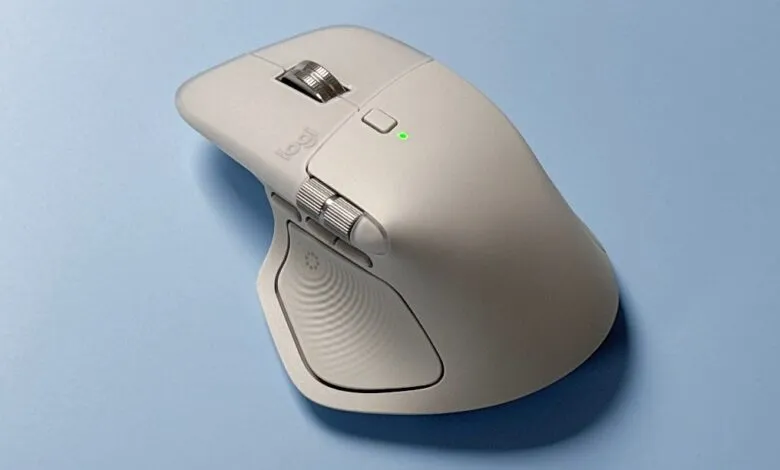
The design follows the familiar sculpted form factor of previous MX Master models. Its wide, arched body with a contoured thumb rest provides comfortable support for various grip styles, particularly palm and claw grips. The substantial form contributes to its 152-gram weight, which may require adjustment periods for users accustomed to lighter mice. The heft could feel slightly imprecise for gaming applications where speed and agility take priority.
Top-mounted left and right buttons feature exceptionally soft, quiet actuation that provides satisfying feedback without disturbing colleagues. While other buttons maintain reasonable noise levels, they don’t match the near-silent operation of the primary clicks.
Positioned between the main buttons, the renowned MagSpeed scroll wheel represents one of the mouse’s most valuable assets. This component automatically ratchets during slow turns while switching to free-spinning mode with more forceful flicks, perfect for navigating lengthy documents and web pages. A dedicated button behind the wheel locks it into either mode, though the scroll wheel lacks lateral clicking functionality found on some competing devices.
Thumb-operated controls constitute the mouse’s power features. The horizontal scroll wheel facilitates side-to-side navigation in applications like spreadsheet software, though it operates without the MagSpeed mechanism’s sophistication. Its heavier, less precise action produces audible scratching sounds that feel inferior to the rest of the mouse’s premium construction.
Three thumb buttons sit below this wheel, with the first two positioned closely together and the third slightly separated. The minimal differentiation between buttons makes them somewhat challenging to distinguish by touch alone. All three controls support customization, with the third specifically designated as the gesture button.
The newly introduced dimpled gesture button occupies most of the thumb rest area. Its textured surface ensures secure positioning, while pressing it activates Logitech’s Actions Ring interface. Haptic feedback occurs when hovering over ring icons, adding functional depth to this mouse section.
The underside houses a quick-switch button for transitioning between up to three connected computers across Windows, macOS, and Linux platforms. Three black glide pads ensure smooth movement across various surfaces.
Performance highlights begin with remarkable battery endurance that significantly exceeds expectations. The Logi Options+ application displays battery levels in 5% increments, yet the indicator remained at 100% for over twenty hours of continuous use. After approximately thirty-five hours, the reading had only dropped to 95%, suggesting Logitech’s 70-hour rating might be conservative.
Gaming performance reflects the mouse’s productivity orientation. The substantial weight hinders effectiveness in fast-paced shooters where agility proves crucial, though slower-paced titles present fewer issues. The 8K polling rate matches the previous model, appealing to professionals requiring high sensitivity though remaining less critical for average users.
Surface compatibility represents another strength, with reliable tracking across mouse pads, wood, paper, fabric, and even glass surfaces. Logitech’s claim of functionality on “any surface” appears well-founded based on comprehensive testing.
Customization capabilities through the Logi Options+ application provide extensive control over seven physical components, including five buttons and both scroll wheels. The intuitive interface simplifies assigning functions and creating personalized configurations.
Additional adjustable parameters include haptic feedback intensity, thumb button sensitivity, pointer speed, scroll force, and scroll direction. The software empowers users to fine-tune these elements according to personal preference.
Logi Flow functionality enables single-mouse control across multiple computers, including cross-platform operation between Windows and macOS systems. While transitioning between devices involves minimal lag and file transfer capabilities show occasional inconsistencies, the feature substantially enhances productivity for multi-computer users.
The thumb-positioned gesture button supports time-saving operations when combined with directional mouse movements. Default configurations include opening the Start menu in Windows, though all gestures can be customized to match individual workflows.
Pressing the dimpled thumb button summons the Actions Ring, presenting eight customizable shortcuts arranged around the cursor. Haptic bumps confirm navigation between options, with feedback intensity adjustable through the companion application. Some users might find the thumb button requires substantial pressure, and the ring interface occasionally experiences delayed appearance. Its practical utility varies depending on existing work habits, though it offers compelling alternatives to keyboard shortcuts for mouse-centric operation.
Value assessment acknowledges the premium pricing while recognizing the justified cost through exceptional feature integration and build quality. The familiar, comfortable design earns praise despite the weight potentially deterring some users. Performance ratings reflect the extensive customization and premium capabilities, tempered by gaming limitations.
Consider the MX Master 4 if productivity tools rank high among your priorities, with the MagSpeed wheel, gesture controls, and Actions Ring specifically designed for workflow enhancement. Exceptional battery life makes it ideal for travelers and those preferring minimal charging interruptions. Multi-computer users across different operating systems will appreciate the Logitech Flow compatibility.
Alternative options might better suit those preferring lightweight mice, as the 152-gram weight represents a substantial commitment. Budget-conscious shoppers might explore more economical alternatives, while left-handed users will need to consider ambidextrous models since the design exclusively accommodates right-handed operation.
Competitive alternatives include the Razer Pro Click, which emphasizes business applications with premium ergonomics and multi-device support while offering better gaming performance despite lacking some Logitech-specific features. Apple’s Magic Mouse 2 provides superior gesture control through its entire top surface functioning as a trackpad, though it remains limited to macOS environments.
Testing involved nearly two weeks of continuous use across work and personal computing scenarios, including document creation, web browsing, and gaming. Evaluation covered both Windows and macOS platforms with testing conducted on various surface types to verify performance claims.
(Source: techradar)