Microsoft’s Xbox Handheld: A Promising Start for Windows Gaming
▼ Summary
– Microsoft has created a full-screen Xbox experience for handheld devices that hides the Windows OS, using the Xbox PC app and Game Bar to provide a console-like interface.
– The Xbox Ally saves around 2GB of memory by not loading unnecessary Windows components like the desktop wallpaper and taskbar, though users can easily switch to the full Windows desktop when needed.
– While the Xbox interface integrates games from other stores like Steam, users still need to access Windows for installing apps and some configurations, and occasional OS elements like notifications can break the immersion.
– The device allows switching between Xbox and Windows modes quickly, but a full reboot is required to regain the saved memory after accessing the desktop, and some bugs were noted during testing.
– This represents an initial step in Microsoft’s broader strategy to merge Windows and Xbox, with plans for further improvements to create a unified gaming experience across handhelds, consoles, and PCs.
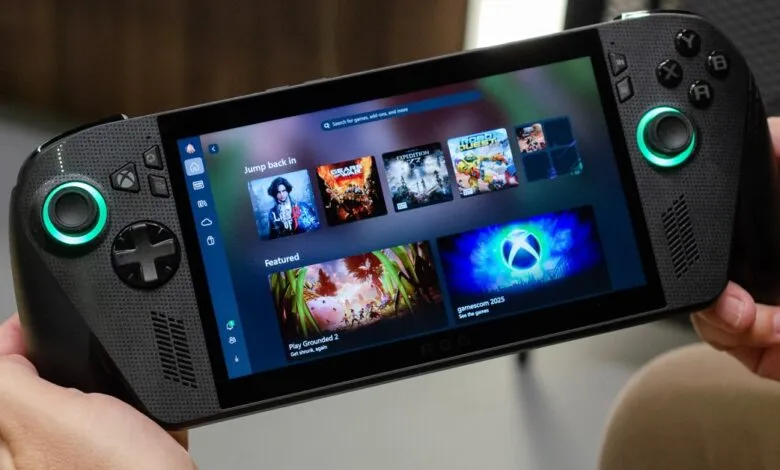
Microsoft’s new Xbox handheld represents a significant step forward for Windows-based gaming devices, offering a streamlined experience that prioritizes gameplay over traditional desktop complexity. The device boots directly into a full-screen Xbox interface, effectively concealing the underlying Windows 11 operating system while still providing access to its full capabilities when needed.
Upon startup, users are greeted with a familiar Xbox-style interface rather than a standard Windows login screen. The system allows controller-based PIN entry, a thoughtful touch that eliminates the need for external peripherals right from the beginning. Once logged in, the Xbox PC application takes over completely, creating a console-like environment that feels purpose-built for gaming.
This seamless experience is powered by Microsoft’s Game Bar technology, which serves as the foundation for the handheld-optimized interface. A single press of the Xbox button activates the overlay, providing quick access to settings, friends lists, and system controls without ever exposing the Windows desktop. Microsoft has made clever optimizations by not loading unnecessary elements like the desktop wallpaper or taskbar, freeing up approximately 2GB of memory that would otherwise be consumed by typical Windows processes.
Despite the focused gaming interface, returning to the full Windows desktop remains straightforward. Users can access the traditional environment through the Game Bar menu or by holding the Xbox button to bring up a task switcher. Microsoft includes a warning when exiting to desktop mode, recommending touch or keyboard/mouse input for the best experience. The desktop functions identically to any Windows handheld, requiring users to venture into this space for installing applications like Discord or Steam, though once configured, these programs integrate smoothly into the Xbox interface.
The transition between gaming and desktop modes happens quickly, though there’s an important technical consideration: after visiting the desktop environment, users must fully reboot the device to reclaim the 2GB of reserved memory. Alternatively, they can continue switching between modes without those memory savings, trading convenience for performance.
Some Windows elements inevitably peek through the console-like veneer. While the left swipe gesture activates the Game Bar, the right swipe still brings up the Windows 11 notification center, creating a visual mismatch that Microsoft acknowledges needs addressing. The company is also experimenting with settings that might allow users to set alternative launchers like Steam as the default interface, suggesting flexibility for different gaming preferences.
During testing, the experience showed both promise and areas needing refinement. Games installed through Steam appear within the Xbox library interface, maintaining the consistent handheld-optimized experience. However, occasional crashes revealed underlying Windows elements rather than graceful error handling, and some interface bugs were noted that Microsoft promises to address before the October 16th release date.
Power management represents another area where the handheld experience differs from traditional consoles. The quick resume functionality available on Xbox Series X consoles isn’t yet replicated in this Windows-based environment, leaving questions about how standby and hibernation will handle active gaming sessions.
This handheld represents more than just another gaming device, it signals Microsoft’s broader vision for the future of Xbox. The implementation demonstrates how Windows could serve as the foundation for next-generation gaming experiences across handhelds, consoles, and PCs. While there’s clearly more work ahead to perfect the blend of Windows flexibility and console simplicity, this initial offering shows meaningful progress toward a unified gaming ecosystem.
(Source: The Verge)