Xbox Mode Launches on PC With Console-Inspired Experience
▼ Summary
– Xbox Mode, a console-inspired interface previously available on handhelds, has launched on Windows 11 PCs in select markets, with a gradual global rollout.
– The mode provides a controller-optimized UI with direct access to Xbox PC games, PC Game Pass titles, and games from other storefronts.
– It was developed from the ROG Xbox Ally’s full-screen experience to address feedback about Windows being clunky and resource-heavy on handheld gaming devices.
– On desktop PCs, Xbox Mode is an optional feature that players can jump into for easier navigation when using a controller, rather than a default boot option.
– Users can access Xbox Mode via Windows Update, after which it becomes available through the Xbox Game Bar on their Windows 11 PC.
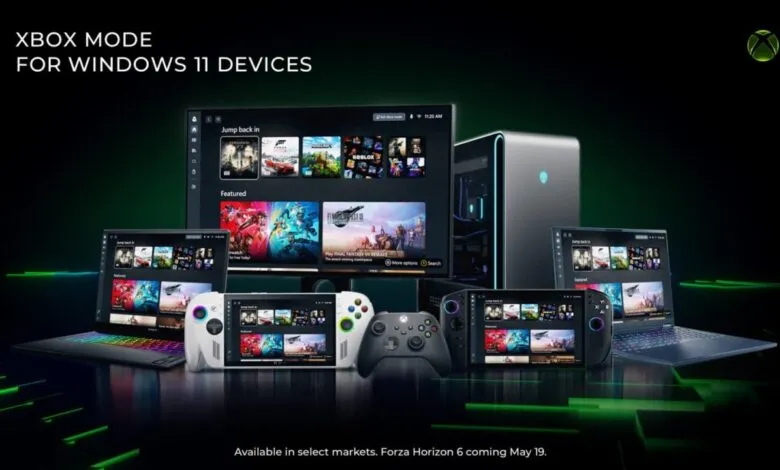
Microsoft has officially launched Xbox Mode on Windows 11 PCs, bringing a console-inspired gaming interface to desktop and handheld devices. The feature is rolling out gradually, beginning in select markets today, with broader availability expected in the coming weeks.
For those unfamiliar, Xbox Mode is essentially the controller-friendly interface originally developed for the ROG Ally X. It was created to address a common frustration among handheld PC gamers: navigating Windows can feel clunky, resource-heavy, and far from the streamlined experience offered by dedicated gaming platforms like Steam OS. Now, Microsoft is extending that same philosophy to standard PCs.
The core idea is simple. When you activate Xbox Mode, your screen transforms into a game-first environment. Your library, recently played titles, and PC Game Pass catalog are front and center, while background Windows distractions are minimized. The interface is optimized for controller navigation, making it far easier to browse and launch games without needing a mouse and keyboard. You can also add games from other storefronts if you choose.
“Xbox mode is designed for the moments when you want your games to take center stage on Windows 11 PCs and handhelds,” Microsoft explained. “Inspired by the Xbox console experience, Xbox mode offers a streamlined interface that puts your library and recently played titles within easy reach while minimizing background distractions. Since first introducing Xbox mode, formerly known as ‘full screen experience,’ on Windows handhelds, we’ve been listening closely to player feedback and continuing to evolve the experience across devices. Those learnings directly shaped Xbox mode on Windows 11 PCs.”
Crucially, this is not a replacement for the standard Windows desktop. Instead, it is an optional overlay you can jump into whenever you want a more console-like session. For desktop users, the choice is entirely yours. You are not forced to boot into it; you can simply launch it through the Xbox Game Bar (accessible by pressing the Windows icon and G on your keyboard) whenever you settle in with a controller.
Microsoft frames this as another step in unifying the Xbox experience across different screens. “Xbox mode is another step in our broader work to make Xbox feel consistent across screens while giving you more choice in how and where you play,” the company stated. “Windows has long been an important part of the PC gaming ecosystem, supporting innovation through its open platform. Together with Windows, Xbox is taking everything we’ve learned about building a world-class operating system for gaming and continuing to evolve the experiences that meet players where and how they choose to play.”
When Xbox Mode becomes available in your region, it will arrive via a standard Windows Update. After installation, you can access it directly from the Xbox Game Bar. This gradual rollout means some users will see it immediately, while others may need to wait a few weeks.
(Source: Pure Xbox)