Photoshop’s New AI Tools: How to Try Them Now
▼ Summary
– Adobe has introduced several new AI-powered features for Photoshop to make editing easier and faster.
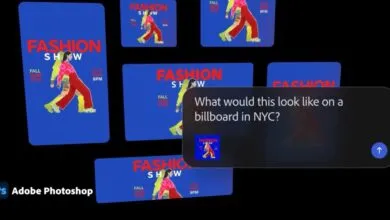
– A new agentic AI assistant automates repetitive tasks and provides personalized editing recommendations via chat.
– Generative Fill now supports partner AI models like Google Gemini and Black Forest Labs in addition to Firefly.
– AI features include Generative Upscale for enhancing image resolution and Harmonize for realistic color and lighting integration.
– Object Mask simplifies video editing by isolating objects, and Assisted Culling helps select the best photos from large batches.
Adobe continues to push the boundaries of creative software by integrating powerful new artificial intelligence capabilities directly into Photoshop. These latest additions aim to simplify complex editing workflows, speed up repetitive jobs, and unlock new creative potential for both amateur and professional users. Announced at the recent Adobe Max conference, the suite of AI tools includes an intelligent assistant, expanded generative fill options, and several features designed to tackle common photo-editing challenges with remarkable precision.
A standout innovation is the new AI assistant, which leverages agentic AI to take over tedious tasks. Imagine needing to resize hundreds of photos or apply the same color correction across a series of images, the assistant handles this automatically. It also offers personalized suggestions and step-by-step guidance, all accessible through a simple chat interface. This allows you to maintain full creative control while the AI handles the grunt work.
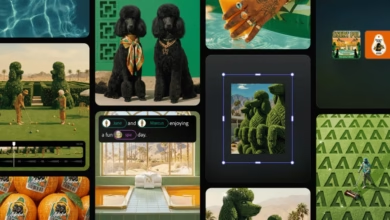
The popular Generative Fill tool has received a significant upgrade. Initially launched in 2023, it now supports third-party AI models in addition to Adobe’s own Firefly. Users can employ engines like Google Gemini 2.5 Flash and Black Forest Labs FLUX.1 Kontext to generate and edit content based on text prompts, offering greater flexibility and creative options.
For those working with older or lower-quality images, the new Generative Upscale feature is a game-changer. Utilizing technology from Topaz Labs, it can intelligently enhance low-resolution pictures up to a crisp 4K quality, breathing new life into cherished photos.
Another powerful tool is Harmonize, which tackles the difficult job of blending objects seamlessly into new backgrounds. This AI-driven feature automatically analyzes and matches the lighting, color, and tone of an inserted object with its surroundings, creating a surprisingly realistic composite without manual fine-tuning. Early testers have described the results as impressively authentic and even addictive to use.
When it comes to video editing, Object Mask simplifies a traditionally complex process. It uses AI to quickly isolate people or objects within video frames. This eliminates the need for painstaking manual rotoscoping, making it far easier to apply color corrections, blurs, or visual effects to specific elements.
Finally, Assisted Culling addresses a common photographer’s headache: sifting through thousands of shots from an event to find the best ones. This intelligent feature not only identifies the top images but also allows you to filter them based on criteria like focus accuracy, shooting angle, and sharpness, dramatically cutting down review time.
Most of these features are available for public testing now in the Photoshop beta. The AI assistant is currently being rolled out through a private beta waitlist for the web version of Photoshop.
(Source: ZDNET)