Pixel 11 Pro: A great phone despite its flashiest features
▼ Summary
– The Pixel 11 Pro and 11 Pro XL have minor hardware upgrades like brighter screens, faster charging, and a larger telephoto sensor, but the base model has reduced RAM (12GB vs 16GB) and a $100 price increase.
– Proactive Assistance, a feature using AI to suggest actions like booking reservations or checking calendars, works only in narrow, keyword-dependent scenarios and is unreliable, often failing with flight info or photo requests.
– HiLight, a colored LED ring replacing the temperature sensor, only glows for Gemini voice interactions and calls from favorite contacts, with limited color options, making it a poorly executed feature.
– Rambler, a voice-to-text tool, is a standout feature that removes filler words, applies grammar, and speeds up dictation, making it genuinely useful for texting.
– Magic Capture and Camera Looks are praised camera features, with Magic Capture pulling best photos and clips from videos (though requiring careful framing) and Camera Looks offering customizable film-style presets that reduce computational processing.
Google is pitching the Pixel 11 Pro as a phone that helps you put it down. The company’s marketing calls it a device designed to reduce screen time, with new software that can book restaurant tables, extract perfect stills from videos, and speed up voice texting. The underlying message is that these features can mend a relationship with technology that Google itself acknowledges has frayed. But since the hardware on the 11 Pro and 11 Pro XL barely moves the needle compared to last year’s models, and in one notable case even steps backward, those software tricks carry the entire weight of the pitch.
I spent the last week living with the 11 Pro, testing every new tool to see if it actually keeps me from reaching for my screen. The verdict is mixed. When Google’s software works, it’s genuinely useful. The catch is that it often works only under very specific conditions that feel like they were dreamed up in a lab where every variable is controlled, not in the messy reality of daily life.
On paper, the Pixel 11 Pro and 11 Pro XL are modest refreshes of their predecessors. You get brighter displays at 3,600 nits, faster wired charging, and Qi2.2 wireless support up to 25W. The 5x telephoto lens gets a larger sensor that Google claims pulls in 30 percent more light. Base storage doubles to 256GB. There’s also a new notification light, which I’ll circle back to. The trade-off is that the base 11 Pro now ships with 12GB of RAM instead of last year’s 16GB, matching the standard Pixel 11. I tested the 16GB / 512GB configuration, so I can’t speak to whether the cut is noticeable, but the price increase is: the entry model jumps to $1,099, a $100 hike.
Given such minor spec bumps, Google has bet everything on software this year. The centerpiece is Proactive Assistance, a set of dynamic chips that appear in Google Messages when certain triggers occur, like a friend asking about your availability or whether you’ve made a reservation. For basic interactions, like checking your calendar or adding an event, I found it genuinely handy. When my friend Marc texted about scheduling, Gemini automatically suggested pulling up my calendar. But outside those simple cases, the feature gets flaky fast. Google’s flagship example is having Gemini book a dinner reservation for you mid-conversation, but I had to receive a text with a very exact string of details to get it to trigger, and even then, it only worked intermittently.
What’s frustrating is that Proactive Assistance still relies on explicit keywords, which feels counter to the promise of large language models that should understand intent. If a text lacks a date or time, nothing surfaces. And when the chip does appear, it often vanishes the moment I reply. I’d love to see Google keep it around for a few messages or let it linger near the conversation. As it stands, the feature is too inconsistent to rely on, and you have to manually enable it and connect apps like OpenTable in settings, which most people simply won’t do. My colleague Cameron Faulkner put it best: you need to be proactive to get Proactive Assistance to work. I also tested it with flight info and photo requests, and both failed. My Gmail has flight details, but asking about landing time surfaced nothing. A friend asked for a photo of me from 2024, and it pulled up photos from that year, just none of me. The vision is there, but the execution isn’t.
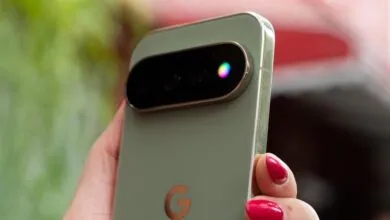
Then there’s HiLight, the flashy new feature that replaces the temperature sensor. It’s a multicolored LED ring inside the flash that glows for certain notifications, designed to let you keep your phone face down and only pick it up when something important happens. In theory, I love it. In practice, it’s a mess. Right now, HiLight only lights up for two things: when you’re talking to Gemini with the phone face down, and when a favorite contact calls. I rarely do the former, and for the latter, I’d just rather my phone ring. The customization is laughably limited, with only five color options, including white. We used to have customizable RGB LEDs that could map any app to any color, and Google is only now considering text notifications from favorites. Why not just let users map it to any app? It feels like a missed opportunity that wasn’t fully thought through before launch.
But not everything misses. Rambler, a new voice-to-text tool powered by Gemini, is a standout. It strips out filler words, applies proper grammar and punctuation automatically, and even corrects misspeaks on the fly. The Pixel’s voice typing has been a strength since the Tensor chip days, but Rambler elevates it to the point where I’m dictating texts whenever I can. It’s fast, accurate, and genuinely saves time, making texting feel like a real-time conversation.
On the camera side, Magic Capture is the headline feature. It’s front and center in the camera app, which shows how confident Google is. You hit record, point it at the action, and Gemini processes the footage to pull out the best photos and clips. Google’s demo showed it capturing a basketball game while the user ignored the screen, but in reality, it’s tough to keep your subject framed without looking. Unless you’re on a tripod, you’ll be staring at the screen anyway. That said, when you do keep the subject in frame, it works well. I take lots of videos but rarely revisit them, so having automatic stills and clips is a win. The stabilization on the extracted clips isn’t as good as dedicated video mode, but for parents trying to capture kids without chasing the perfect smile, it’s a solid tool. The marketing should focus on the convenience, not the promise of being hands-free.
Camera Looks is another highlight, and arguably the most discussed photo feature this year. Think of it like Fujifilm’s film simulations, with four subtle tweaks to the standard camera and six more creative looks like Velvet, Editorial, and Minimal. You can adjust contrast, highlights, shadows, vibrance, tint, warmth, sharpness, and grain, and here’s the clever part: Google adjusts the computational processing at capture based on your settings, not just slapping a filter on later. Digi mode does less frame stacking, Minimal applies less sharpness and contrast. I’ve set Minimal as my default for its unprocessed look, and Velvet and Editorial have the most film-like aesthetic. You can actually see texture in photos that noise reduction usually erases.
Camera quality overall is excellent, and it’s the main reason to choose a Pro model over the standard Pixel 11. The primary sensor is technically new but the same size as last year, swapped for efficiency. The big change is the larger telephoto sensor, and it shows. Even at 10x zoom, a 2x crop of the telephoto, quality degradation is hard to spot, and the lens transition is much smoother now. There’s also a new 120x Pro Zoom mode powered by the Tensor G6’s image signal processor, which uses generative AI to upscale heavily zoomed shots. For simple subjects, like the moon during last week’s solar eclipse, it works surprisingly well, turning a blurry mess into something shareable. But detailed scenes often look like early AI images, with garbled edges and skewed angles. I’d only use it to read distant information, not for artistic shots.
Night Sight is also faster, about three times quicker on average than the Pixel 10 Pro. Most shots needed just a one-second hold to get the same results that used to take three seconds or more. That’s a quality-of-life improvement I appreciate.
After a week, I’m convinced that Rambler, Magic Capture, and Camera Looks are genuinely great reasons to consider the Pixel 11 Pro. But the promise of using your phone less doesn’t hold up. Proactive Assistance saves you a few taps at best, and HiLight is barely functional. If you’re hoping a phone will fix your screen time habits, this isn’t it. But if you want the best voice-to-text on the market, a camera with real built-in style, and solid hardware, the Pixel 11 Pro delivers on that.
(Source: The Verge)