Beware: Fake Windows Update Screens Spread ClickFix Malware
▼ Summary
– Fake Windows Update screens trick users into running malicious commands that install malware like Lumma or Rhadamanthys infostealer.
– The malware delivery uses a multi-stage chain involving mshta.exe commands and a .NET loader that extracts hidden shellcode from PNG images.
– Attackers evade detection by using obfuscated scripts, hidden payloads, and living-off-the-land binaries that run entirely in memory.
– Researchers recommend disabling the Windows Run box via registry or GPO policies and training users to recognize ClickFix tactics.
– For macOS, admins can restrict Terminal access and block unsigned scripts to prevent similar infection methods.
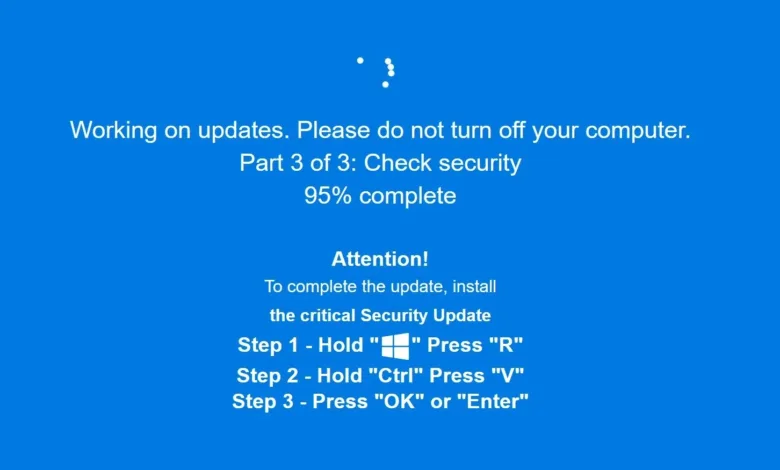
A new and highly deceptive malware campaign is tricking users by displaying a fake Windows Update screen that appears completely authentic. This clever social engineering tactic prompts individuals to manually run malicious commands, inadvertently installing dangerous information-stealing software onto their systems. Security researchers at Huntress have been tracking these attacks, which they refer to as ClickFix campaigns, noting their increasing sophistication since early October.
The attack begins when a user visits a compromised or malicious website. In the latest iteration, the web browser automatically switches to full-screen mode, displaying a very convincing imitation of a Windows Update progress screen. This fake interface instructs the user to press the Windows key and R simultaneously to open the Run dialog box, then paste a pre-copied command using Ctrl+V, and finally press Enter to execute it. The message falsely claims these steps are necessary to complete a critical system update.
Following these instructions triggers a multi-stage infection process. The initial command uses mshta.exe to retrieve further malicious components from a remote server. Security analysts note the attackers employ hex-encoding within IP addresses to obscure their infrastructure. This leads to the deployment of a sophisticated .NET loader that uses steganography, hiding malicious code within the pixel data of ordinary PNG image files, to evade detection.
The final payload typically installs either Lumma or Rhadamanthys stealer malware, both designed to harvest sensitive information from infected computers. The entire infection chain operates in memory without writing files to disk, making traditional antivirus detection more challenging. Attackers further complicate detection by using obfuscated scripts, dynamically-loaded code, and living-off-the-land techniques that leverage legitimate system processes.
ClickFix has become one of the most prevalent and effective initial access methods for cybercriminals. The technique has become so popular that phishing kits based on ClickFix are now available for less technically skilled attackers to deploy. These campaigns are continually evolving, with different lures tailored for Windows, macOS, and Linux users.
For protection, security professionals recommend several defensive measures. System administrators should consider disabling the Windows Run box for standard user accounts through registry modifications or Group Policy settings. Organizations should implement endpoint detection and response solutions to monitor for suspicious process relationships, particularly when explorer.exe spawns unexpected instances of mshta.exe or powershell.exe.
User education remains critical in defending against these attacks. Individuals should be trained to recognize that legitimate Windows updates never require manually pasting commands into the Run dialog. For macOS environments, where similar attacks instruct users to paste commands into Terminal, administrators can restrict Terminal access for non-administrative users and configure mobile device management policies to block execution of unsigned scripts.
Staying informed about emerging threats through security alerts and maintaining updated security software provides essential layers of protection against these increasingly sophisticated social engineering attacks.
(Source: HelpNet Security)