Google Unifies Tag and Tag Manager, Adds No-Code Tracking
▼ Summary
– Google is overhauling its tagging ecosystem by merging Google tag and Google Tag Manager to simplify measurement setup for advertisers.
– Existing Google tags will be upgraded into fully capable containers, granting users access to advanced features like debugging and version control without altering current behaviors.
– A new no-code visual tagging tool allows advertisers to define events and conversions by selecting website elements directly, removing the need for manual coding.
– The platform redesign includes a simplified interface with centralized settings and an advanced section, alongside optimized data transmission to reduce latency.
– This unified approach aims to lower technical barriers for smaller advertisers while providing sophisticated users with better visibility into data flows.
Google is merging its tagging infrastructure, combining the lightweight Google tag with the robust Google Tag Manager platform. This strategic overhaul, announced on August 20, aims to streamline how advertisers collect and route data to essential tools like Google Ads and Google Analytics. The update introduces a more intuitive interface, enhanced no-code tracking capabilities, and optimized data transmission methods designed to reduce technical barriers for marketers.
Simplified Interface and Unified Containers
The core of this update involves upgrading standard Google tags into fully functional Tag Manager containers. Websites currently relying solely on Google tag will now inherit advanced features such as version control, debugging tools, and interface-driven tagging. Importantly, Google assures users that existing tags will continue to operate exactly as they do today, preserving all current automation event triggers and destination-specific configurations.
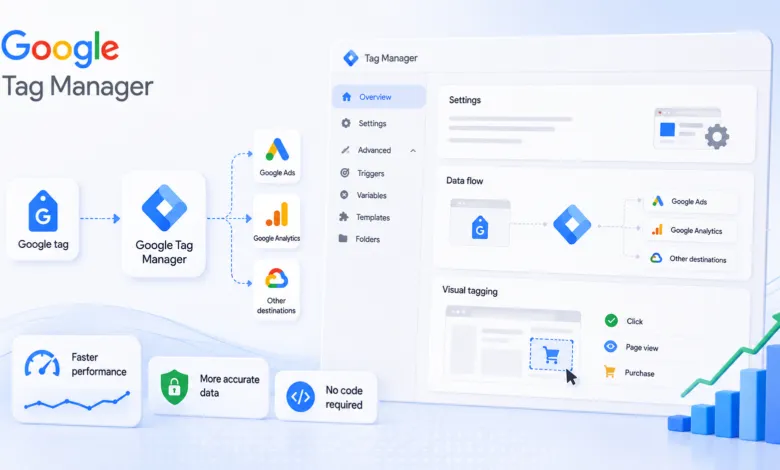
To make management easier, the Tag Manager interface has been redesigned. A new Settings section centralizes container-wide configurations, while complex elements like triggers, variables, templates, and folders are moved into a collapsible Advanced section. This restructuring does not remove any functionality; it simply organizes tools to reduce clutter for everyday users.
No-Code Event Tracking
A significant addition is the introduction of visual tagging, which allows advertisers to create events and set up conversions without writing code. Users can navigate their website visually and select specific elements to define events. Google handles the underlying technical requirements, such as selectors and triggers, in the background.
This approach simplifies the process for teams lacking dedicated development resources. As Ginny Marvin, Google Ads Liaison, explained: “Advertisers will be able to navigate through an action such as a purchase in the same way a customer would while Google handles the technical setup.”
Optimized Data Transmission and Visibility
Performance improvements accompany these structural changes. Previously, Google Tag Manager often loaded additional gtag.js JavaScript when sending data to destinations. Optimized containers now transmit measurement data directly to Google destinations, reducing latency and potentially boosting website speed.
Additionally, the unified platform provides a visual map of data flows. Advertisers can clearly see which products, such as Google Analytics or Google Ads, are receiving data. This transparency helps identify configuration errors and ensures accurate measurement setups.
Deployment and Integration Changes
Container optimization is optional but encouraged. Existing users will see an in-account banner prompting them to optimize. Those with edit or publish permissions can preview proposed changes before applying them. During this process, existing Google tag settings migrate to the new Settings tab, while event tags remain unchanged.
Moving forward, new deployment snippets will adopt a uniform format, eliminating the legacy `gtag config` command. Instead, initialization behavior should be managed via the gtm init trigger. Legacy setups can still be preserved by configuring this trigger to wait for the config command.
Optimized containers can also link directly to their corresponding Google destination accounts. These links grant default Read access, making containers visible within other Google product interfaces, though permissions can be adjusted later. Finally, Google is expanding its ecosystem with integrations from partners including Akamai, Cloudflare, Duda, Fastly, and Webflow to ensure secure and accurate data handling.
(Source: Search Engine Land)