Microsoft overhauls Windows 11’s sluggish right-click menu with performance and customization upgrades
▼ Summary
– Microsoft announced major upgrades to Windows 11 File Explorer and desktop context menus, aiming for faster, less cluttered, and more customizable right-click experiences.
– The new design reduces top-level clutter and prioritizes commonly used actions, addressing current sluggishness and complexity acknowledged by Microsoft engineer Michael Novak.
– Users can now customize context menus by enabling, disabling, or hiding specific actions and third-party app extensions, useful for removing unwanted entries.
– A new option lets users restore the Windows 10-style layout, placing commands like Cut, Copy, Paste, and Properties inline vertically instead of as a horizontal icon row.
– The updates are rolling out to Windows Insiders in preview builds now, with a general release expected later in the fall.
Microsoft has officially confirmed a sweeping overhaul of the Windows 11 context menu, promising a right-click experience that is markedly faster, cleaner, and far more user-configurable. The company is rolling out the first preview builds featuring the new system to Windows Insiders today, signaling a major shift in how the operating system handles File Explorer and desktop menus.
This development follows initial reports from last month detailing Microsoft’s internal push to revamp the menu architecture. The company has now acknowledged that the current implementation has fallen short of expectations. In a blog post, Microsoft engineer Michael Novak admitted the existing menu had become problematic. “The menu became cluttered and sluggish, and we recognized the need to dramatically reduce the time between right-clicking and having a menu that’s fully ready to use,” he stated. The new design, he added, “reduces top-level clutter, keeps commonly used actions easy to access, and introduces a new Settings experience that gives you more control over what appears in the menu.”
Early hands-on testing with the preview build confirms that these are not just incremental tweaks. The default layout is significantly less crowded, prioritizing a snappy response time over displaying every possible action at once. Perhaps the most welcome change is the long-awaited addition of user customization. Windows 11 users can now manually toggle individual actions on or off and control whether third-party app extensions appear. This effectively gives users the power to banish unwanted entries that often install themselves without clear consent.
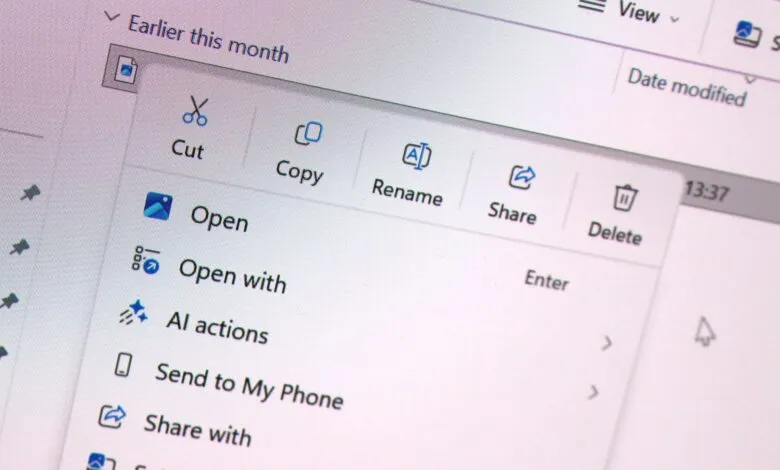
Another notable feature is the ability to revert to a legacy Windows 10 menu layout without leaving the modern system entirely. In the current Windows 11 design, primary commands like Cut, Copy, and Paste are displayed as a horizontal icon row at the top. The new options allow users to switch to a vertical, text-based list that mimics the classic Windows 10 structure, catering to those with deep muscle memory for the older interface. Microsoft’s guidance confirms you can now “list the main commands (Cut, Copy, Paste, Rename, Delete, and Share) inline directly in the menu instead of as a row of icons, and you can move Properties down to the very bottom.”
These quality-of-life enhancements are substantial for daily productivity. Windows Insiders can access the new functionality immediately by downloading the latest preview builds. However, given that the feature is just entering its testing phase, a general rollout to the public is not expected until later in the fall.
(Source: Windows Central)