6 Hidden Android 17 Features You Need to Know

▼ Summary
– Android 17 will let users turn any app into a floating Bubble, expanding the feature beyond messaging apps.
– Built-in game controller button remapping is being added to Android 17.
– Location access gains a one-time permission option and precise location that adjusts based on crowd density.
– Android 17 introduces per-app dark theme settings and a refined split-screen interface.
– Voice assistant volume is now separate from other audio, and Wi-Fi and mobile data toggles are split in Quick Settings.
Google just dropped another batch of details on Android 17, and this time, the focus is on features that could change how you actually use your phone every day. While the company’s earlier “Android Show” covered the big-ticket updates, a new video from the Android team shines a light on six hidden changes that didn’t get top billing. Most of these were spotted when Android 17 Beta 3 launched a few weeks ago, but now Google is officially confirming they’ll all be part of the stable release arriving soon.
Here’s what else is coming in Android 17.
First up, Bubbles for any app. This is a major shift. Previously, only messaging apps could live inside those floating chat bubbles. Now, you can turn virtually any app on your phone into a Bubble. Want to keep your calculator, notes, or music player hovering on screen while you work? That’s now possible. It’s Google’s way of pushing super-multitasking to the next level.
Gamers, listen up. Game controller button mapping is finally built directly into Android. If you play mobile games with a supported controller, you can now remap buttons without needing a third-party app. This is a long-requested feature that makes mobile gaming feel much more like a console experience.
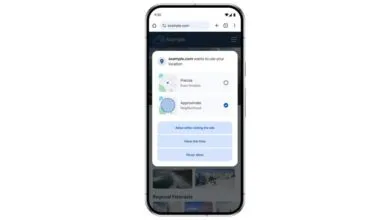
Location privacy gets two important upgrades. First, you’ll see a one-time location access option for apps you don’t fully trust or rarely use. Second, there’s a new precise location setting that adapts based on your surroundings. If you’re in a crowded area, Android 17 narrows your location precision. If you’re somewhere sparsely populated, it widens the zone to protect your privacy.
Per-app dark theme is exactly what it sounds like. You can now set dark mode on a per-app basis, rather than forcing it system-wide. This gives you more control over your visual experience, especially if some apps handle dark mode better than others.
The improved split-screen interface is designed to be more intuitive, especially for foldables and larger screens. The new layout makes it easier to launch and manage two apps side by side, which should feel much smoother for power users.
Separate volume for voice assistant is another welcome tweak. You can now control your assistant’s speaking volume independently from media, alarms, and notifications. That means you can keep your assistant quiet without muting your music.
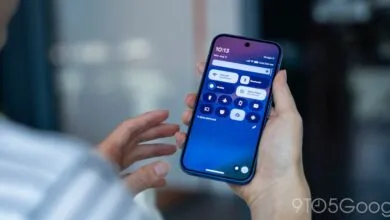
Finally, the WiFi and mobile data toggles in Quick Settings are now separated. This was a frequent request from users, and Android 17 delivers. No more digging into submenus to switch between networks.
The full video is available below, but that screenshot at the top really says it all.
(Source: Droid Life)