6 new AI skills turned Edge into my top mobile browser
▼ Summary
– Mobile Edge now lets you ask Copilot to summarize or answer questions about multiple open tabs at once.
– Edge’s Journeys feature tracks topics from past searches and displays summaries on the new tab page.
– Copilot can access your browsing history to continue conversations and provide updated information.
– You can ask Copilot to generate a podcast from a current web page or all open tabs, with playback controls.
– In Study and Learn mode, Copilot can create interactive quizzes from web page content to help you study.
I’ve long relied on Safari on my iPhone and Google Chrome on my Android phones. But a new contender is steadily pulling me away from both: Microsoft Edge. Why the shift? The latest mobile version of Edge now packs AI-powered features that make information gathering faster and smarter, letting you query multiple open tabs at once and get a unified answer.
Let me be clear: I’m not an uncritical AI booster. I’ve called out Microsoft for shoving Copilot into every corner of its ecosystem, and I know generative AI can stumble. But when it works well, it’s genuinely useful. That’s why I’ve started opening Edge on my phone for certain research tasks.
According to Sean Lyndersay, Edge’s VP of product, the mobile browser has adopted several AI skills that were previously exclusive to the desktop version , plus a few that are new to both platforms. Here’s what you can do now.
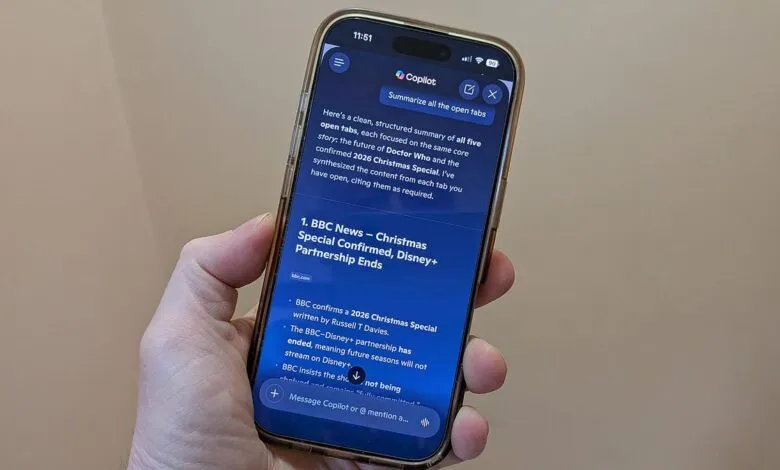
1. Summarize multiple tabs at once. Instead of jumping between open pages, just ask Copilot to summarize them. Update Edge to version 148 or higher on your Apple or Android device. Open the browser, research a topic across several tabs, then tap the Copilot icon on the new tab page. Ask something like “Summarize the information in the open tabs,” and Copilot analyzes all the content to deliver a single response.
2. Retrace your search journeys. The Journeys feature now works on mobile, tracking topics you’ve explored through past searches. Your latest topic appears on the new tab page so you can resume where you left off. To enable it, go to Settings > Copilot and AI, then turn on Copilot New Tab Page and Enable Journeys. After some browsing, Edge will compile your activity into summaries you can revisit.
3. Streamlined new tab page. Like the desktop version, the mobile new tab page now offers more useful content. You can run a standard search or pose a question to Copilot. Icons for frequently visited pages appear, and you can add or remove them by tapping the Add button or pressing down and hitting X. A summary of your past browsing journey is also displayed.
4. Tap into your browsing history. A feature new to both desktop and mobile, Copilot can now review your browsing history to continue a conversation. Just tell the AI to discuss a topic you were looking at earlier, and it will reference your past chats and history to provide updated information.
5. Turn pages into podcasts. This AI skill has expanded from desktop to mobile. At the Copilot prompt, type “create a podcast” for your current page or all open tabs. Wait a few minutes for generation, then tap Listen. You can pause, skip ahead, or go back 10 seconds.
6. Interactive quizzes with Study and Learn mode. Open a web page on a tough subject, then type “Quiz me on this topic” at the Copilot prompt. The AI generates a short multiple-choice quiz to test your understanding.
A few more tricks. Edge now offers an AI-powered writing assistant to help when you’re stuck for words. And with Copilot Vision on mobile, you can share your screen and ask questions about the content you’re viewing.
I never used mobile Edge much before , Safari and Chrome just felt easier. But these new Copilot skills are changing my habits. When I need a research assist, I’ll be reaching for Edge more often.
(Source: ZDNet)