Sonos adds iPhone lockscreen Live Activities controls
▼ Summary
– Sonos added iOS Live Activities support to its mobile app, providing lockscreen playback controls for music and podcasts without unlocking the iPhone.
– The feature was requested by users and teased by CEO Tom Conrad in February, but it lacks album art display and is off by default due to backlash from a 2024 app update.
– To enable it, users must turn it on in both the Sonos app preferences and iOS settings; it appears after playback starts and the app is closed, showing room/group name and track title.
– The Live Activity disappears from the lockscreen 15 minutes after playback stops, and it works on Apple Watch and CarPlay, but controls are not supported on those devices.
– Sonos is exploring ways to enhance the lockscreen experience with album art and continues to improve the feature, though no timeline is given for adding controls on other platforms.
Sonos has quietly rolled out a major quality-of-life upgrade for iPhone users, adding support for iOS Live Activities in its mobile app. The feature delivers lockscreen playback controls, a long-awaited addition that lets users manage their music or podcasts without unlocking their device.
The update was announced through a post on Reddit, where Sonos acknowledged the feature as a “much requested, anticipated, and needed” improvement. The news quickly spread after being picked up by 9to5Mac.
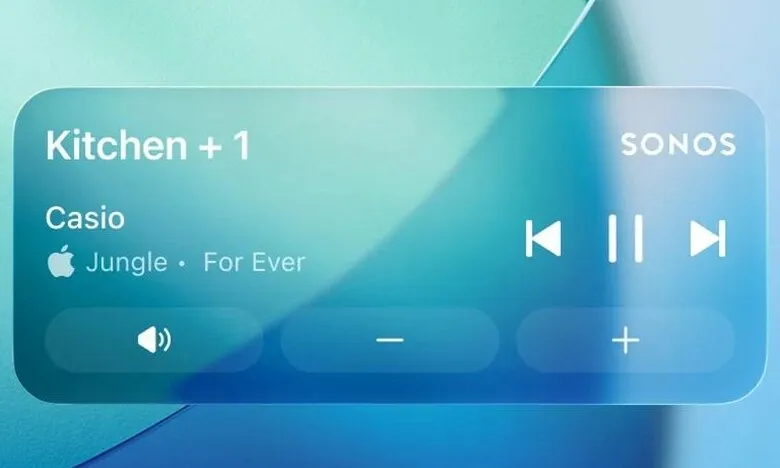
While the Live Activity doesn’t include album art, it does offer the essentials. Users can see what’s currently playing and access basic controls directly from the lockscreen, whether they’re streaming music or catching up on a podcast through their Sonos system. It’s a streamlined experience that removes the friction of opening the app just to pause or skip a track.
This functionality mirrors what Android users have enjoyed for some time. Sonos CEO Tom Conrad first hinted at the possibility during a Bloomberg interview back in February. The timing is notable, as the company has been working to rebuild trust following the backlash over its major app overhaul in 2024.
Given that history, Sonos is taking a cautious approach. The Live Activities feature is turned off by default, requiring users to enable it manually in two places: the Sonos app’s preferences and the Sonos section within iOS settings.
Once activated, the Live Activity appears automatically after you start playback and close the app. It shows the name of the room or group where audio is playing, along with the title of the current track. If you stop playback, the lockscreen widget will vanish on its own after 15 minutes.
The update also extends to Apple Watch and CarPlay, though with a limitation. While the Live Activity will display on those screens, the controls are not functional there yet. Sonos hasn’t provided a timeline for when those controls might work, but the company says its team is actively refining the feature. As for album art, Sonos is investigating “alternative ways to enhance the lock screen experience,” leaving the door open for future improvements.
(Source: The Verge)