Pixel Weather update adds new icon, renames to Weather Brief
▼ Summary
– Pixel Weather app update introduces a new icon, replacing the blue sky background for consistency with other Pixel apps.
– The update adds an “Updated xx:xx” timestamp below the city name to show data freshness.
– “AI Weather Report” is renamed to “Weather Brief” in the feed and settings, with no functional changes.
– No widget changes are included, and Pixel Weather still offers only two widget styles.
– The update, version 1.1.20260626.962582759, is rolling out widely via the Play Store.
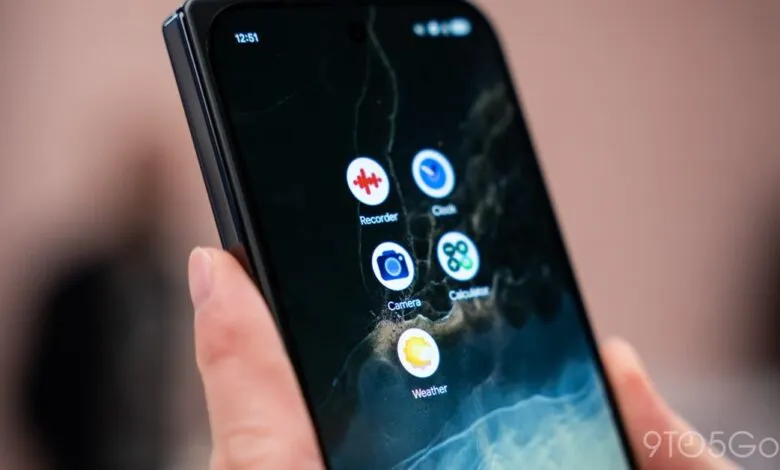
The latest round of Pixel app refreshes continues, with Google’s weather application receiving a visual overhaul and a new name for its flagship feature. The update strips away the familiar blue backdrop that once mirrored the sky, part of a broader push to standardize the look and feel across the company’s mobile software. This design directive has notably impacted Pixel Weather, Recorder, Calculator, and Clock, all of which are being aligned to a more uniform visual language.
Beyond the cosmetic shift, the changes inside the app are relatively subtle. Users will now see a persistent timestamp beneath the city name located in the top-left corner. This “Updated xx:xx” indicator serves as a constant confirmation that the displayed conditions are current, removing any guesswork about data freshness.
A more noticeable change comes in the form of a rename. The feature previously known as “AI Weather Report” has been rebranded as Weather Brief, appearing under this new title both in the main feed and within the Settings menu. The underlying functionality, however, remains unchanged.
Widget offerings remain static, with Pixel Weather still providing just two options. For users who have long requested more variety in home screen customization, this area continues to feel underserved.
The new version, designated 1.1.20260626.962582759, is currently making its way to devices through a wide-scale Play Store rollout.
(Source: 9to5google.com)