ReTerminal Sticky: E-Paper Display Built for Hackers

▼ Summary
– The Seeed Studio reTerminal Sticky is a $50 magnetic eInk display with a touch screen, mic, higher pixel density than the Xteink X4, and sensors for temperature, humidity, and motion.
– Seeed Studio fully embraces third-party firmware, offering web-based flashers for CrossPoint Reader, TRMNL, ESPHome, and OpenDisplay, unlike competitors with restrictions.
– The glossy screen is the main drawback, though text looks sharp; a matte screen protector or folio case is recommended to address this.
– The device includes strong corner magnets and an adhesive mounting ring, allowing it to attach securely to fridges or phones without hitting camera bumps.
– The Sticky targets DIY enthusiasts over traditional eReader buyers, functioning as a hackable, versatile device for e-reading, smart home displays, and community-built apps like life counters or games.
E-paper has found its second wind, and the momentum shows no signs of slowing. The Boox Palma redefined the eReader as a pocketable, non-proprietary companion, and then open source developers took over from there, flashing custom firmware onto the Xteink X4 and X3, budget-friendly devices that attach magnetically to your phone. The X4’s runaway success has spawned successors in the X3 Pro and X4 Pro, alongside Boox’s own Picco competitor. But the bare-bones e-paper space is wide open, and Seeed Studio has stepped in with the reTerminal Sticky, a cheaper, more capable magnetic eInk display that embraces everything that made the X4 a viral phenomenon.
I have at least nine of these devices scattered around my house, embedded in countless DIY projects.
Seeed Studio holds a special place in my heart because I enjoy soldering circuit boards. This Chinese company operates in the same arena as Adafruit and M5Stack, producing tiny boards, sensors, displays, and IoT gear for hands-on tinkerers. Their reputation was built on the Xiao, a diminutive microcontroller that has wormed its way into keyboards and gadgets everywhere, including the TOTEM split keyboard I own. Seeed manufactures many of the official Home Assistant devices, and their products carry a professional polish while undercutting the price of no-name AliExpress alternatives.
Like every smart home company these days, Seeed has leaned hard into AI branding, with the Sticky’s packaging proclaiming it “The AI Sticky Note.” It is a predictable but unfortunate marketing choice, though entirely skippable given the hardware’s open nature. The Sticky offers plenty of ways to sidestep that particular feature.
The Sticky is the latest addition to the reTerminal line, a family of open, smart home-oriented e-paper displays. At $50, it undercuts the X3’s Amazon price by roughly $19. Xteink has also announced they are discontinuing the current X4, likely to make room for a refreshed version soon.
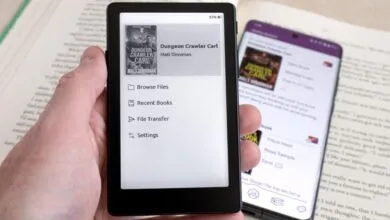
The Sticky matches the X4 in size and shape while packing more capability: a touch screen, a microphone, and higher pixel density. A beeper comes enabled by default, and you will want to disable it immediately, as it is genuinely irritating. The glossy screen is a minor letdown, as I would have preferred a matte option. Out of the box, the Sticky runs Seeed’s Seeedash software, which is perfectly serviceable for use as a smart sticky note, to-do list, smart home frame, or clock.
The stock firmware is essentially a calendar, a notes app, and an AI dictation tool. That is not what interests me, frankly.
The “AI” angle lets you dictate notes via the internal mic or display your Codex usage, neither of which I plan to use, though I can see the appeal for others. Unsurprisingly, transcription happens in the cloud rather than on-device, which is where my curiosity ends. The Sticky also includes a temperature and humidity sensor plus a gyroscopic motion sensor, an impressive bundle for fifty bucks.
If this were merely a fridge magnet clock with AI gimmicks, I would not buy it. But that functionality is just window dressing. Seeed has done something clever here by leaning fully into the actual reason people buy these devices: hacking them and loading software you actually care about.
Seeed Studio straight up said “here you go”.
This is not a company turning a blind eye to user tinkering. Their website proudly advertises compatibility with ESPHome, OpenDisplay, TRMNL, and CrossPoint Reader, the community eReader firmware built for the Xteink X4. Almost anything you can imagine can be flashed onto this device. While Xteink faced a Reddit dustup earlier this year over CrossPoint flashing support, Seeed has essentially told its users: “yeah, go nuts man, we’re not your dad.”
This is how computers should actually work. Most IoT devices are just off-the-shelf components repackaged into a novel form. The ESP32 chip family, in particular, powers everything from light bulbs to smart sensors to open source music-making computers. The real question is whether you control the hardware or whether it is a little cop you paid to narc on you.
Seeed differs from many smart home companies because they actually manufacture hardware rather than outsourcing it, slapping on a monthly subscription, and selling it at Best Buy to unsuspecting consumers. Most smart home cameras come out of the box as surveillance tools, and Amazon’s entire hardware lineup is an exercise in selling the least open products possible, often at a loss, for vaguely defined goals like Alexa. Much of that ends up as ewaste or becomes progressively worse and ad-riddled unless you find a jailbreakable model like the Echo Show or that one Fire Cube you can install CoreELEC on. Kindle hacking has surged in popularity precisely because it transforms a forgotten closet dweller into a device with purpose. Makers have gotten increasingly skilled at using e Ink in DIY contexts, as seen with the Steam Machine’s Inkterface and companies like TRMNL prioritizing user sovereignty. The reTerminal Sticky is what happens when a company that actually builds things reads the tea leaves and gives people what they want.
“Bionic Reading” is an optional formatting feature based on the font of the same name. It was added to CrossPoint and CrossInk because some people find it easier to parse letters like this.
The eReader Experience
My only complaint about the reTerminal Sticky as an eReader is the glossy screen. I avoid glossy displays whenever possible, especially when I am expected to touch them and read text. There is something pleasant about the slightly rough texture of matte eReaders, and scratches are easier to hide. It did not take long before I managed to ding it up slightly, and Seeed Studio needs to offer a screen protector or folio case if they want to take the eReader market seriously. In practice, though, it is less distracting than a smartphone screen, and a matte screen protector or alternate model could easily address it. The upside is that text does look handsome on a glossy screen.
Apart from that one element, the device is a layup. Text looks slightly clearer than the X4, though still what you would expect for fifty bucks. Unlike the non-pro Xteink devices, it has a native touch screen, and the CrossPoint Reader ecosystem is already in beta and easy to flash. It has a USB-C port, which should not be novel, but the X3, X3 Pro, and X4 Pro all dropped it in favor of a POGO pin connector that, despite not being proprietary, basically nobody wants. Like the base X3/X4 and unlike the new X3/X4 Pro models, the Sticky lacks a backlight, but I would gladly pay extra for one if offered.
Quite literally my only issue with the device, which is not awful in practice and can be fixed with a matte screen protector.
Because the device is ostensibly meant to be a sticky note, the N52 magnets sit in the corners rather than the center. Unlike the X4, they are sturdy as hell, and when you stick this on your fridge, it will not swing back and forth or fall off. Seeed is clearly aware that people will want to mount this on their phone, so they include an adhesive mounting ring. Like the internal magnets, it is not messing around. The ring is substantial with a slight lip and strong adhesive, though I have not put it through a torture test. Leaning into the adhesive ring being optional also solves one of the X4’s bigger issues, where the device would not sit flush with your phone and would collide with the camera bump. The added depth makes positioning easier and raises the eReader above the camera bump, so rotating it 180 degrees on my iPhone 15 Pro was possible without interference. Though the ring’s depth made the device a bit bulkier in my hand, it is absolutely not going anywhere unless you want it to.
The magnets on the device are significant but on the corners. The adhesive ring they ship with the device for phones, however, is NOT screwing around.
Since I wrote up the Xteink X4, the CrossPoint Reader firmware has become increasingly easy to flash. Insert a FAT32 formatted microSD card, open their website, connect your device via USB-C, hit flash, and reset. The microSD slot is deeply inset, so you may need a toothpick or similar tool. This process contrasts starkly with hacking a Kindle, which is an elaborate yet rewarding endeavor with its own wiki and exploits named “AdBreak,” “Nosebleed,” and “WinterBreak.” Like the Xteink and Palma, ePubs can be loaded directly onto the SD card or via WiFi, and CrossPoint Reader can now preemptively optimize text for the ESP32’s limitations.
Though the Sticky lacks the X4’s second row of buttons, the touch screen more than compensates. I initially worried about accidental page turns from screen sensitivity, but touch behavior can be disabled, and in CrossPoint Reader it feels organic and predictable. CrossPoint can also use the internal gyroscope for page turning, with tilting the device backward or forward advancing the page depending on the setting. This is off by default and not something I have gotten the hang of again, but it is neat to have in a cheap little gadget.
It’s rare for a company to be like “yeah throw whatever you want on it man”. Credit: Seeed Studio.
The Everything Else Experience
As mentioned, a key differentiator for the reTerminal Sticky is that Seeed Studio does not care if you install third party firmware on it and would, in fact, love it if you did. Not only did Seeed reach out to several open source e-paper projects before release, they have web-based flashers for each on their own website. CrossPoint Reader, CrossInk, TRMNL, ESPHome, and OpenDisplay are prominently featured on the Sticky’s homepage. Flashing the device and getting firmware running takes minutes with little or no technical background, though I hit one snag that set me back a few days before Seeed clarified a wrinkle: for most non-eReader firmwares, you should not have a microSD card in the device when flashing. The technical reason is that the eInk display and microSD share the same SPI bus, but Seeed told me they are working on resolving this.
There are many ways to interact with TRMNL. One plugin can give you a quick roundup of your Letterboxd feed.
The reTerminal Sticky is the ideal target for software like TRMNL, an everything hub for networked e-paper displays. The company sells their own devices, but the software can run on hacked Kindles or many open e-paper displays. You can host your own service locally for free, or currently pay 50 bucks once to register your own device, which TRMNL calls BYOD. TRMNL uses a plugin system to synchronize services like Google Calendar, weather, ToDoist, TickTick, or anything you code yourself. From there, you can set up a plug-in playlist for your device to cycle through at regular intervals. Some plugins are as corny as you would expect from an open e-paper service, like one displaying random Ferengi facts from Star Trek, while others are more practical. One card in my playlist linked TRMNL to my Letterboxd account to show a quick breakdown of recent movies my friend saw.
It is quite pleasant and a bit futuristic to grab a snack from the fridge, see an updating magnet, and remark: “Oh, Will gave The Samurai And The Prisoner five stars, I gotta remember to buy tickets.” If a company tried that with my fridge I would put it in a faraday cage, but it is entirely different when you choose to do it.
Open Display is simple and works over Bluetooth. You can use it to update a simple image, or connect it to Home Assistant.
OpenDisplay is far easier to set up while also being more simple and local. You control anything on the device via Bluetooth and can send doodles or text to it. OpenDisplay is an open platform and works with compatible senders like Home Assistant. It is a much simpler interface than TRMNL, but if you want to treat the Sticky like a sticky note or something direct and basic, that simplicity is a strength. The devs were also quite nice when I bugged them for support help on Discord, so I would like to thank them publicly for that.
You can turn this thing into a life counter for Commander games.
There are plenty of other apps in the “Playground,” the section of the site Seeed devotes to development. While rotating through the off-the-shelf firmwares, I installed a bunch of different apps. One called Sticky Lotus turns the touch screen into a two or four way life counter for Magic The Gathering. Another firmware is a recreation of 2048 that uses the touch screen. I am sure the Sticky will become a destination for many vibe coded one-off projects that are promptly abandoned, but honestly there are far worse things you could put on GitHub, and it does not reflect poorly on the device itself. Frankly, I am just happy that people are excited about the possibility of a tiny, cheap computer.
An Open Paper Future
Since my review of the Xteink X4, I have seen many traditional reviews trying to fit this new category of devices, e-paper displays connected to cheap microcontrollers running community firmware, into the framework of existing eReaders. Many bring up the lack of a storefront, while others knock them for being a bit hacky and requiring some knowhow to get running. That could be fair feedback for a broad consumer base that would purchase a Kindle, and I would love a version of these devices that worked with Libby, for example. But it fundamentally misunderstands that the audience for these devices is people who are fucking sick of Kindles. Devices like the Xteink X4 family and the reTerminal Sticky are for people with a loose folder of ePubs on a Dropbox or hard drive. They are for people who want to fill a 32gb microSD card with erotica downloaded from AoE3. These are not devices that try to be everything; they are meant to be inexpensive and dedicated.
Though similar in function to traditional eReaders, they share more spiritually with the ever-proliferating category of retro handhelds, devices no reviewer would dream of treating the same way as a traditional console. Saying “you’re going to have to find ePubs” is a bit like saying “you may have to find ROMs” when talking about the Retroid Pocket; functionally a tiny bit silly and condescending to the reader. You would be shocked at the average person’s capacity to follow a wiki, a subreddit sticky, or a fairly complex YouTube tutorial to completion if they are excited for a new, affordable, and accessible device.
What Seeed Studio has done here doubles down on the bet on its audience’s competency. They have seen that there is a niche but growing market for these small, cheap devices that Xteink kicked off, intentionally or not, and decided to run with it while selling at a cutthroat price point. They have made a device they would use themselves, an e-paper display that leans into the DIY and open nature of the hardware they sell and the community that embraced the X4. And though I experienced a few launch hiccoughs and really wish they sold a matte screen version, and maybe one in black, if the current price holds, it will sell like hotcakes. The reTerminal Sticky is not simply a cheap eReader; it is a dirt cheap magnetic swiss army knife eInk display with an ever-growing repertoire of flashable firmware. But most importantly, it reaffirms the truth that the ideal use case for a computer is whatever the user can imagine.
(Source: Aftermath.site)