Xteink e-readers now get free books via Libby

▼ Summary
– CrossPoint Reader, a free alternative firmware for Xteink X3, X4, and X4 Pro e-readers, now supports third-party plug-ins, including one that enables access to DRM-protected ebooks from Libby and Kobo.
– To use the feature, users must first install CrossPoint Reader firmware via USB-C and browser, then download the Plugin Store and the “Protected Content” plug-in onto the microSD card.
– The process requires a free ByteBooks account to authorize the device and a Libby account with a library card; ebooks must be borrowed on another device as the e-readers cannot search or download from Libby directly.
– Users transfer an ACSM file to the microSD card, and the plug-in processes it via the built-in web server to download and copy the DRM-protected EPUB to the e-reader for the loan period.
– The Common Stacks app (Android, Windows, macOS) simplifies borrowing from Libby by sending ebook files directly to Xteink devices with a few clicks, though title availability varies by library.
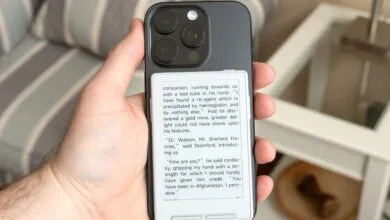
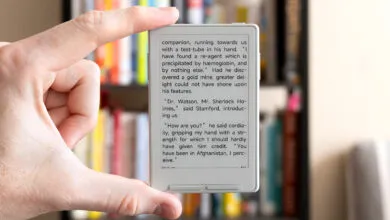
One of the biggest drawbacks to Xteink’s compact e-readers has always been the hassle of finding content. While Kindles and Kobos offer seamless access to massive digital storefronts, Xteink owners have traditionally been left to hunt down DRM-free ebook files on their own. That limitation is finally disappearing. The developers behind CrossPoint Reader, a free alternative firmware for the X3, X4, and X4 Pro, are rolling out support for third-party plug-ins, and the first major addition unlocks access to DRM-protected ebooks borrowed through OverDrive’s Libby library app or purchased from retailers like Kobo.
The feature is still in beta, but I’ve been testing it on an X4 Pro with custom firmware provided by the CrossPoint Reader team over the past few days. It’s now available for anyone to try, and while the workflow isn’t as polished as Libby’s mobile app or Kobo’s native OverDrive integration, it’s far less complicated than I anticipated. If you’re already used to wirelessly transferring files to your e-reader, moving borrowed library books onto it won’t feel like much of a stretch.
The first hurdle is replacing the stock firmware. You’ll want to install the free CrossPoint Reader alternative, and the simplest method is connecting your e-reader to a computer via USB-C, powering it on, and flashing the new firmware through a browser using the CrossPoint Reader website. The site walks you through selecting your exact device model and firmware version.
From there, you’ll download and install CrossPoint Reader’s new Plugin Store. The process involves unzipping a few files onto your e-reader’s microSD card, which adds a Plugins section to the homescreen. The store currently offers a handful of tools, but the one you need is the “Protected Content” plug-in. It runs through CrossPoint Reader’s built-in web server and enables Xteink’s devices to handle ebooks secured by Adobe Digital Editions DRM.
To make everything work, you’ll need a free ByteBooks account, or you can convert an older Adobe Digital Editions account you haven’t touched in years. This lets you authorize your e-reader to open DRM-protected files. You’ll also need access to Libby on another device, which requires a library card to sign in. Because Xteink’s devices run on low-power ESP-32 processors, you can’t search or download books from Libby directly on the e-reader itself.
Here’s how the borrowing process works: when you borrow a book in Libby, the app gives you a tiny ACSM file rather than the full ebook. That file is what an authorized reading app uses to unlock the actual DRM-protected EPUB. With the new plug-in active, you move the ACSM file to the microSD card, and the CrossPoint Reader web server processes it, downloads the book, and copies the EPUB to your e-reader. You can then read it for the duration of the loan.
The same approach works for ebooks you’ve purchased from stores like Kobo that use EPUB with ADE. Amazon doesn’t participate, but if you log into Kobo’s website, you can download an ACSM file for any book you own, transfer it to your Xteink device, and let the plug-in handle the rest.
If that sounds like too many steps, there’s a simpler route. A free app called Common Stacks, available for Android, Windows, and macOS with iOS support on the way, streamlines the entire process. It’s designed to pull from multiple free ebook libraries, including self-hosted ones, and offers full Libby integration. With just a couple of clicks, it can download and send borrowed books directly to your Xteink e-reader. It relies on CrossPoint Reader’s web server in the background, but in my testing, getting library books onto the X4 Pro was just as easy as borrowing them on a Kobo.
Of course, library availability varies. Selection depends on your local library’s digital catalog, and popular titles might require a wait if all copies are checked out. But now that Xteink’s tiny e-readers can handle DRM-protected ebooks, whether borrowed or bought, they’ve become a far more compelling alternative to the mainstream options from Amazon and Rakuten.
(Source: The Verge)