Android 17 QPR1 Beta 3 adds partial screenshots, with limits
▼ Summary
– Android 17 QPR1 Beta 3 has enabled partial screenshot features by default, but only for large-screen devices.
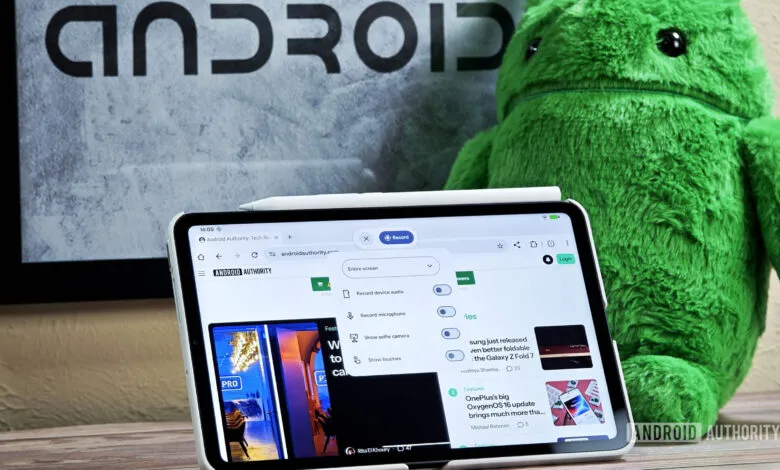
– The screen recording toolbar offers three screenshot options: capture a split-screen window, a custom area, or the full screen.
– Enabling the partial screenshot feature on phones results in a broken, enlarged toolbar UI that is not optimized for small screens.
– Google has been working on improving the screenshot and screen recording experience for over a year, with partial screen recording still not enabled by default.
– The partial screenshot functionality works on phones when forcefully enabled, suggesting a future update could fix the UI for smaller screens.
With the launch of Android 17 QPR1 Beta 3, Google has quietly activated a long-anticipated feature: partial screenshots are now enabled by default. However, there’s a catch , this functionality is currently limited to large-screen devices like tablets and foldables.
The update revamps the screen recording toolbar, introducing three distinct screenshot options. Users can capture a selected window in split-screen mode, a custom-selected area, or the entire screen. The window-specific option also works with App Bubbles, allowing you to grab only the content inside a bubble, and it should function similarly for apps running in windows on Aluminium OS.
This rollout follows a broader effort by Google to refine the screenshot and screen recording experience across Android. We first spotted design changes for tablets and PCs last year. The redesigned toolbar debuted with Android 17 Beta 3, but key features like partial screenshots and partial screen recording were missing at launch. Now, with QPR1 Beta 3, partial screenshots are live , but only for larger displays.
What about phones? If you try to force-enable the partial screenshot feature on a standard smartphone, you’ll encounter a broken, enlarged toolbar UI that simply isn’t optimized for smaller screens. The feature technically works, but the interface is unusable. The good news is that this suggests the core functionality is there, and a future update could fix the UI and bring partial screenshots to phones.
As for partial screen recording, it remains disabled by default. Users can still record an active window or the full screen, but the ability to record a custom-selected area is not yet available. We’re hopeful that Google will enable this feature in a future release, completing the suite of screen capture tools for all device types.
(Source: Android Authority)