iOS 27 turns any QR code into a custom Wallet pass
▼ Summary
– Apple is adding a “Create a Pass” feature to iOS 27 Wallet, allowing users to build custom digital passes from any QR code using three templates (standard, membership, event) with customization tools.
– After 14 years of low developer adoption of PassKit, Apple is shifting from a developer-dependent model to a user-driven one, letting users bridge the gap for small businesses that still issue QR codes.
– The feature addresses the fragmented experience where most service providers, like local gyms and cinemas, have not adopted Wallet passes, undermining the app’s usefulness as a single container.
– The pass builder is part of a broader strategic shift to make the iPhone more useful without requiring third-party integrations, similar to Apple’s investment in silent speech AI.
– The feature’s success depends on user willingness to manually scan and customize passes, with potential value in reducing App Store clutter from apps that exist solely to display barcodes.
Apple is finally acknowledging a truth that has been evident for years: most businesses are never going to build native passes for the Wallet app. With iOS 27, the company is shifting strategy dramatically by introducing a “Create a Pass” feature that lets users transform any QR code into a custom digital pass. After fourteen years of waiting for developers to embrace PassKit, Apple is handing the reins directly to its users.
For over a decade, Apple has tried to convince every gym, cinema, airline, and transit system to integrate with Wallet. The vast majority have not. Your local gym still forces you into a standalone app for a barcode. The movie theater emails a PDF. The transit card remains locked inside its own interface with its own notification settings. Wallet has been a beautifully designed container that most service providers simply ignored. With iOS 27, Apple is no longer waiting for them.
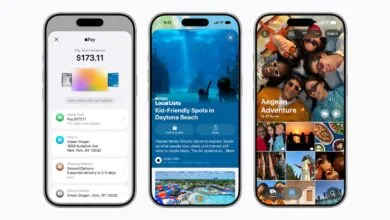
The new tool, discovered in test builds ahead of the expected WWDC announcement on June 8, lives inside the Wallet app via the “+” button. Users can build a pass from scratch or simply point the iPhone’s camera at any QR code to import it directly. Apple is testing three template categories: standard in orange for general use, membership in blue for recurring access like gyms, and event in purple for concerts and screenings. Each template offers customization for styles, images, colors, and text fields, giving users control over what appears on the pass. The result is that any business that issues a QR code for entry, payment, or identification can now have a presence in Wallet, even if its developer has never heard of PassKit.
PassKit, Apple’s framework for Wallet-compatible passes, has been available since iOS 6 in 2012. It supports boarding passes, event tickets, coupons, store cards, and generic passes, with remote updates, location-based notifications, and Apple Pay integration. The framework is well-documented, free, and supported by third-party tools that generate passes without coding. Apple built its payments infrastructure methodically: Tap to Pay turned iPhones into payment terminals, Apple Pay brought cards into Wallet, and PassKit was supposed to bring everything else. It did not work. Fourteen years later, the majority of small and mid-sized businesses that issue QR codes have not adopted it. The reasons are mundane: building and maintaining a Wallet pass requires a developer account, a server for updates, and ongoing attention to a feature most consider a minor convenience. The result is a fragmented experience where some passes live in Wallet and most do not, undermining the app’s purpose as a single home for everything in your pocket.
The “Create a Pass” feature is Apple’s quiet admission that the developer-first strategy has hit its ceiling. Digital wallets are converging toward a universal model where identity documents, payment credentials, transit passes, and event tickets all live in one interface. Apple cannot afford to let Wallet’s utility depend on whether a local gym in Dusseldorf has a developer who knows PassKit. By letting users create their own passes from any QR code, Apple is decoupling Wallet’s growth from developer adoption and tying it instead to user behavior, a resource Apple has in abundance.
The design remains characteristically controlled. Users are not building arbitrary content. They are wrapping existing QR codes in Apple-designed templates with defined customization parameters. The three template categories map to the most common use cases that PassKit adoption has failed to serve. Apple is not opening Wallet to user-generated chaos. It is building a structured bridge between the unstructured QR codes businesses already issue and the curated Wallet experience Apple wants users to rely on.
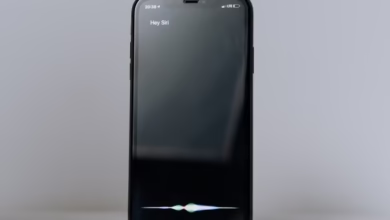
This pass builder is one of several enhancements in iOS 27. The headline feature is a revamped Siri, now powered in part by Google’s Gemini models under a multi-year deal reportedly costing Apple around $1 billion per year. Siri will get a dedicated app, a new Dynamic Island interface, and text-based conversational capabilities alongside voice. Apple is also expanding AI features in photo editing with generative tools to extend and reframe images, and introducing a Siri Camera Mode that uses Visual Intelligence to provide real-time information about objects, text, and locations. Apple’s $2 billion acquisition of Q.ai, the Israeli silent-speech AI startup, signals heavy investment in new interaction modalities beyond voice and touch. The Wallet pass builder sits in a different part of the product but reflects the same strategic impulse: making the iPhone more useful in more contexts without requiring third parties to build the bridge. Silent speech recognition lets the iPhone understand you without speaking. Custom passes let Wallet hold your tickets without the venue building an integration.
In both cases, Apple is removing the dependency on external partners that has limited what the iPhone can do.
Apple’s iOS ecosystem is also contending with a surge in low-quality app submissions driven by AI-assisted “vibe coding,” flooding the App Store with hastily built apps. The Wallet pass builder may partially address this from the other direction: instead of downloading a bad app to access a QR code, users can skip the app entirely and bring the code into Wallet. It is a small but meaningful reduction in the number of unnecessary apps that exist solely to display a barcode, a category that accounts for a non-trivial share of App Store clutter.
Apple Wallet has expanded steadily from payments to identity, adding driver’s licenses, state IDs, and now user-created passes. Each expansion makes Wallet more central to daily life and more difficult to replace. The “Create a Pass” feature is not technically ambitious. It is strategically significant. It converts a product that depended on a supply-side network effect, developers building passes, into one that can grow through a demand-side network effect, users creating them. Apple has tried for fourteen years to convince the long tail of businesses to adopt PassKit. The pass builder concedes that most never will, and routes around the problem.
Whether users actually build custom passes in meaningful numbers is an open question. The feature requires manual effort: scanning a QR code, choosing a template, customizing the appearance. Most users may not bother for a gym membership they use three times a week. The value will depend on how well the camera integration works, how quickly the pass is generated, and whether Apple adds automation, such as suggesting a pass creation when the camera detects a QR code in a supported context. The templates are a starting point. The ambition is to make Wallet the default home for every credential, ticket, and token a person carries, regardless of whether the issuer ever built a thing. After fourteen years of waiting for the supply side to show up, Apple is betting on the demand side instead.
(Source: The Next Web)