Google Desktop App Launches for Windows
▼ Summary
– The Google desktop app for Windows is now globally available in English, providing integrated search for the web, local files, and installed apps.
– A key feature is the Alt + Space shortcut, which opens a search box for a Mac Spotlight-like experience.
– Its web search includes an AI Mode with functions like Google Lens, translation, and homework help.
– Search results appear in a floating window that supports follow-up questions, mirroring the mobile interface.
– This is a rare consumer desktop app from Google, joining a small suite that includes Google Drive and Chrome.
Google has officially released its dedicated desktop application for Windows users worldwide, following a testing phase that began last September. The new software aims to deliver the full power of Google Search directly to the Windows desktop environment, offering a centralized tool for finding information, files, and applications. This global launch in English marks a significant step for the company, which has historically focused its consumer efforts on the browser and mobile platforms.
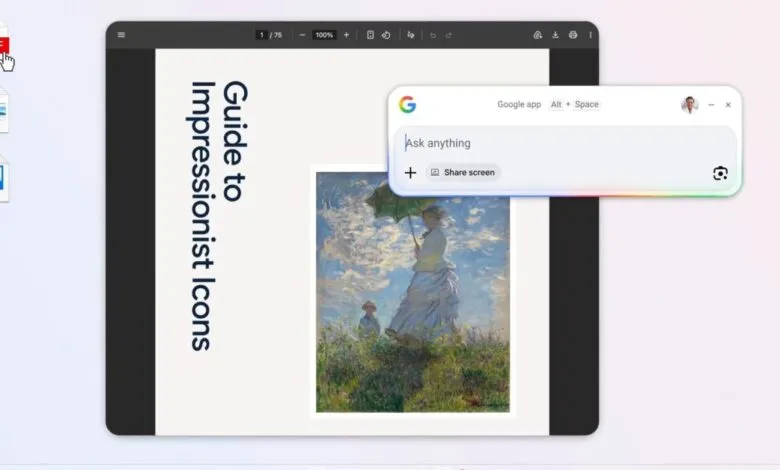
The core functionality is accessed through a simple Alt + Space keyboard shortcut, which summons a versatile search box. This interface allows users to query the web, locate files within Google Drive and on their local machine, and quickly launch installed programs. The integration of local file and application search creates an experience reminiscent of system-level tools like Mac Spotlight, bringing similar convenience to the Windows ecosystem.
For web searches, the app incorporates Google’s AI capabilities through a dedicated AI Mode. This feature enables users to perform advanced tasks directly from the search bar, such as invoking Google Lens for visual searches, translating text or images, and obtaining help with homework or complex questions. A particularly notable function is the ability to share your screen or a specific application window to ask contextual questions about what is displayed, allowing for highly interactive assistance.
Search results are presented in a floating window that remains accessible on the desktop, facilitating a seamless workflow. This window supports conversational interactions, letting users ask follow-up questions to refine their search. The overall user interface is closely aligned with the familiar design of the Google Search experience on mobile devices, ensuring consistency for existing users.
The application is now freely available for download on devices running Windows 10 and above, removing the previous requirement for a Google Labs enrollment. While Google positions this desktop app as a natural extension of its popular mobile clients, there is currently no announced version for macOS. However, the company’s Gemini team is reportedly developing a similar application for Apple’s platform. This release is a notable departure from Google’s usual strategy of promoting Progressive Web Apps (PWAs) over native desktop software, joining a small suite that includes Google Drive for desktop, Quick Share, and Google Play Games.
(Source: 9to5google.com)