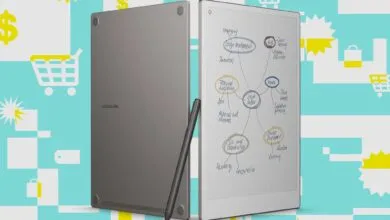
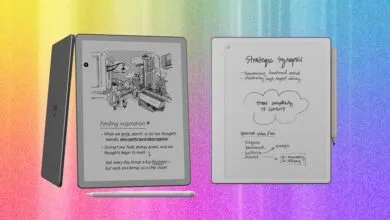
I wrote this reMarkable Paper Pro review on the device itself.
▼ Summary
– The reMarkable Paper Pure is a distraction-free writing device with no notifications or multitasking apps, targeting writers, designers, and researchers.
– The $399 tablet features a 10.3-inch monochrome display with a wider, shorter resolution for improved reading and writing compared to the reMarkable 2.
– New software allows calendar syncing, one-tap sharing of handwritten notes via email, and access to content through a web app.
– The device integrates with Drive, Dropbox, and OneDrive for document import/export but handles PDFs and ePUBs poorly, limiting its use as an e-reader.
– The Paper Pure excels as a focused work tool for note-taking and sketching, though it lacks advanced AI features and seamless cross-device note syncing.
For years, reMarkable has built its identity around one simple promise: pull you away from glowing screens and deliver a writing experience that feels like real pen on paper. The company’s newest device, the reMarkable Paper Pure, doubles down on that mission. It is deliberately positioned as the anti-iPad, anti-phone, anti-laptop tool , no notifications, no multitasking apps, just a clean digital canvas for writers, designers, and researchers who want to read and write without distraction.
When I review gadgets, I usually scatter notes across apps, platforms, and devices. But the Paper Pure is built for writing, so I decided to write this entire review on it. I used the tablet’s handwriting conversion feature to turn my scribbles into text, then edited the whole thing in WordPress. It felt fitting.
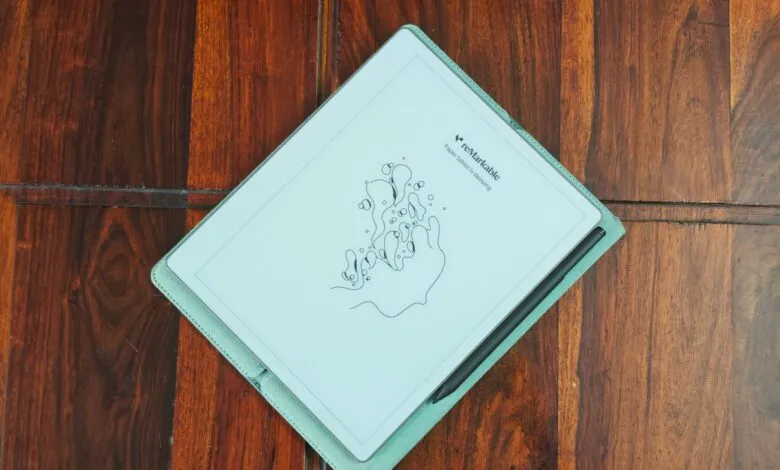
The new $399 reMarkable Paper Pure is the successor to the reMarkable 2, which launched six years ago. Since then, the company released the color-screen Paper Pro for $499 and the more portable Paper Pro Move. The Paper Pure strips things back. It features a monochrome display in a notebook-sized form factor with a 10.3-inch screen , matching the reMarkable 2’s dimensions. But reMarkable flipped the resolution, making the display wider and shorter. That means more text fits on each horizontal line, whether you are reading or writing. Having tried the reMarkable 2 before, I can say the writing on the Paper Pure feels noticeably crisper.
Beyond the hardware refresh, reMarkable added software improvements that make it easier to access content outside the tablet. The handwriting search has been upgraded, allowing you to search across all your notes. One standout feature: you can now sync your calendar to the device. Tap the calendar icon, view meeting details, and start taking notes directly within that meeting block. When you are done, convert your handwritten notes and share them with a single tap. A link arrives in your email, which you can forward to others. As someone who relies on meeting note-takers for transcriptions, I find it useful to revisit my own notes to add thoughts or follow-up questions.
You can share other notes the same way, accessing them through email or reMarkable’s new web app. The company also improved the outside reading experience. You can send an article as a native notebook to the tablet, making it easy to highlight, add notes, and send it to the web app. (I wish the company would default articles to a separate folder, though.)
Performance with different document types has improved. You can integrate Drive, Dropbox, or OneDrive to import and export documents. Imported files become notebooks you can work on directly. However, PDF handling still has issues. When I imported the Paper Pure’s review guide, the edges were cut off. And while the device supports ePUB, the reading experience does not match a dedicated e-reader like Kindle.
reMarkable’s positioning is clear: this is largely a work device for note-taking, sketching ideas, and reading articles or documents. It will not replace an all-in-one gadget for both reading books and taking notes. I understand the appeal of a device designed to minimize distraction. There is something satisfying about sitting down with just a tablet and jotting down ideas. But once those notes are taken, I want to sync them easily with my other notes and search across them. reMarkable does not need to add extra AI features to the device itself, but it would be interesting to see how the company approaches integration with AI tools after you export your notes.
At $399, the Paper Pure is not cheap. But its core promise , distraction-free writing , holds up. When I write on my MacBook, I inevitably get pulled away by apps or open tabs, like opening the fridge for a snack when I am not hungry. In the past, I would go to a cafe to brainstorm story ideas, but using an internet-connected device never worked. As I spent more time with the reMarkable Paper Pure, I grew comfortable carrying just it to jot down ideas or start rough drafts. I also gained confidence that its software could reliably convert my messy handwriting into clean text.
The base $399 model comes with a stylus. A $449 bundle includes the Marker Plus stylus with an eraser function and a sleeve folio in multiple colors.
(Source: TechCrunch)