Turn Your Dune Keypad Into a Meeting Controller
▼ Summary
– Dune is a small, three-key aluminum keypad that plugs into a MacBook’s USB-C port and changes its functions based on which app is active.
– The device draws power from the MacBook, has no battery, and is built to match the specific Mac model so it sits flush against the laptop.
– The keys have high resistance, which can cause accidental presses—such as muting or unmuting—when the user’s hand brushes the device.
– Dune ships with a companion app for configuring shortcuts per app or system-wide, and it can sync with a calendar to surface upcoming meetings.
– Users can customize Dune by writing Python scripts or using an integration with Claude Desktop to create shortcuts in plain language, but the current marketplace for shared skills is limited.
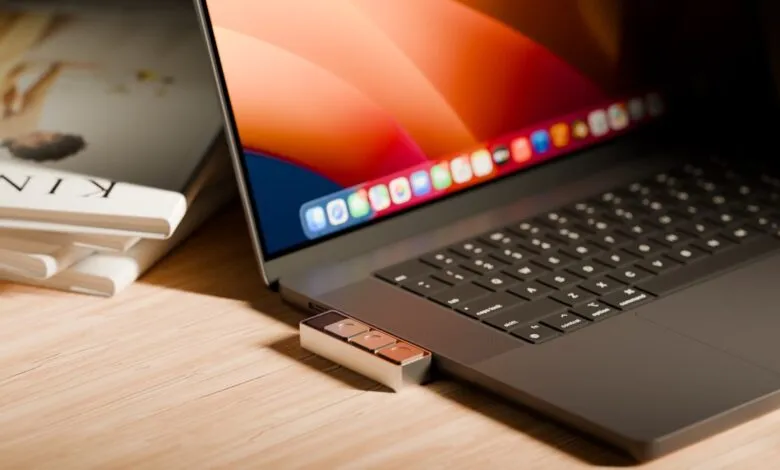
If you’ve ever fumbled for the right keyboard shortcut to mute yourself during a video call, you’re not alone. Each meeting app uses a different combination of keys, and trying to recall them in the heat of a conversation is frustrating. That’s exactly the problem Project Mirage’s Dune sets out to solve. This compact, three-key aluminum keypad , roughly the size of a stick of gum , plugs directly into your MacBook’s USB-C port and gives you a physical, universal button for controlling mute and camera functions. No more hunting for shortcuts; just press and go.
Priced at $119, the Dune adapts its three buttons based on the app you’re using. In meeting apps and websites, the keys can toggle your microphone, switch your video on or off, and bring the meeting window to the front. For spreadsheets like Excel or Sheets, they might handle copy, paste, and undo. In Chrome, you can set them to refresh the page, jump to the URL bar, or paste text. Developers aren’t left out either , the device works with tools like VS Code and GitHub to merge, approve, or close pull requests with a single press.
Each Dune is built to match your specific Mac model, ensuring it sits flush against the laptop with no gap underneath. If your USB-C ports are already occupied, you can connect it through a dongle. Since it draws power directly from the MacBook, there’s no battery to charge and no separate power adapter needed.
Currently, the device supports M2 Air or later and M1 Pro or later MacBook models running macOS 15 Sequoia or a newer version.
While the Dune looks and feels premium, the keys are a bit too sensitive. It’s easy to accidentally press a button , I found myself unmuting or killing my camera just by brushing the device while reaching for a water bottle or coffee mug. The keys could use more resistance to prevent these unintentional presses.
A companion app comes with the Dune, letting you configure shortcuts either per app or system-wide. Within a specific application, you can assign a key to a keyboard shortcut, a command, or a link that opens an app or URL. The app also syncs with your calendar, surfacing your next meeting a few minutes before it starts. From there, you can join, dismiss, or send an “I’m running late” message with one tap.
For power users, the Dune supports custom Python scripts. If you don’t code, there’s an easy integration with Claude Desktop: just describe the shortcut you want in plain language, and Claude writes the script and assigns it to a key for that app , no manual setup required.
I used this feature to build a shortcut that, whenever I’m on a startup’s website, pulls up a quick brief on the company , its competitors, investors, and questions I might ask if I were booking a meeting with them. It’s a perfect tool for investors, founders, and operators who need to size up companies quickly. I also created one that converts images to JPEG for faster uploads to WordPress or social platforms. Both shortcuts were easy to build and needed no manual configuration, though getting one fully working still takes some back-and-forth with Claude, including debugging when you actually run it.
The app includes a marketplace where you can explore skills made by other Dune owners. If this marketplace gains traction, it could become a key part of Dune’s growth and retention strategy , turning the hardware into a thin front end for a Claude-powered skills ecosystem. Each new skill gives owners one more reason to stick around. However, the marketplace is still limited. There’s also no way to test a skill without assigning it to a hardware button , ideally, you could preview a skill before committing it. The startup should also proactively suggest more skills for different apps to its users.
After its introductory price, the Dune retails for $149. It’s a solid choice for anyone focused on productivity. While MuteMe covers just mute/unmute and Stream Deck offers business-focused macros, the Dune is easier to customize on both the hardware and software sides. For a universal, physical meeting controller, it’s hard to beat.
(Source: TechCrunch)