Android 17 QPR1 Beta 3 defaults screen recording to last app
▼ Summary
– The Android 17 screen recorder menu now uses toggles instead of a dropdown menu for quicker access to recording options.
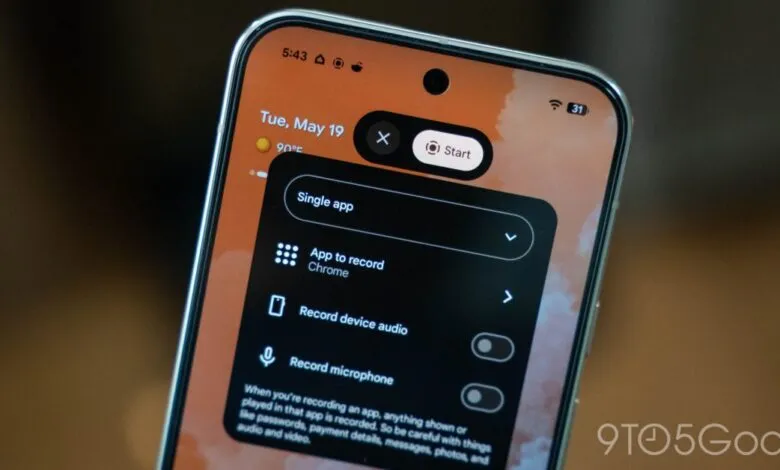
– The default recording option has changed from “entire screen” to the last used app, with “single app” selected first in the dropdown.
– Users can now quickly toggle device audio, microphone, and screen touch visibility on a single page.
– The new default is a welcome change for privacy-conscious users, as it prevents the recorder from capturing pop-ups.
– Android 17 QPR1 Beta 3 includes minor UI adjustments, such as updated animations and added blur.
After debuting in Android 17 Beta, Google’s screen recorder interface now automatically selects the option that makes the most sense for everyday use.
The updated screen recorder menu in Android 17 speeds up the process by displaying toggles rather than a dropdown menu. Previously, users had to choose between recording device audio, microphone audio, or both from a single list. The new layout lets you toggle those audio options on or off and decide whether to show screen touches, all on one screen.
That part isn’t new. What has changed is the default recording target.
With Android 17 QPR1 Beta 3, Google has reconfigured the menu so that the last used app is now the default selection. The dropdown menu now highlights “single app” first. If you tap “start” without changing anything, the most recently opened app will be captured.
Previously, the default was set to “entire screen.” This shift is a welcome improvement, especially since the older default meant the screen recorder could capture any notification or overlay that appeared. For privacy-conscious users, this new default on Pixel devices offers much-needed peace of mind.
Aside from this adjustment, Android 17 QPR1 Beta 3 brings minimal UI changes. Some animations have been refined, and additional blur effects have been added.
For more details on Android 17, stay tuned.
(Source: 9to5google.com)