Steam Controller’s Pros and Cons Explained
▼ Summary
– The new Steam Controller, releasing May 4th for $99, improves on the original with drift-resistant TMR joysticks, better ergonomics, four rear buttons, and touch-sensitive grips.
– It offers deep customization through Steam Input, allowing multiple control schemes per game and onscreen command menus, plus features like dual trackpads and a Steam Quick Access button.
– The controller includes a 2.4GHz USB-C puck for low-latency wireless pairing and charging, supports Bluetooth and wired modes, and can wake a PC or Steam Deck from sleep.
– It is user-repairable with replacement parts on iFixit, and Steam tracks controller profiles by unique identifier, enabling use across different PCs.
– While not a direct competitor to pro controllers due to lacking swappable sticks and trigger stops, it costs about half the price and offers unique features absent in rivals.
Most PC gamers already have a go-to controller they trust with Steam, whether that’s a Sony DualSense, an 8BitDo Ultimate, a Nintendo Switch Pro, or something else entirely. The affection for these devices stems in part from Steam treating them like native controllers, granting them the same kind of deep, customizable control that defined the original Steam Controller. That means you can enjoy a level of tailored input that remains unmatched on any console.
Thanks to Steam Input, any compatible controller can support multiple control schemes for different gameplay scenarios, such as flying, walking, or navigating menus, with instant switching at the press of a button. You can also create on-screen radial menus that appear when you press a button or touch a trackpad, giving you quick access to custom commands like weapons, spells, or consumables.
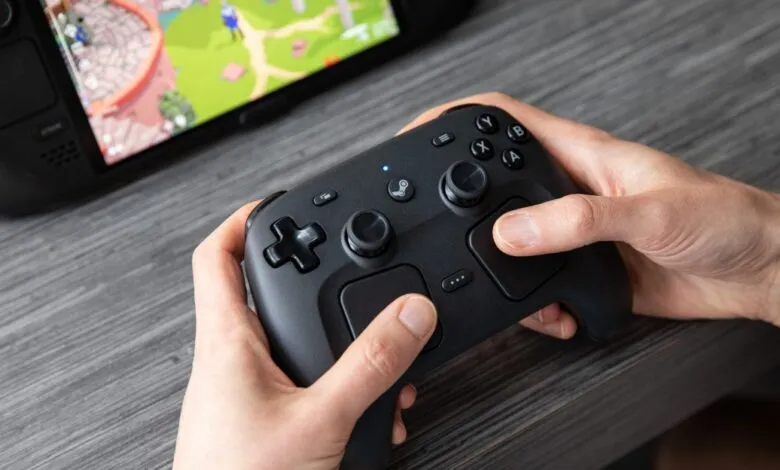
This versatility is why the prospect of a new physical Steam Controller doesn’t carry the same weight it once did. Still, Valve has refined its misunderstood predecessor with a 2026 model that introduces features unavailable anywhere else. In essence, it packs the Steam Deck’s vast input array, including its dual touchpads, into a single gamepad. Think of it as a Steam Deck without the screen, plus a few extras.
I appreciate the small but meaningful hardware upgrades over the Steam Deck. The new Steam Controller includes drift-resistant TMR joysticks that shouldn’t degrade over time, a feature still missing from Sony, Microsoft, and Nintendo offerings. It also boasts better ergonomics, four rear buttons that are easier to press, and unique touch-sensitive sensors embedded in the sticks and grips that can be mapped to any input. The level of customization is staggering, and the controller is designed to be user-repairable, with replacement parts eventually available from iFixit.
For some, that’s enough to justify a purchase when orders open on May 4th for $99. Even those who rarely tweak control settings might find the Steam Controller appealing. It’s comfortable, offers excellent battery life, and has a build quality far superior to the original, with a weighty feel and a tough, slightly gritty plastic that exudes quality. Beyond that, its included 2.4GHz USB-C puck makes pairing and charging far more seamless than most competitors.
The included five-foot USB-C-to-A cable lets you position the puck wherever it’s most convenient, whether near your gaming PC or in your entertainment center. While maintaining line of sight between the puck and controller isn’t strictly necessary, it helps ensure a strong signal. Another advantage is that the puck doubles as a magnetic charging dock, snapping onto the controller with a satisfying click.
First-time pairing is effortless. Simply attach the controller to the puck and follow an on-screen prompt to tether them, which may also trigger firmware updates. You can skip the puck entirely by using the Steam Controller in Bluetooth mode or as a wired gamepad. Importantly, you can wake your PC or Steam Deck from sleep by pressing the controller’s Steam button.
While I and many others see clear value in these features, not everyone will be eager to abandon their current controller. If you’re happy with what you already own, there’s no urgent need to buy this. You can still enjoy a great experience by connecting a gyro-equipped Sony DualSense or an 8BitDo Ultimate 2 via Bluetooth to a Steam Deck, PC, or the upcoming Steam Machine.
Valve’s Pierre-Loup Griffais told The Verge that both the Bluetooth and custom 2.4GHz puck offer “very comparable” latency, with a delay of about 8ms after a button press, regardless of wireless technology. However, 2.4GHz is the better choice for local multiplayer gaming. Bluetooth latency increases as you connect more controllers, but the puck’s latency remains stable even with four Steam Controllers connected at once, according to Griffais. (I only had one pad, so I couldn’t test this.)
Compared to the Steam Deck, the new controller offers even deeper customization thanks to its Grip Sense grips, which detect when you touch them, a feature absent from rival controllers. These work similarly to the Deck’s touch-sensitive joysticks, which are also present here. I had fun making subtle adjustments to how games control, like mapping No Man’s Sky’s faster-than-light Pulse Drive (originally L1 + R1) to activate when I firmly hold the right grip. In Marathon, I set the left grip to start sprinting, avoiding the need to click the left stick. I’m eager to see what the Steam community creates with these features.
The new Steam Controller isn’t a direct competitor to “pro” controllers like Sony’s $199 DualSense Edge, the $200 Xbox Elite Series 2, or Razer’s $229 Kaiju V3 Pro. It lacks swappable joystick caps and trigger stops for shortening trigger pulls. However, it compensates with dual trackpads, four rear buttons, a dedicated Steam Quick Access button, and the ability to type and navigate your PC, even in the BIOS, when plugged in via USB-C. Plus, it costs roughly half the price of those competitors.
The Steam Controller doesn’t have onboard storage for controller profiles like some high-end models, but Valve hasn’t overlooked this. Griffais explained that Steam tracks a unique identifier for each controller independently of your computer, so you can use your saved control schemes even when plugged into a PC signed into someone else’s Steam account.
If you have questions about the Steam Controller, feel free to ask during our subscriber-exclusive AMA at 3PM ET.
Even if the new Steam Controller’s polished hardware and deep customization intrigue you, it’s not a necessary upgrade if you already have a preferred controller for Steam games. That might seem like an odd conclusion, but it’s actually refreshing. Most companies would lock down special features for their own “native” controller. Valve isn’t like most companies, and its Steam Controller isn’t like most controllers. If you primarily play on a Steam Deck, as my colleague Jay Peters does, seamlessly using all your existing control schemes might be worth the price alone. If not, its unique features may still make it a worthwhile purchase.
(Source: The Verge)