Double Your Productivity: Essential WFH Gadgets & Routines

▼ Summary
– The author solved workspace issues by using a dual monitor mount that freed up desk space and improved ergonomics through adjustable positioning.
– A physical Pomodoro timer cube eliminated phone distractions by creating a mental boundary and avoiding the need to unlock devices.
– A wired USB microphone replaced unreliable Bluetooth headphones, providing stable connections and better audio quality for video calls.
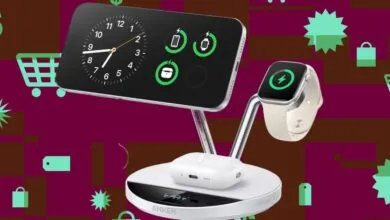
– An Anker charging stand consolidated multiple device cables into one location, reducing desk clutter and simplifying charging.
– Simple automations like an NFC tag and Alexa routine streamlined work setup by handling multiple tasks with a single tap or voice command.
Transforming your home office into a productive sanctuary often hinges on eliminating common distractions and streamlining your daily workflow. Many people mistakenly believe that boosting output requires immense willpower, when in reality, the right tools and habits can reclaim hours each week. After struggling with technical glitches and a cluttered workspace, I discovered a handful of affordable solutions that fundamentally changed my work-from-home experience.
A dual monitor mount can completely revolutionize your desk space and improve your posture. Instead of being trapped by bulky factory stands that devoured my entire work surface, I installed a gas spring arm system. This allows me to effortlessly reposition my screens for optimal viewing angles, whether I’m sitting or using a height-adjustable keyboard tray. The clamp-based installation was straightforward, and the built-in cable management channels helped create a clean, organized area. Regaining nearly half of my desk real estate meant I finally had room for notebooks and my coffee mug, instead of letting everything pile up on the floor.
For maintaining deep focus, a physical timer proved far more effective than any smartphone app. Phone-based timers are inherently flawed because unlocking your device invites a flood of notifications and distractions. A simple cube-shaped timer that you physically rotate to set work and break intervals creates a powerful mental boundary. The deliberate action of flipping the cube signals to your brain that it’s time to concentrate, and the audible alert is clear without being jarring. This small device has become indispensable for managing writing sessions, emails, and meetings.
A dedicated USB microphone solved the persistent problem of unreliable audio during video conferences. Relying on Bluetooth headphones often led to audio unexpectedly switching to my phone mid-call, creating awkward and unprofessional interruptions. A plug-and-play microphone provides a stable, single connection for all communication platforms. While it does occupy some desk space, the trade-off for crystal-clear audio and flawless connectivity is well worth it. Colleagues no longer ask me to repeat myself, and I can join calls with confidence.
Consolidating device charging with a multi-functional stand eliminated the frustrating cable clutter that plagued my desk. A single station with magnetic charging for a phone, a dedicated spot for a smartwatch, and a base for wireless earbuds replaced a tangled mess of individual cords and power adapters. This not only cleared the physical space but also created one predictable location for all my devices to power up. The strong magnetic hold ensures devices stay in place, and the entire setup is both sleek and highly functional.
Automating the start of your workday with a simple tap can remove a surprising amount of mental friction. I placed a small, inexpensive NFC tag under the edge of my desk. Tapping my phone to this tag instantly triggers a custom shortcut that enables Do Not Disturb mode, adjusts my smart lighting, and opens my task manager. This single physical action replaces what used to be three separate manual steps, making the transition into work mode seamless and immediate.
A reusable smart notebook bridges the gap between the tactile benefits of handwriting and the convenience of digital organization. For those who think better with pen and paper, traditional notebooks quickly become an unsearchable, physical burden. A notebook with specially coated pages and an erasable pen allows you to write naturally, then scan each page with a smartphone app. The app converts your handwriting into searchable text and saves it to cloud storage. After scanning, you simply wipe the page clean with a damp cloth, making the notebook endlessly reusable.
A voice-activated smart home routine can instantly create an ideal work environment and curb decision fatigue. Instead of manually adjusting lights, silencing devices, and selecting background music each morning, a single voice command now handles it all. Saying a specific phrase dims the office lights, disables notifications, and starts a focused music playlist. This environmental consistency trains your brain to enter a state of concentration automatically, saving both time and mental energy at the start of every work session.
Perhaps the most powerful strategy is the simplest: physically relocating your smartphone during focus periods. No app blocker or screen-time setting could compete with the temptation of a phone within arm’s reach. By placing my phone in another room during dedicated work blocks, the impulse to check it vanished. This physical barrier creates just enough friction to break the habit of mindless scrolling. Paired with the physical timer, this practice ensures long stretches of uninterrupted, deep work.
The cumulative effect of these modest upgrades was a dramatic increase in productive output. None required a significant financial investment or complex setup, yet together they removed the daily obstacles that quietly drained focus and time. The key was not relying on self-discipline alone, but rather on designing an environment and routine that actively supported concentration and efficiency.
(Source: Make Use Of)