Google’s AI-Powered Workspace Expands Access in Search
▼ Summary
– Google is launching its Canvas feature to all US users within the AI Mode of its Search tool.
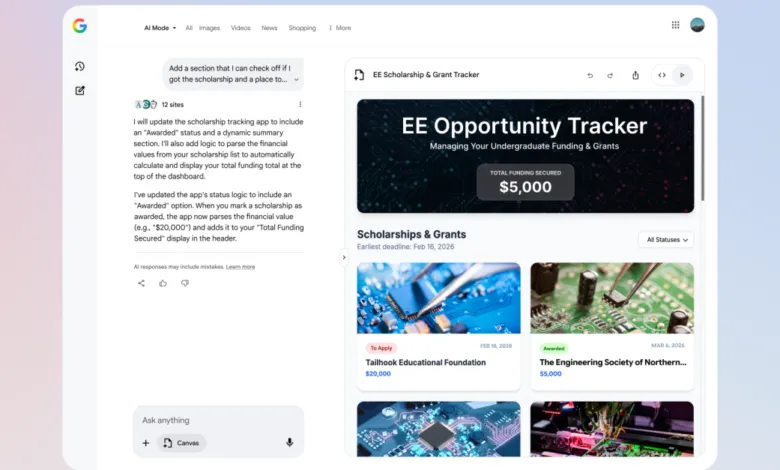
– Canvas provides a dedicated workspace that uses current Search information to help organize plans, develop tools, and draft documents.
– The feature, previously tested for visualizing travel plans, now also supports creative writing and coding tasks.
– Users can access Canvas in AI Mode Search via the chat’s plus button to describe and generate content in a side panel.
– This rollout is currently available only in English.
Google is now making its AI-powered Canvas workspace available to all users in the United States directly within its AI Mode in Search. This expansion transforms the search experience by providing a dedicated, interactive panel where users can leverage real-time web information to organize projects, build tools, and compose documents alongside their conversational queries. The move signals a significant step in integrating generative AI into everyday productivity tasks directly from the search bar.
Originally introduced within the Gemini app for real-time document and code creation, Canvas was later trialed in Search’s AI Mode with a narrow focus on visualizing travel itineraries. The feature has now been broadly unlocked for a wider array of applications, including creative writing and software development. Users can prompt the AI to generate comprehensive dashboards that compile research or to build interactive prototypes of digital tools, all within a streamlined sidebar interface.
Accessing the new capability is straightforward. Users simply need to enter Google’s AI Mode in Search, click the “plus” icon located in the chat window, and select the Canvas option. After describing their intended project, whether it’s a business plan, a piece of code, or a story outline, Google’s AI will populate the right-hand panel with dynamically generated content. This immediate workspace allows for ongoing refinement and iteration based on the initial output. It’s important to note that, for the time being, this functionality is exclusively offered in the English language.
(Source: The Verge)