How This Alarm Clock Broke My Phone-in-Bed Habit
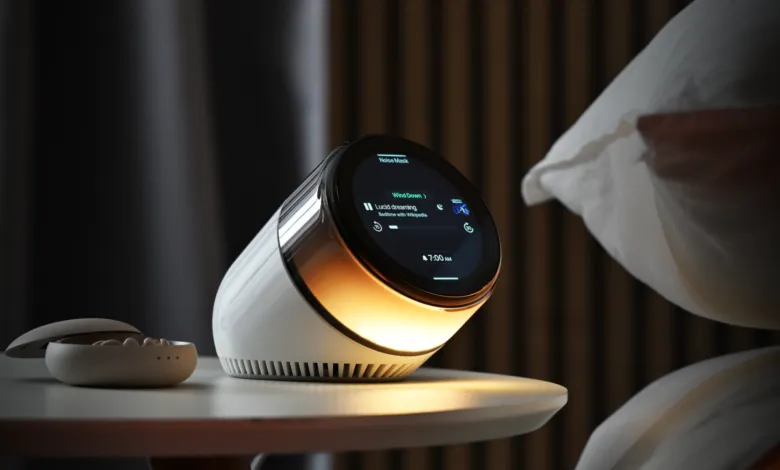
▼ Summary
– The author successfully stopped sleeping with her phone by using the Dreamie alarm clock, which helps her avoid phone-related sleep disruption.
– Dreamie features a “wind down” mode with sounds like a fireplace crackle and a “noise mask” mode for sleep, plus a “back to sleep” mode that plays podcasts without needing a phone.
– The “back to sleep” mode is crucial because the author, like 87% of Americans, tends to check phone notifications at night, leading to prolonged wakefulness.
– The Dreamie costs $250, has a straightforward interface like the iPhone Clock app, and requires no subscription, but it cannot play audiobooks from apps like Libby.
– The author found that using a cheaper $59 Brick device to block apps at night provides similar benefits, but leaving the phone in another room is even more effective.
I have pulled off something I once considered impossible: I now sleep through the night without my phone beside me. Save your applause. If not for the Dreamie alarm clock, this feat would have remained out of reach.
If that sounds like bragging about brushing my teeth, you are not the person Dreamie is built for. I am, and so are countless others who feel so fused with their phones that we might as well be cyborgs.
I have long known that phone use in bed ruins my sleep, and poor sleep undermines nearly every aspect of my mental and physical health. Yet before Dreamie, I spent over a decade with my phone on my nightstand every single night , tens of thousands of nights tethered to a glowing rectangle, unable to imagine waking up in the dark without it.
I am not entirely helpless. Over the past few years, I have built a habit of reading before bed, which genuinely calms me before sleep. Still, I have never been a great sleeper (ask my parents, who suffered after taking me to a Titanic exhibit as a child, leaving me convinced I would perish on that ship). When my racing brain refuses to quiet down, the only thing that works is closing my eyes and listening to podcasts or audiobooks , as long as they are not about the Titanic.
Whoever designed Dreamie seems to share this struggle, because what sets it apart from other fancy alarm clocks is almost absurdly simple: It can play podcasts.
Before we get to the podcasts, though, let’s step back. Here is how Dreamie works.
In “ambience” mode, it functions as a normal clock. But it also offers a series of modes that structure your sleep routine.
The “wind down” mode signals that bedtime is approaching. I set mine to a crackling fireplace sound with a soft orange light that flickers and dims like real flames. I let the fireplace run for about 25 minutes while I read. Then it transitions to “noise mask” mode, which I set to a thunderstorm , though I can activate it earlier if I feel drowsy. Whatever sound I choose plays until my wakeup routine begins, with a “sunrise” light gradually brightening until the alarm goes off. (You can also opt for silence.)
Dreamie’s standout feature is its “back to sleep” mode. If I wake up in the middle of the night, I can activate it to play whatever media I selected ahead of time , a preloaded breathing exercise, another soundscape, or any podcast episode I choose. I pick the show and episode in advance, so I never have to scroll through a screen in the dark, which would only wake me up further. I can also use Dreamie with Bluetooth headphones, so I won’t disturb a bedmate , though that does mean sleeping with headphones on.
Dreamie connects to Wi-Fi, allowing it to download podcasts directly from the internet. This is possible because podcasts are distributed via RSS feeds, an open standard that lets any developer build a custom RSS app. (Let’s pause to appreciate RSS, one of the last pillars of the open internet, which Spotify has tried hard to replace with its own walled garden.)
It is embarrassing how useful this feature is for me. Normally, if I wake up and cannot fall back asleep, I reach for my phone to start a podcast. But I am a millennial, which means that if any notification arrived after I fell asleep, I will reflexively open it before playing my podcast or audiobook. From there, it is a cascade of poor choices that keeps me awake for two hours.
My own actions are to blame, but I know my bad habits are widespread , one survey of 2,000 American adults found that 87% of us sleep with our phones in our bedrooms. I do not need scientific studies to confirm that I sleep worse after too much phone time, but the data backs my experience. With Dreamie, I simply swipe down to activate “back to sleep” mode and listen to people discuss baseball statistics.
My phone-in-bed problem extends to mornings. I typically spend about 30 minutes scrolling before getting out of bed. Without my phone as a distraction, I get up much faster and start my day feeling like a person instead of a hungry, caffeine-deprived zombie who needs to pee.
Dreamie costs $250, which is steep for an alarm clock. At least there is no subscription or companion app required. Despite its dense feature set, the user interface is straightforward and resembles the iPhone Clock app.
While testing Dreamie, I sometimes “cheated” and used my phone in bed to listen to audiobooks (sometimes you just want something specific that is not a podcast). At first, I tried to maintain the Dreamie spirit and avoid using my phone for anything else. But that was not realistic. Inevitably, I ended up using my phone in the middle of the night.
I do not know if Dreamie can ever support apps like Libby or Libro.fm, given technical constraints. Perhaps future versions will allow users to upload their own media, including downloaded audiobooks.
Toward the end of my review period, I also started testing the Brick, which I use to block every app on my phone at night except for podcast and audiobook apps. At $59, it is more affordable than Dreamie, and if I were to buy one of these devices, I think I could get most of the same benefits from the Brick. Still, there is something appealing about leaving my phone in a completely different room. Even if your phone is “Bricked,” it is still your phone. And do you really want your phone to be the last thing you see every day?
(Source: TechCrunch)