Google NotebookLM Adds Video Overviews Feature

▼ Summary
– Google introduced Video Overviews to NotebookLM, enabling users to convert dense multimedia content into visual presentations.
– Video Overviews serve as a visual alternative to Audio Overviews, using images, diagrams, and quotes from uploaded documents to explain content.
– Users can customize Video Overviews by specifying topics, learning goals, and target audiences, similar to Audio Overviews.
– Video Overviews are now available in English for all users, with more languages coming soon.
– Google updated NotebookLM’s Studio panel, allowing users to create multiple outputs and multitask within the panel.
Google’s NotebookLM has expanded its capabilities with the introduction of Video Overviews, a feature designed to transform complex materials into engaging visual summaries. This enhancement builds on the platform’s existing Audio Overviews, offering users a dynamic way to digest dense content like research papers, PDFs, and images through structured video presentations.
The new Video Overviews feature leverages AI to generate visuals by extracting key elements, such as diagrams, quotes, and data points, from uploaded documents. Google positions this as an ideal tool for breaking down intricate topics, clarifying processes, or simplifying abstract ideas. Unlike traditional note-taking apps, NotebookLM now provides both auditory and visual learning options, catering to different user preferences.
Customization remains a priority, allowing users to tailor their video summaries by specifying focus areas, learning objectives, or audience expertise levels. Whether someone needs a beginner-friendly explanation or a deep dive into niche details, the feature adapts accordingly. For instance, queries like “Explain this technical diagram in simple terms” or “Focus on the implications for my specific project” yield personalized results.
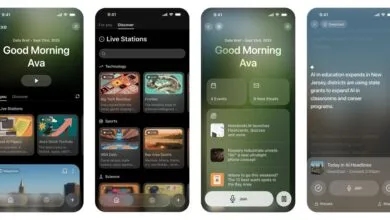
Currently available in English, Video Overviews will soon support additional languages. Alongside this update, Google has refined NotebookLM’s Studio panel, enabling users to store multiple outputs, such as mind maps, reports, and audio or video summaries, within a single notebook. A streamlined interface now includes one-click tiles for each output type, boosting efficiency.
Another notable improvement is the ability to multitask within the Studio panel. Users can listen to an audio summary while simultaneously exploring a mind map or reviewing a study guide, making it easier to cross-reference information. These upgrades solidify NotebookLM’s position as a versatile research companion, blending AI-powered organization with flexible learning tools.
(Source: TechCrunch)