How Linux Revived My Failing Windows Laptop
▼ Summary
– The author’s 2017 ThinkPad is fully functional for everyday tasks but is officially unsupported for Windows 11 due to its older processor, leaving it without security updates on Windows 10.
– Installing Linux Mint, a free and beginner-friendly operating system, provided a supported alternative that runs well on the older hardware and prevented the laptop from becoming obsolete.
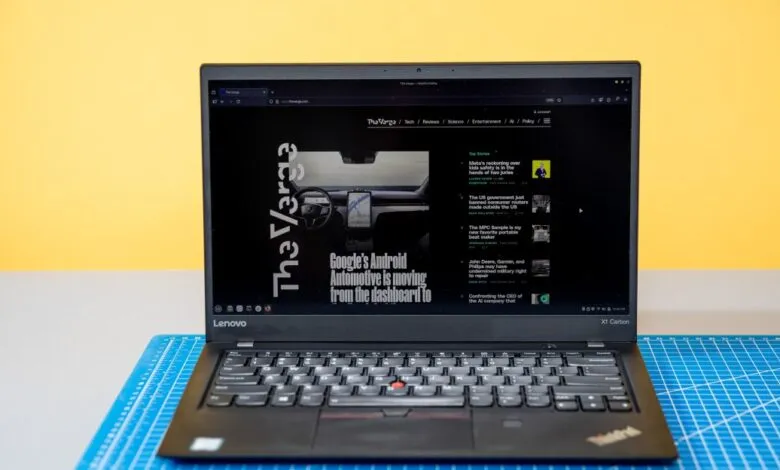
– The ThinkPad, purchased used for $250, remains a capable device with a lightweight design, a high-quality keyboard, and a useful port selection, though its battery life has degraded.
– While Linux Mint performed well for work and light gaming, some drawbacks included needing terminal commands for certain setups and the laptop’s age showing in areas like slower storage and warmth under load.
– The article argues that Linux can extend the life of millions of functional older PCs deemed obsolete by Windows 11, offering a cost-effective and eco-friendly alternative to replacement.
A laptop deemed obsolete by its original manufacturer doesn’t have to become electronic waste. This was the reality for a 2017 Lenovo ThinkPad X1 Carbon, a machine Microsoft declared ineligible for Windows 11 due to its 7th-generation Intel processor. Despite this, the hardware itself remains perfectly capable. The solution wasn’t a costly replacement but a shift in perspective, embracing Linux as a modern, secure, and fully-supported operating system that can extend the life of older hardware.
This particular ThinkPad, purchased used for $250, originally retailed for over $2,100. It features a capable Intel Core i7-7600U processor, 16GB of RAM, and a 512GB SSD. On paper, it meets almost all of Microsoft’s Windows 11 requirements except for the CPU generation, a single specification that rendered it officially unsupported. Continuing to use Windows 10 without security updates poses a risk, and while bypass tools exist, they are often unreliable. The more elegant and sustainable answer was to install a new operating system altogether.
For this project, Linux Mint was the distribution of choice. Renowned for its beginner-friendly approach, Mint offers a stable experience with a desktop environment that will feel familiar to Windows users. The installation process was straightforward, replacing Windows 10 in about ten minutes. Upon booting, a welcome screen guided initial setup, and essential applications like the Firefox browser and the LibreOffice suite were already installed. Getting other software, like Slack and Steam, required a mix of methods, from downloading installer files to using the terminal for commands like `sudo apt-get install steam`. For newcomers, this represents a learning curve, but it’s a manageable one.
The resulting Linux laptop is a revelation. The nine-year-old ThinkPad’s design still impresses with its lightweight carbon-fiber reinforced chassis and an exceptional keyboard. Its port selection puts modern ultrabooks to shame, featuring two USB-C/Thunderbolt 3 ports, two USB-A ports, HDMI, and a headphone jack. Everyday tasks like web browsing, document editing, and video calls were handled with ease. Even light gaming was possible thanks to Valve’s Proton compatibility layer in Steam, which allows many Windows games to run on Linux. Titles like Dead Cells and Hollow Knight ran smoothly, demonstrating the hardware’s enduring capability.
Of course, using older hardware involves compromises. The most significant was battery life, which averaged around four hours, a decline from its original eight-hour rating. The 720p webcam and microphone showed their age with grainy video and mediocre audio. Some components, like the fingerprint reader, required extra terminal commands to function. The system also slowed slightly with many browser tabs open, and the chassis grew warm under heavy load. However, these were minor trade-offs for gaining a fully updated and secure system. Crucially, the laptop remains repairable, with replacement batteries readily available.
This experience underscores a broader issue: forced obsolescence. Microsoft’s decision to end support for Windows 10 has left millions of functional devices in a security limbo. While the company advocates for upgrading to Windows 11 for enhanced security features, that path often demands new hardware. Linux distributions like Mint present a powerful alternative, offering continued updates, robust security, and a path to sustainability. They are free, increasingly user-friendly, and can breathe new life into machines that still have years of service left.
Linux is not a perfect fit for everyone. Professionals reliant on specific Windows or macOS-only software, such as certain Adobe creative apps, may face compatibility hurdles, though alternatives like GIMP or web-based office suites exist. The initial learning process, particularly around software installation, requires patience. However, for users whose needs revolve around web applications, document editing, and communication, an older laptop running Linux can be a supremely cost-effective solution.
When considering a used laptop for Linux, Lenovo ThinkPads have an excellent reputation for compatibility. Business-class models from Dell and HP are also reliable choices. For beginners, starting with a mainstream distribution like Mint, Ubuntu, or Fedora is advised. The key advantage is freedom; you are not locked into a single company’s ecosystem and can choose an operating system that aligns with your hardware’s lifespan.
Performance data reinforces this value proposition. In Geekbench 6 testing, the ThinkPad’s older Core i7-7600U held its own in single-core performance against modern budget laptop CPUs, even scoring higher than some. Its multi-core performance lags due to having only two cores, but for everyday tasks, the ample 16GB of RAM and 512GB storage in this used model often provide a more tangible benefit than slightly faster processor cores in a new device with only 8GB of RAM.
Ultimately, the story of this ThinkPad challenges the notion that software support cycles should dictate hardware longevity. A machine doesn’t become obsolete just because its original operating system has reached its end-of-life. By choosing Linux, users can reclaim control, reduce electronic waste, and discover that with the right software, old laptops can still be remarkably capable computers. The red light on this ThinkPad is still blinking, and thanks to Linux, it will continue to do so for the foreseeable future.
(Source: The Verge)