Google Pixel’s Now Playing Gets M3 Expressive Redesign
▼ Summary
– Google has redesigned Pixel Now Playing into a dedicated Play Store app with a modern three-tab layout using Material 3 design.
– The main tab allows users to identify songs, while a floating action button appears for starting new searches after a match.
– A History tab provides a reverse-chronological list of identified songs with search and curation capabilities.
– A Favorites tab and a lockscreen shortcut are retained, with results displayed more prominently on the lock screen.
– The update includes a new Quick Settings tile for easy access and a modern app icon matching the Pixel aesthetic.
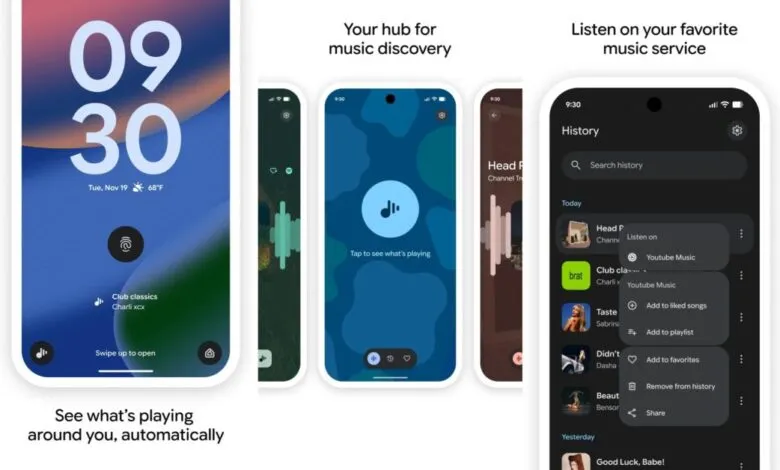
Google has officially launched a comprehensive redesign for its Pixel Now Playing feature, transforming it into a dedicated application available through the Play Store. This move replaces the older interface managed by Android System Intelligence, introducing a fresh, modern layout built on Material 3 Expressive design principles. The new app organizes its functionality into a three-tab structure anchored by a distinctive floating toolbar, offering a more intuitive and visually cohesive experience for identifying music.
The primary tab is the search hub, prompting users to “Tap to see what’s playing.” Once a song is identified or when navigating to other sections, a floating action button appears on the right, ready to initiate a new search. The second tab presents a reverse-chronological History of all identified tracks. This list view fully embraces the M3 Expressive aesthetic and includes a search bar at the top for easy filtering, allowing users to review and manage their past discoveries efficiently.
A simple swipe left on any song in the history reveals quick action buttons. Users can “Share” a track, “Add to favorites,” or select “Listen on” to open it in a connected music service. Tapping the three-dot menu provides further options like “Remove from history.” For those linked with YouTube Music, additional integrations such as “Add to liked songs” and “Add to playlist” are conveniently available.
The final tab is dedicated to Favorites, functioning similarly to the previous system but within the new app’s polished framework. Now Playing continues to offer a lockscreen shortcut, with identification results displayed in a slightly larger format at the screen’s bottom. A particularly useful addition is a new Quick Settings Tile. Google recommends using it in a 2×1 configuration, where it smartly shows your last matched song. A simple tap starts a fresh search, while a long-press opens the History tab directly.
To access this redesigned experience, Pixel users can visit the Play Store listing for Now Playing and select “Update.” Installation provides a new app icon for the launcher and homescreen, which features a contemporary blue hue that aligns perfectly with the modern Pixel aesthetic.
(Source: 9to5Google)