Ditched Windows for Linux: My Success Story
▼ Summary
– The author installed CachyOS, an Arch-based Linux distribution, to test it as a main operating system with minimal setup time.
– The installation process required making several technical choices, such as selecting a bootloader and desktop environment, which highlights Linux’s customizable nature.
– Most hardware, including the Nvidia graphics card and printer, worked immediately, though a gaming mouse had a quirky issue only functioning within games.
– The author successfully used the system for work, installed various applications through different methods, and played a game using Proton compatibility.
– Overall, the initial experience was positive and easier than expected, with the OS being less intrusive, though challenges like running Minecraft: Bedrock Edition remain.
My journey to using Linux as a primary desktop operating system began with a simple, frustrated decision. I was tired of the constant annoyances and wanted to see if a free, open-source alternative could handle my daily workflow without becoming a high-maintenance project. The experience so far has been surprisingly smooth, challenging some preconceptions while confirming others, and it has proven that making the switch from Windows to Linux is a viable option for many users.
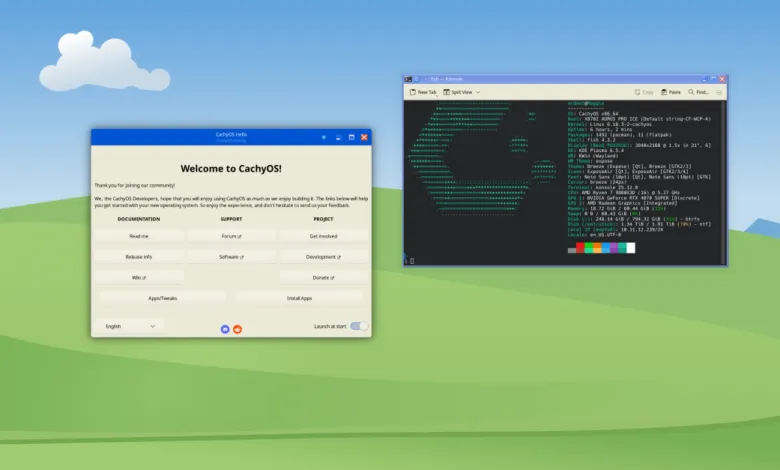
The initial plunge involved choosing a distribution. I opted for CachyOS, an Arch-based system praised for its performance on modern hardware and gaming readiness, rather than a more mainstream option like Ubuntu. After creating a backup and a bootable USB drive, I disabled Secure Boot and launched the installer. My first hiccup was amusing: my gaming mouse’s buttons refused to work in the live environment, though the cursor moved. I navigated the initial setup using just the keyboard, assuming it was a temporary glitch.
The installation process itself was an education. Linux presents choices that Windows and macOS make for you, from the bootloader to the desktop environment. Following advice to avoid conflicts with Windows updates, I installed CachyOS on a separate physical drive. Partitioning was straightforward, though I later needed to resize my root partition after initially allocating too little space. From thirteen desktop environment options, I selected KDE Plasma for its strong gaming support. A few more settings, a six-minute install, and I was looking at a boot menu offering both Linux and Windows.
Upon reaching the desktop, the mouse issue persisted. It turned out to be a known quirk with my specific, older Mad Catz model. The simple fix was to unplug it, allowing my trackball to function normally. Beyond that oddity, hardware compatibility was impressive. My Nvidia graphics card, monitor, speakers, and webcam all worked immediately with drivers automatically installed. Even my printer functioned after a single firewall adjustment.
Software installation felt decentralized but manageable. I used CachyOS’s welcome screen to grab basics like Chromium and Discord, ventured into the Arch User Repository for Slack, and encountered the occasional repository downtime. While I missed my preferred Arc browser, Firefox and Chromium filled the gap. Web versions sufficed for services like Airtable and Spotify for the time being.
Gaming was a key test. CachyOS’s one-click gaming package installed Proton, Steam, and the Heroic Games Launcher seamlessly. After expanding my root partition to accommodate game files, I downloaded The Outer Worlds. It ran flawlessly through Proton, complete with cloud save syncing. The irony? My gaming mouse worked perfectly within the game, but its buttons still failed on the desktop. I now own a peripheral that literally only functions for gaming.
Not everything has been perfect. The most significant hurdle has been Minecraft: Bedrock Edition, which lacks a native Linux version. Playing with my kids on their iPads requires Bedrock, and attempts to run it via Android emulation or Proton have so far been unsuccessful. The Java edition works, but it doesn’t solve my cross-platform family gaming need.
There’s plenty left to explore: setting up face authentication, syncing cloud storage, or trying alternative browsers like Zen. I’ve barely scratched the surface of the command line or configuring development tools. In a whimsical move, I did apply a KDE theme that mimics Windows XP, just because I could.
This is undoubtedly a honeymoon period. I haven’t stress-tested the system with intensive creative work or the latest AAA games. I’ll likely boot back into Windows for specific tasks like playing Minecraft with my children or editing photos in familiar software. My job also requires me to stay fluent across multiple operating systems, so exclusive Linux use isn’t the goal.
Yet, the initial experience has been remarkably quiet and productive. The operating system isn’t nudging me toward AI features or trying to change my default search engine. For now, the regret level is firmly at zero. The transition has been far easier than anticipated, proving that with the right distribution and a bit of patience, Linux can be a powerful and peaceful desktop companion.
(Source: The Verge)