Firefox now lets you pick VPN sites and clear history with one click
▼ Summary
– Mozilla has released Firefox 161, introducing a new VPN management feature that allows users to automatically activate or deactivate the browser’s VPN for specific websites.
– A new “Fire” button has been added to the standard toolbar, enabling users to quickly clear various types of browsing data including history, cookies, and site permissions.
– The update includes a keyboard shortcut option for copying the current tab’s URL and extends the Reader Mode’s “read aloud” functionality to Android devices.
– Firefox is now available for installation directly through the Google Play Store on vehicles equipped with Google built-in systems.
– These updates aim to enhance user privacy control, streamline navigation tasks, and expand the browser’s accessibility across different platforms and devices.
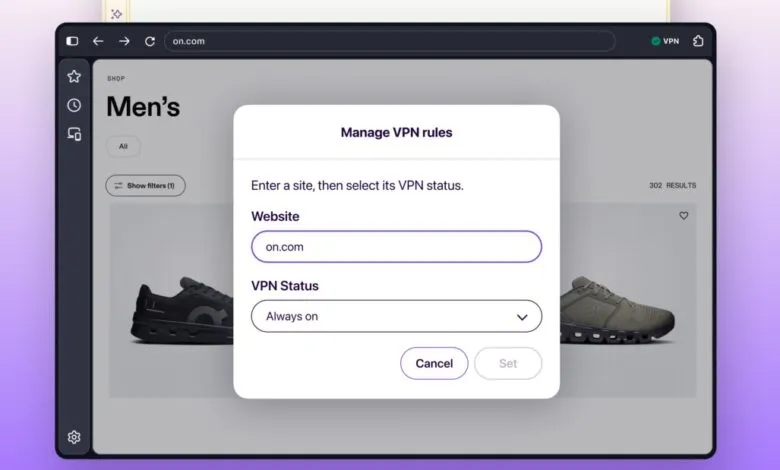
Mozilla has rolled out Firefox 161, introducing significant enhancements to privacy controls and user convenience. The latest update empowers users to granularly manage the browser’s built-in VPN through a new “Manage VPN rules” setting. Located within the VPN panel, this feature allows individuals to designate specific websites as either permanently protected or entirely excluded from VPN routing. This eliminates the need for manual toggling, ensuring that sensitive pages remain secure while non-sensitive sites load without unnecessary latency.
In addition to VPN management, Mozilla is deploying a prominent “Fire” button directly into the standard Firefox toolbar. This tool provides an immediate method for purging browsing data with a single click. Users can customize exactly what information gets erased, including browsing history, download logs, cookie files, site data, temporary cache files, saved form inputs, and website permissions. Configuring the button to wipe all categories results in a complete session reset, signing the user out of all accounts and launching a fresh browser window.
The update also expands accessibility and usability features across platforms. A new keyboard shortcut now enables users to instantly copy the URL of their current tab, streamlining workflow for those who frequently share links. Furthermore, the “read aloud” functionality, previously exclusive to desktop versions, is now available in Reader Mode on Android devices. This brings consistent text-to-speech capabilities to mobile users, enhancing content consumption on the go.
Distribution channels have also widened with this release. Mozilla confirmed that Firefox is now installable directly via the Play Store on vehicles equipped with Google built-in systems. This integration marks a step toward bringing full-featured web browsing to automotive interfaces, allowing drivers and passengers to access the browser natively within supported car infotainment systems.
(Source: The Verge)