April Xbox Update Brings Console Customization and PC Game Additions
▼ Summary
– Custom colors can be created using sliders, with light accents appearing in the Guide, and the feature can be turned off in Settings.
– Quick Resume can now be disabled on a per-game basis so games always launch fresh.
– A new Play History tab in My games & apps uses a horizontal layout with clearer grouping by recency.
– User Selected Resolution and a Network Quality Indicator have been added to give more control and transparency over streaming quality.
– Up to three games can be pinned to the Jump back in or Most Recent list for quick access on Windows 11 PCs and gaming handhelds.
The April Xbox update delivers a broad set of enhancements, putting more personalization and control directly into the hands of players across console, PC, and mobile devices. From deeper customization options to new ways to manage your library, the update focuses on refining the everyday gaming experience.
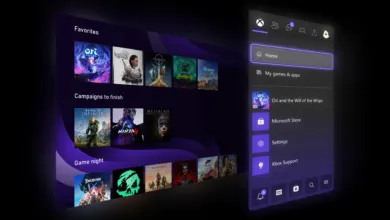
A major highlight is the introduction of custom colors for your console. Using simple sliders, you can now create a unique hue that appears as a light accent throughout the interface, including the Guide. If you prefer a cleaner look, you can disable this accent in Settings > General > Personalization > Customize the guide. Your last custom color is automatically saved, making it easy to switch back from a system color.
Quick Resume settings have been updated based on community feedback. You can now disable this feature on a per-game basis, ensuring titles that rely on online connections or perform better with a fresh start always launch without a saved state. Access this option by opening More options on a game tile in the Quick Resume group and selecting Manage Quick Resume, or by going to Manage game and add-ons > Quick Resume settings.
The Play History experience on console has been redesigned for faster navigation. A dedicated tab in My games & apps provides a direct entry point, while a new horizontal layout with clearer grouping by recency makes it easier to jump back into your most recent sessions.
For cloud gamers, the update introduces User Selected Resolution (USR) and a Network Quality Indicator (NQI) . Before streaming, you can set your preferred resolution in Console Settings > Cloud Settings. While playing, the NQI offers real-time visibility into your network health, helping you understand how your connection affects performance.
On the PC side, you can now manually add any installed game or app to your Xbox library using the Xbox app on handheld devices. This works regardless of the storefront origin, allowing you to centralize everything in one place. You can also customize names, icons, and launch options, including adding mod parameters or special commands for advanced setups.
Windows 11 PCs and gaming handhelds now support pinning up to three games to your Jump back in or Most Recent list. This works across installed, cloud, and other supported titles. Simply right-click a game and select “Pin to this list” to keep it at the front until you choose to unpin it.
The Gamepad cursor feature turns your controller into a mouse, making it easier to navigate apps not designed for controller input. Use the left stick to move a pointer for tasks like switching songs in Spotify or adjusting Discord chats. Enable it in Game Bar by going to Settings > More settings > General.
You can also reposition notifications on Game Bar. Open the Settings widget, select More settings, and choose your preferred notification placement from the General tab. This keeps alerts visible but out of the way of your gameplay.
The Xbox mobile app now sends wishlist alerts directly to your Inbox. You’ll be notified when a game goes on sale, enters Game Pass, or becomes available for preorder. A single tap takes you to the product page to buy, install, or connect to remote play.
Additional enhancements include docking improvements for ROG Ally and ROG Ally X devices, support for super wideband stereo voice with LE Audio headsets, and Enhanced Vibration. These devices also gain the manual library addition and Gamepad cursor features. Xbox Insiders can now test Auto Super Resolution (Auto SR) on the ROG Ally X for docked play, aiming to sharpen and smooth games on external displays without performance loss.
In the realm of rewards, the Microsoft Rewards Total Prize Drop runs through May 21, offering a chance to win $1,000,000 USD cash, a Mercedes-Benz, Xbox Gift Cards, or thousands of instant prizes. Terms apply.
The Handheld Compatibility Program continues to grow, with new additions like Hades II (Handheld Optimized), Invincible VS (Mostly Compatible), Kiln (Handheld Optimized), and Mouse: P. I. For Hire (Handheld Optimized). These are now visible on product detail pages across select Windows devices.
The Xbox Play Anywhere collection has expanded to over 1,500 games, including new titles like Absolum and Screamer. Your progress, saves, add-ons, and achievements travel with you across PC, console, and supported handhelds.
Stream your own game in Xbox Cloud Gaming now includes over 1,000 titles for Game Pass Ultimate, Premium, and Essential subscribers. Recent additions include Hades II, Invincible VS, and Warframe.
Finally, the update adds support for touch controls on Kiln and mouse and keyboard support for games like Dragonkin: The Banished, Planet of Lana 2: Children of the Leaf, and Super Meat Boy 3D.
Xbox continues to evolve based on community input. To help shape future updates and get early access to new features, join the Xbox Insider Program by downloading the Xbox Insider Hub on your console or Windows PC.
(Source: Xbox.com)