OpenAI Codex Desktop Runs Your Computer and Browser
▼ Summary
– OpenAI has updated Codex Desktop from a coding tool into a broader productivity application with expanded automation capabilities.
– A key new feature is “computer use,” allowing the AI to operate applications in the background, though it is currently only available for macOS.
– The update introduces an in-app browser with a click-to-select feature for directing AI actions on specific webpage elements.
– Codex Desktop now includes image generation within automations and gains memory to retain context across sessions for long-term tasks.
– The application adds developer-focused features like multiple terminal tabs and support for over 100 curated plugins.
OpenAI has significantly expanded the capabilities of its Codex Desktop application, moving it beyond a specialized coding assistant toward a broader productivity tool. This evolution mirrors the functionality of platforms like Claude Cowork, though the company clarifies that developers remain its core audience. The update introduces several features designed to automate complex workflows across a user’s entire digital workspace.
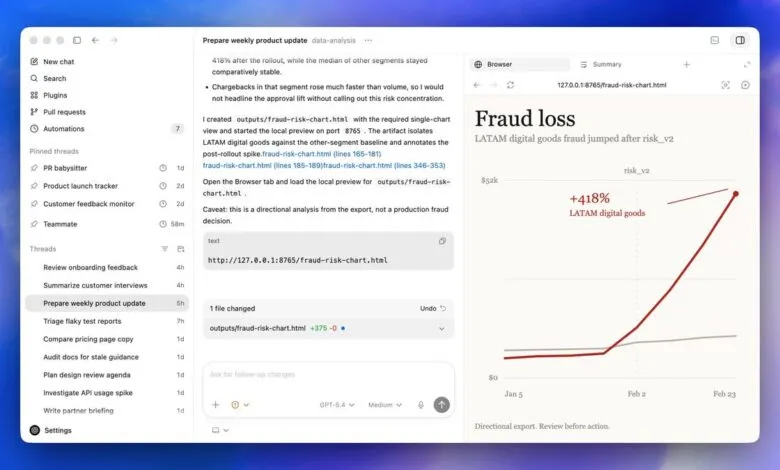
A central advancement is the new computer use capability, allowing the AI to directly operate a user’s machine. This enables background automation of tasks while the user works in other applications. Currently, this powerful feature is exclusive to MacOS and is not available in the European Union. Complementing this is an integrated in-app browser. A standout function here lets users click directly on a webpage element, with the AI understanding the context of that click. This could drastically simplify instructions, moving from verbose descriptions to simple commands like “change this to that.”
The update also brings image generation directly into automated workflows. Users can now create agents that produce images, charts, or diagrams as part of a larger process. Furthermore, automations have become more sophisticated. They can now be added to existing conversation threads, allowing Codex to leverage prior context. A significant improvement is the app’s new memory capability, which helps it retain user preferences and gathered information across sessions, eliminating the need to re-explain goals after each restart.
Codex now proactively assists users with a nag feature, suggesting ways to continue unfinished work when the app is reopened. For developers, several targeted enhancements have been added. These include support for addressing GitHub review comments, multiple terminal tabs, SSH connectivity to remote development environments, and rich previews for documents and spreadsheets in the sidebar. The application now ships with access to over 100 curated plugins, which are vetted by OpenAI to combine skills and app integrations safely.
The new Codex Desktop is available for both Mac and Windows to subscribers with Codex access. Users should be mindful that complex, long-running automations will consume token allocations more rapidly. While its expanded toolkit makes it a compelling option for general productivity tasks, its foundation and many new features still cater powerfully to a technical audience.
(Source: ZDNet)