Chrome’s AI Side-by-Side Browsing Now Available
▼ Summary
– Google has updated Chrome’s AI Mode so clicking a link opens the webpage beside the AI panel instead of replacing it.
– Users can now add open browser tabs, images, and PDF files as context for a search using a new plus menu.
– Features like image creation, previously only in AI Mode, are now accessible from the plus menu on any Chrome surface.
– These changes aim to make AI Mode feel more integrated into Chrome for continuous research and follow-up questions.
– The updates are currently available in the United States, with a rollout to other countries planned for later.
Google has enhanced its Chrome browser with a significant upgrade to its integrated AI tool, making research and information gathering more seamless. The latest changes introduce a side-by-side browsing feature and expand the ways users can provide context for their AI-powered searches. These updates are now live for desktop users in the United States, with a global rollout planned for the near future.
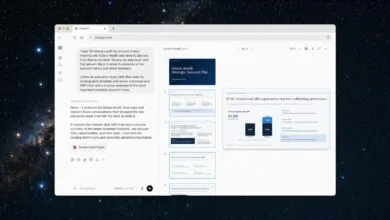
The most notable improvement alters the fundamental behavior of clicking a link while using the AI feature. Previously, selecting a link would navigate away from the AI assistant panel. Now, the webpage opens directly alongside it, allowing users to read content and immediately ask the AI follow-up questions about that specific page without losing their conversational thread. This creates a more fluid and integrated research workflow.
A second major enhancement revolves around context. A new plus menu has been added to the Chrome search box on the New Tab page, complementing the existing one within the AI panel itself. This menu empowers users to pull information from various sources directly into their search. You can now select recently opened tabs, upload images, or attach PDF files to provide the AI with rich, multi-format context for a single query. This functionality is designed for complex research tasks, eliminating the need to manually copy text or re-explain content from pages you already have open.
Furthermore, capabilities that were once confined to the AI panel, such as AI image creation and working on a digital canvas, are now accessible from any Chrome surface that displays the plus menu, increasing their utility.
These refinements build upon Google’s earlier integration of its AI assistant directly into the Chrome address bar. That initial phase introduced page-aware prompts and allowed queries to be sent to the AI from the omnibox. The current update represents a continued effort to weave these AI-powered tools more deeply into the fabric of the browser, transforming them from a separate destination into a native and persistent aid.
The practical impact is substantial. The side-by-side view fundamentally changes how users interact with search results, enabling continuous dialogue with the AI about specific web content. Meanwhile, the expanded context menu significantly boosts productivity for projects involving multiple sources, allowing the AI to synthesize information from several open tabs and documents simultaneously.
(Source: Search Engine Journal)