Pixel 8’s New Panorama Mode: Photo Sphere Reimagined
▼ Summary
– Google introduced a new Panorama mode with the Pixel 9 and later brought it to the Pixel 8 series via a Camera update.
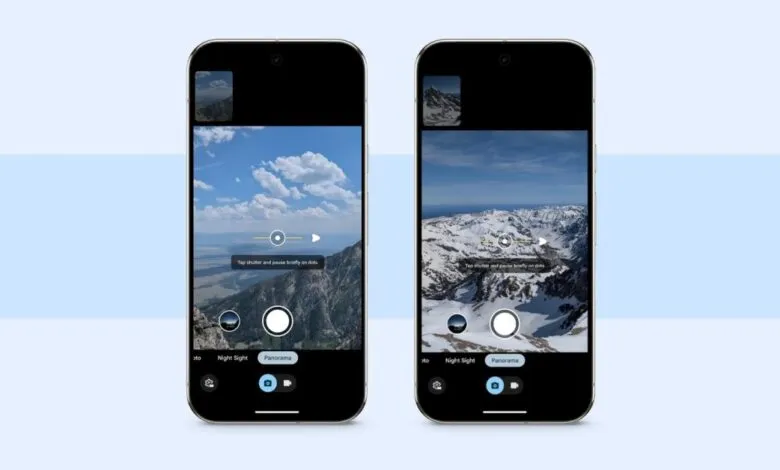
– The mode features a guided interface with dots, prompts, and a level indicator to assist users in capturing the image.
– It allows users to set the capture direction and can be used in conjunction with Night Sight for low-light conditions.
– Google recommends rotating only the camera while standing still to prevent perspective shift and ensure smooth image stitching.
– The updated mode uses the HDR+ photo pipeline instead of video to create stitched panoramas, capturing more data.
Google has rolled out a significant update to the Camera app for its Pixel 8 series, introducing a completely reimagined Panorama mode. This feature, which arrived via an update in early December, offers a smarter and more intuitive way to capture wide scenes. It replaces the older Photo Sphere functionality, which was discontinued on newer devices, with a more streamlined and powerful tool for creating seamless panoramic images.
The experience begins with a user-friendly interface designed to guide you through the capture process. A series of dots and on-screen prompts appear beneath the viewfinder, providing clear directions on where to move the phone next. To ensure your shots are level, the interface also includes a built-in level indicator. As you smoothly pan the device, a small live preview of the stitched image appears above the main viewfinder, letting you see the panorama take shape in real time.
For greater control, tapping the settings gear in the bottom-left corner allows you to set the capture direction. You can choose to pan left or right, and if you rotate your phone into landscape orientation, the options change to up or down. This flexibility makes it easy to capture tall subjects like buildings or expansive horizontal vistas.
A particularly useful capability is the integration with Night Sight. You can set this powerful low-light mode to Off, Auto, or On directly within the Panorama interface, enabling clear and detailed panoramic shots even in challenging lighting conditions. Google provides specific advice for best results: instead of rotating your body, you should rotate the camera while standing in place. This technique helps eliminate perspective shift, which often causes jagged edges and misalignments between stitched frames, resulting in a much smoother final image.
The technical foundation of this new mode is a substantial upgrade. Unlike older methods that might use a video pipeline, this updated Panorama leverages the Pixel’s advanced HDR+ and photo processing pipelines. This approach captures more detailed image data for each frame, leading to higher-quality stitched panoramas with better dynamic range and color accuracy. Currently, this enhanced feature is available on the Pixel 8 series but is not present on older models like the Pixel 7 Pro, even when running the same camera app update, highlighting a focused software advantage for the latest hardware.
(Source: 9to5 Google)