Google Chrome AI Search Reduces Tab Clutter

▼ Summary
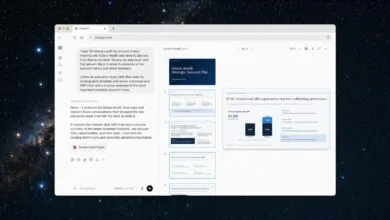
– Google Chrome introduced a “Search side-by-side” feature that opens webpages next to AI Mode, allowing users to view sites and ask follow-up questions without losing their original search context.
– A new “Search across your tabs” feature lets users add recent tabs to their AI Mode search on desktop or mobile, enabling more tailored AI responses and site suggestions.
– Chrome’s update includes multi-input capability, allowing users to combine context from multiple tabs, images, or files like PDFs directly into AI Mode.
– Tools such as Canvas and image creation are now accessible from the new plus menu in Chrome, integrating these features directly into the browsing experience.
– These new AI Mode features are currently available only to Chrome users in the U.S. who use English, indicating Google’s strategic direction for enhancing AI within its browser.
Google has rolled out a significant update to its Chrome browser, enhancing the AI Mode experience with features designed to streamline research and reduce tab overload. These new tools allow users to interact with web content and AI assistance in a more integrated, efficient workflow directly within the browser.
A key addition is the side-by-side search function. When using AI Mode on Chrome desktop, clicking a link now opens the target webpage in a panel adjacent to the AI conversation. This layout enables users to visit referenced sites, compare information, and ask the AI follow-up questions without ever leaving their original search context. The persistent AI panel maintains the thread of the inquiry, eliminating the need to juggle multiple tabs.
Another powerful feature is the ability to search across your tabs. On both desktop and mobile versions of Chrome, a new plus menu on the New Tab page, and within AI Mode itself, lets users incorporate their recently opened tabs into a search. By adding this context, AI Mode can generate more tailored responses and recommend additional, relevant sites to explore, effectively using your existing browsing session to inform its answers.
The update also introduces multi-input capabilities. Users can now combine context from various sources, pulling in multiple open tabs, uploaded images, or files like PDFs directly into their AI Mode session. This creates a richer information base for the AI to analyze. Furthermore, quick access to tools such as Canvas for note-taking and image creation is now available wherever the new plus menu appears.
Currently available to U. S. English users on Chrome, these features represent a clear strategic move by Google. They are focused on deeply embedding AI-powered search directly into the browsing experience, transforming Chrome from a simple window to the web into an intelligent research assistant that helps manage digital clutter.
(Source: Search Engine Land)