TP-Link Deco BE77 Review: Strong Mesh Wi-Fi Alternative to Eero
▼ Summary
– The $550 TP-Link Deco BE77 Wi-Fi 7 mesh system offers faster speeds than the Eero Pro 7 and includes features like a 10Gbps port, SFP+ port, and lower subscription pricing.
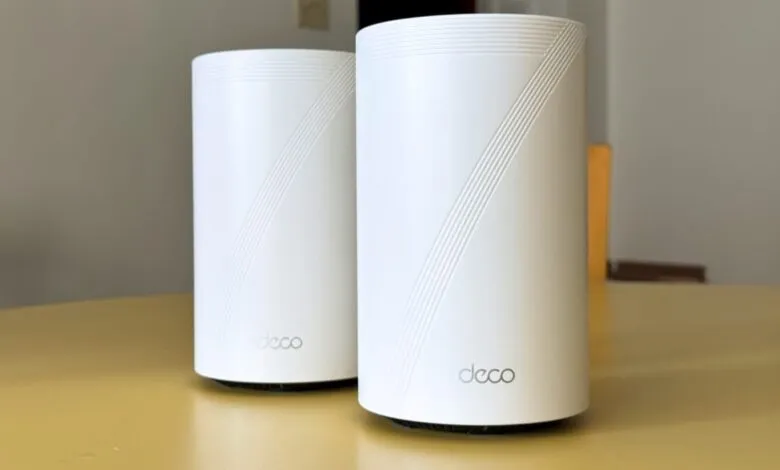
– The router’s chunky, cylindrical design makes it harder to hide, and setup caused half of the author’s smart home devices to disconnect, requiring troubleshooting.
– The Deco app provides per-device controls, such as forcing devices to a specific band or assigning static IPs, but lacks the depth of Asus or Ubiquiti routers.
– In testing, the Deco BE77 delivered up to 1.7Gbps on Wi-Fi 7 and performed well with AirPlay 2, streaming, and gaming, though the Eero Pro 7 was faster on the 2.4GHz band.
– TP-Link’s HomeShield subscriptions cost less than Eero Plus, but the router’s smart home hub feature is basic, and subscriptions can become pricey.
After years of reviewing Wi-Fi routers, one truth remains constant: almost any dedicated router outperforms the ISP-provided box. But for the average user, most models feel interchangeable. So how do you choose? For me, the decision hinges on price, design, and real-world network management.
At $550, the TP-Link Deco BE77 Wi-Fi 7 mesh system competes directly with the Eero Pro 7 and Netgear Orbi 770. Where it pulls ahead is in port variety, software flexibility, and lower subscription fees. During my testing, the Deco BE77 frequently outpaced the Eero Pro 7 in raw speed. It’s tempting to crown it the better mesh system.
But there’s more to the story. In daily use, the two routers felt nearly identical. The Deco BE77’s bulky chassis, however, is a visual challenge,it’s far harder to hide than the sleek Eero. Setup also came with headaches: migrating my network was frustrating, and I hit a few quirky software bugs. Once resolved, though, the Deco BE77 delivered fast, reliable performance that makes it a serious contender.
A Feature-Rich Router with Impressive Ports
TP-Link sent a two-pack of Deco BE77 units. Each stands nearly eight inches tall and five inches wide,almost an inch taller than the Eero Pro 7, though narrower in width. That cylindrical bulk makes it tough to conceal, which matters if you care about aesthetics. (And while I never recommend hiding a router behind furniture for signal reasons, we all have priorities.)
Both units share the same port lineup: a gigabit LAN Ethernet port, a 2.5Gbps port, and a 10Gbps slot for your modem or fiber ONT. There’s also an SFP+ port for fiber users, freeing the 10Gbps slot for other devices. As someone with a Synology NAS for Plex and backups, I value that flexibility. But for most people, these ports are a nice bonus, not a dealmaker,especially since few have access to multi-gig internet.
Setup Was Easy, Smart Home Integration Wasn’t
Connecting the Deco BE77 to my fiber ONT took about 10 minutes via the TP-Link Deco app. After agreeing to terms and choosing data-sharing preferences, I named my network and set a password. Adding the second unit for a mesh was just as quick.
The trouble came when I switched to my usual SSID and password: about half my smart home devices refused to reconnect. That’s a common issue with many routers, but I’ve never seen it when moving to an Eero or Ubiquiti network.
Once past that, the Deco app impressed me. The home screen clearly shows how many Deco BE77 units are in your mesh and how many devices connect to each. You can test internet speed, check Wi-Fi settings, and view device lists. A real-time data usage graph shows network traffic, and you can drill into individual device usage.
TP-Link gives you granular control over your network. For each device, you can force it to use only the 5GHz band,perfect for my Nintendo Switch, which always prefers slower 2.4GHz. You can limit throughput, choose which Deco unit a device connects to, or even disable mesh behavior for specific gadgets.
Deeper settings include static routing and IP address reservation, useful for firewall rules on a Plex server. You can also customize DHCP Server settings, which I needed because the default IP range started at 192.168.68.51 for no clear reason. Most users won’t care, but if you’re here after Googling that, there’s your fix.
The Deco app isn’t as deep as Asus or Ubiquiti offerings,you can’t adjust radio transmit power, for instance. And it lacks the subscription-only radio analytics graphs in Eero’s app. But it’s far better than the bare-bones apps from Netgear or Linksys mesh systems I’ve tested.
The Deco BE77 also doubles as a smart home hub, supporting TP-Link’s Tapo and Kasa lines, plus Philips Hue and Matter devices. But it’s rudimentary: after adding my Hue hub and a few Matter bulbs, I got a single, giant two-column list with no way to group or organize devices. I couldn’t even group lights from the same fan or separate devices by room, making it a chore to find and control anything.
Fast, Stable Wi-Fi That Handles Real-World Use
In my midsize two-bedroom apartment,a 100-year-old building with thick, Wi-Fi-blocking plaster walls,a single Deco BE77 at one end delivered fast, stable coverage everywhere. I used iPerf3 to test local throughput between a hardwired M2 MacBook Air and a wireless Samsung Galaxy Book 2 360 with a Wi-Fi 7 USB adapter. That method avoids internet variables, and I also tested gaming and 4K streaming online. Most routers handle those fine, but it was reassuring that the Deco BE77 didn’t struggle.
A note on testing: when I reviewed the Eero Pro 7 last year, I used different equipment in a house. Retesting the Eero in my apartment gave lower numbers, likely because my current Wi-Fi 7 USB adapter isn’t as good as the Intel BE200 chip in the Asus laptop I used before. So the Deco BE77’s numbers might be higher than the Eero’s partly due to hardware differences. That’s why we do comparative benchmarking.
During testing, the Deco BE77 hit 1.7Gbps at its fastest on Wi-Fi 7’s 6GHz band, while the Eero Pro 7 peaked around 1.6Gbps. Interestingly, the Eero was fastest six feet away, while the Deco BE77 peaked 15 feet away through a wall. That pattern repeated, with the two routers trading leads. The only clear winner was on the 2.4GHz band, where the Eero was sometimes twice as fast. But since 2.4GHz is mostly for smart home devices that need stability over speed, both were fine.
In experiential testing, the Deco BE77 shined. Streaming video on seven devices,most 26 feet away,showed no buffering or resolution drops. Services like YouTube, Disney Plus, and Apple TV started instantly. Blu-ray rips from my Synology NAS via Plex played flawlessly. While streaming, I downloaded Counter-Strike 2 to my Samsung laptop, and the download hovered between 400 and 600 Mbps.
Online gaming was smooth, even from across the apartment. Counter-Strike 2 and Mario Kart World on my Switch 2 showed minimal lag or desync, whether connected to the Eero or the Deco BE77.
One standout area: AirPlay 2 performance. Eero routers I’ve owned sometimes struggle with synced audio across multiple HomePods, causing delays or dropped connections. With the Deco BE77, playback switched from my iPhone to HomePods almost instantly and stayed there. Adding speakers to an existing group worked without issues.
Subscription Plans: Cheaper, But Not All-Inclusive
The Deco BE77 offers two subscription tiers under TP-Link HomeShield. Security+ costs $4.99 monthly or $35.99 annually and includes antivirus and malware protection. Advanced Parental Controls costs $3 monthly or $18 annually, offering content filtering, time limits, and usage monitoring.
Combined, they’re cheaper than Eero Plus ($10 monthly or $100 annually). But Eero Plus is more comparable to TP-Link’s higher-tier Total Security Package ($130 per year), which adds a VPN and password manager but lacks parental controls. So TP-Link customers still need to pay separately for those.
In practice, you can often get similar protection through built-in smartphone controls and piecemeal subscriptions. And some router companies, like Asus, offer these features for free (via third parties). Pick your poison.
A Great Mesh System with a Few Trade-Offs
The TP-Link Deco BE77 is a powerful, easy-to-use mesh Wi-Fi system that gives users more control than many approachable alternatives. After initial troubleshooting, I stopped thinking about my network,exactly what I want from Wi-Fi.
My main gripes are the routers’ size, which made placement tricky, and the subscription pricing, though I appreciate TP-Link’s targeted tiers so you don’t pay for unwanted features. I still prefer Eero’s form factor and all-in-one subscription, which offers more than TP-Link’s priciest option.
Still, the Deco BE77 is hard to dismiss, especially given its throughput at a distance on Wi-Fi 7’s 6GHz band and its excellent AirPlay handling. If you can tolerate a chunky can-shaped router and some initial troubleshooting,or you’re just tired of Eero,the Deco BE77 is a strong alternative.
(Source: Gizmodo.com)